Cottons
Max 10 Kg
1h07min
More
1200
40
°
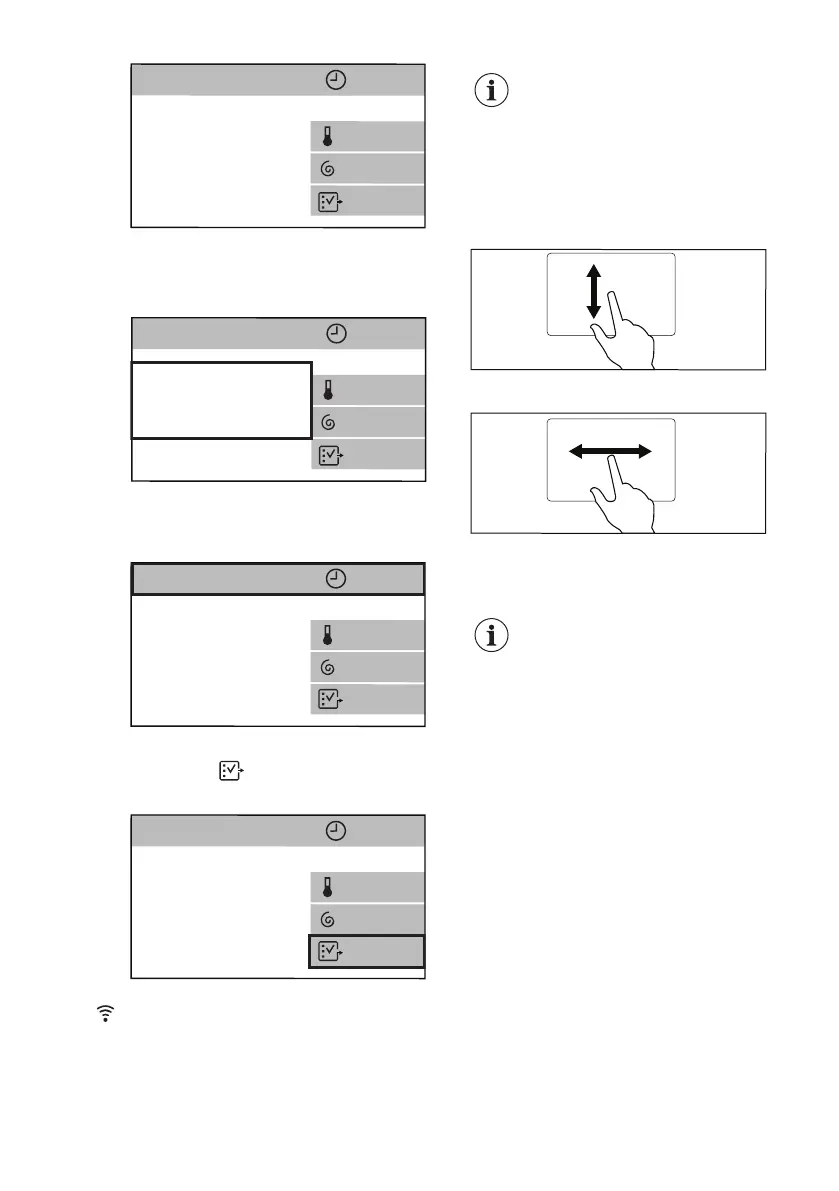
The summary screen shows:
• Programme maximum load,
programme name.
Cottons
Max 10 Kg
1h07min
More
1200
40°
• Programme duration. If selected, this
area can also show the delayed start
or the Time Save symbol.
Cottons
Max 10 Kg
1h07min
More
1200
40
°
• The currently selected options. The
shortcut
allows to enter the
additional option menu.
Cottons
Max 10 Kg
1h07min
More
1200
40
°
When a shortcut is visible on
the summary screen, it is
possible to enter an option/
setting menu by just tapping
on the relevant shortcut.
The different option/setting menus can
be scrolled:
• up and down, or
• right or left.
To set some options or settings it is
sufficient to change the status from OFF
to ON just tapping on the relevant bar.
Programmes, options and
settings can also be set by
turning the programme dial
and in horizontal submenus
the desired choice can be
set just tapping on the
arrows < or >.
8. WI-FI CONNECTIVITY SETUP
This chapter describes how to connect
the smart appliance to the Wi-Fi network
and to link it to mobile devices.
By this functionality you can receive
notifications, control and monitor your
appliance from your mobile devices.
ENGLISH 17


 To Next Page