WARNING!
Make sure that the
temperature is higher than 5
°C and the water is flowing
from the tap before you use
the appliance again.
The manufacturer is not
responsible for damages
caused by low temperatures.
18. TROUBLESHOOTING
WARNING!
Refer to Safety chapters.
18.1 Introduction
WARNING!
Deactivate the appliance
before carrying out any
check.
The appliance does not start or it stops
during operation.
First try to find a solution to the problem
(refer to the "Possible failures" table). If
the problem persists, contact the
Authorised Service Centre.
In case of major problems, the buzzer
operates, an alarm message pops and
the Start/Pause button may flash
continuously, e.g.:
• Check that the water inlet tap is
open - The appliance does not fill
with water properly.
• Check that the drain filter is not
clogged - The appliance does not
drain the water.
• Check that the door is properly
closed - The appliance door is open
or not closed correctly. Please check
the door!
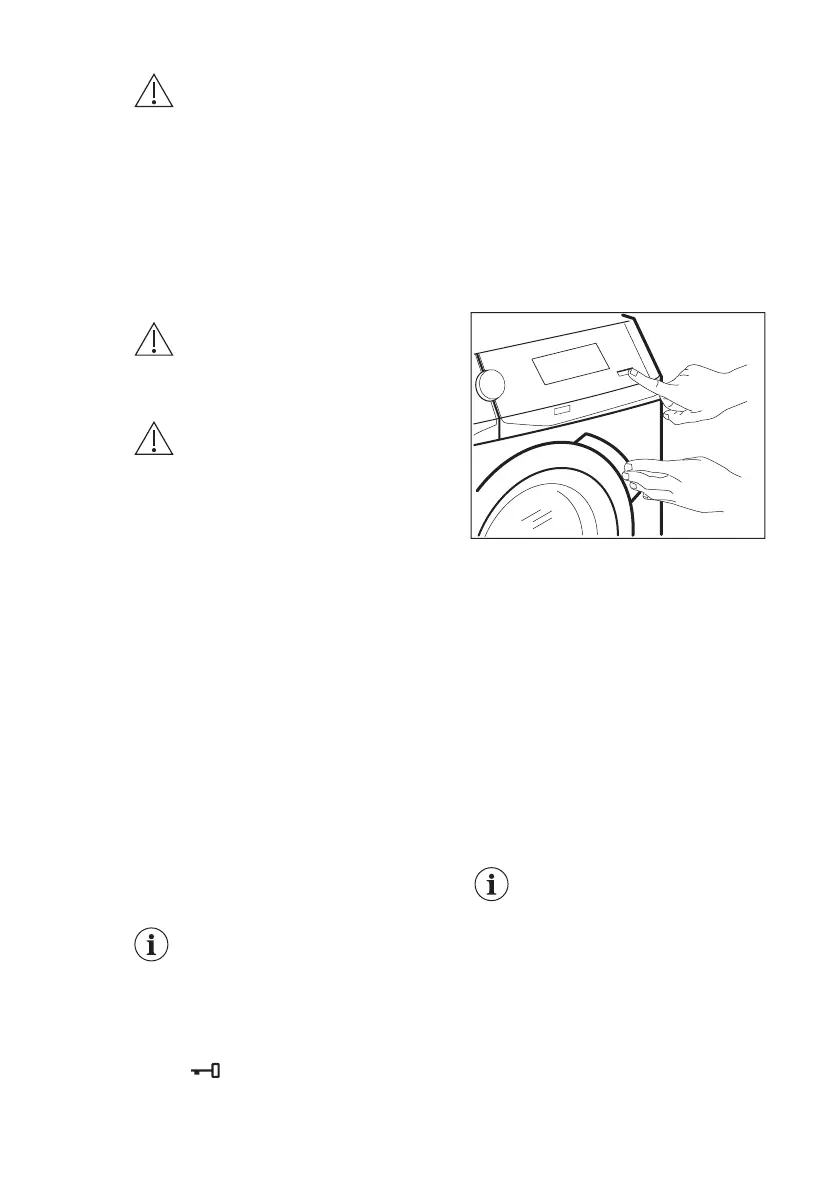
If the appliance is
overloaded, remove
some items from the
drum and/or keep the
door pressed while
pressing the Start/Pause
button until the indicator
stops flashing (see
the picture below).
• Programme will continue when
electricity supply is stable - The
mains supply is unstable. Wait until
the mains supply is stable.
• A water leak has been detected -
The anti-flood device is on.
Disconnect the appliance and close
the water tap. Contact the Authorised
Service Centre.
• Cleaning cycle recommended - Run
the Machine Clean programme as
described in ‘Programmes’ chapter. If
the cleaning programme is
postponed, the message keeps on
popping up during next uses until it is
run.
If the cleaning
programme is
postponed, the message
keeps on popping up
during next uses until it is
run.
ENGLISH 53


 To Next Page