With a drying-only
programme the display does
not show the laundry weight
and the ProSense estimation
is deactivated.
2. Load the laundry one item at a time.
3. Turn the programme dial to the
programme suitable for the items to
dry.
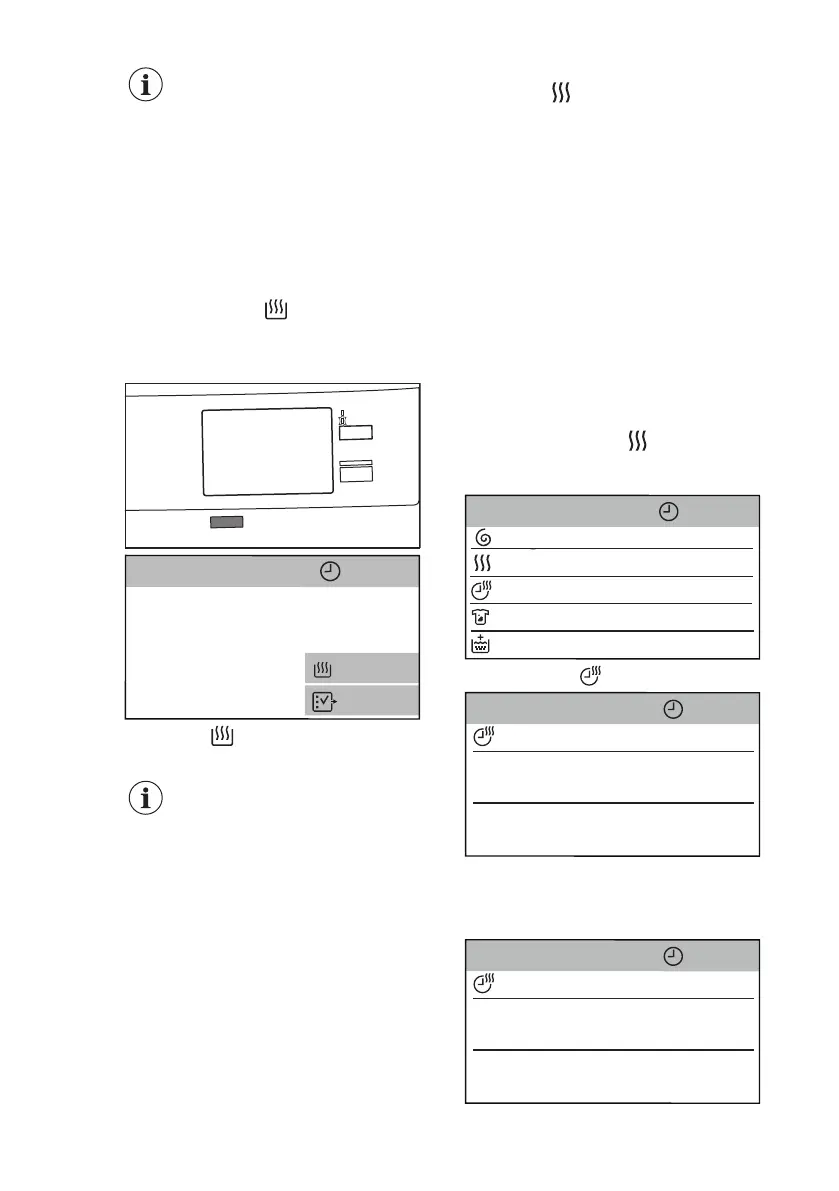
4. Tap on the Mode button twice to
exclude washing and perform drying
only. Only the Dry indicator is on.
The indicators and Cupb. appear
on the display. The display also
shows the maximum recommended
load.
5. Tap on Cupb. to enter the
Dryness Level menu.
When drying a big load of
laundry, to have good drying
performances, make sure
that the laundry itself is not
rolled up and that is
uniformly distributed in the
drum.
14.2 Drying - Automatic levels
1. After entering the Dryness Level
menu, scroll the submenu bar left or
right to change the drying level. If
compatible with the programme, it is
possible to set one of these levels:
a. Iron Dry: for cotton items;
b. Cupboard Dry: for cotton and
synthetic items;
c. Extra Dry
: for cotton items.
2. Tap on Dryness Level and then
on the top bar to return to the
programme summary screen. The
display will show the chosen level
(e.g. Extra Dry) and the updated
programme duration.
The time value on the display updates
accordingly.
3. Touch the Start/Pause button to start
the programme. The door locks.
During the programme, the display
will keep you informed about each
phase.
14.3 Washing and Timed
Drying
1. After entering the Dryness Level
menu, tap on the
Dryness Level
bar to close it.
The option list appears.
<C
ott
o
ns
2h14min
Spin Speed
OFF
0:10
1200
D
ryness Level
Ti
me Dry
S
t
a
ins
OFF
E
xt
ra
R
inse
OFF
2. Tap on the Time Dry bar.
20>
1>
<0
10
min
0
h
<
C
ottons
2h14min
T
i
me Dry
0
:
1
0
The minimum timed drying is 10 minutes.
3. Scroll the hour and minute bars left
or right to set the desired timed
drying.
40>
2>
<20
<0
30
min
1
h
<
C
ottons
3h34min
T
i
me Dry
1
:
3
0
www.aeg.com
40


 To Next Page