3.2
3.2-01
LOCKS
2/ඓԍୟഗڦᅎۯևتᇀEJTDPOOFDUFEDŽDž࿋
ዃ0ྜඇٗ؏ฉָူDŽ࿋ዃኸ๖ഗ!4/4Dž
3/!ൽူժ٪ݣᄩդăDŽሞഄ٪ݣ࿋ዃዐDž
4/!ჽۨ߇LjᅜՍ๑ᆩࠬă
සࡕᄲٶۨጎዃLjሶথൽူࠬժࠬ߇ླྀ࣮ڟ
؏௬ӱഋೝڦ࿋ዃă
ُ้ᅜምْኟ֡ፕڔӱă
ᄩդ্ᆩࠬ
ᅃዖՔጚࠀీLj๑ᆩࢽᅜ٪ݣᄩդժ๑ᆩࠬۨ٪
ݣ࿋ዃLjܸٗݞኹ࿄ঢ়๑ᆩդă
ࠬጎዃፌܠሎႹ๑ᆩෙ߲ٲ٫ྺ!4!9!nn!ڦࠬ
DŽ!4/5!DDžăጎዃኻీሞୟഗڦᅎۯևتᇀ!UFTU
DŽ֪DžEJTDPOOFDUFEDŽDž࿋ዃ0ྜඇٗ
؏ฉָူ้๑ᆩă
සࡕᄲౚࢇጎዃժҾጎࠬǖ
2/! ඓԍୟഗڦᅎۯևتᇀ! UFTUDŽ֪Dž!
EJTDPOOFDUFEDŽDž࿋ዃ0ྜඇٗ؏ฉָ
ူăDŽ࿋ዃኸ๖ഗ!4/3!BDž
3/!ൽူժ٪ݣᄩդăDŽሞഄ٪ݣ࿋ዃዐDž
4/!ჽۨ߇DŽ!4/5!DDžLjᅜՍ๑ᆩࠬă
සࡕᄲٶۨጎዃLjሶথൽူࠬժࠬ߇ླྀ࣮ڟ
؏௬ӱഋೝڦ࿋ዃă
ُ้ᅜٗ٪ݣ࿋ዃൽူᄩդă
؏๕ኧࣂࡆࠬ
ᅃዖՔጚࠀీLj๑ᆩࢽᅜҾጎݞኹୟഗᅎۯև֭
؏ڦࠬă
posiƟon and/or fully removed from the casseƩe.
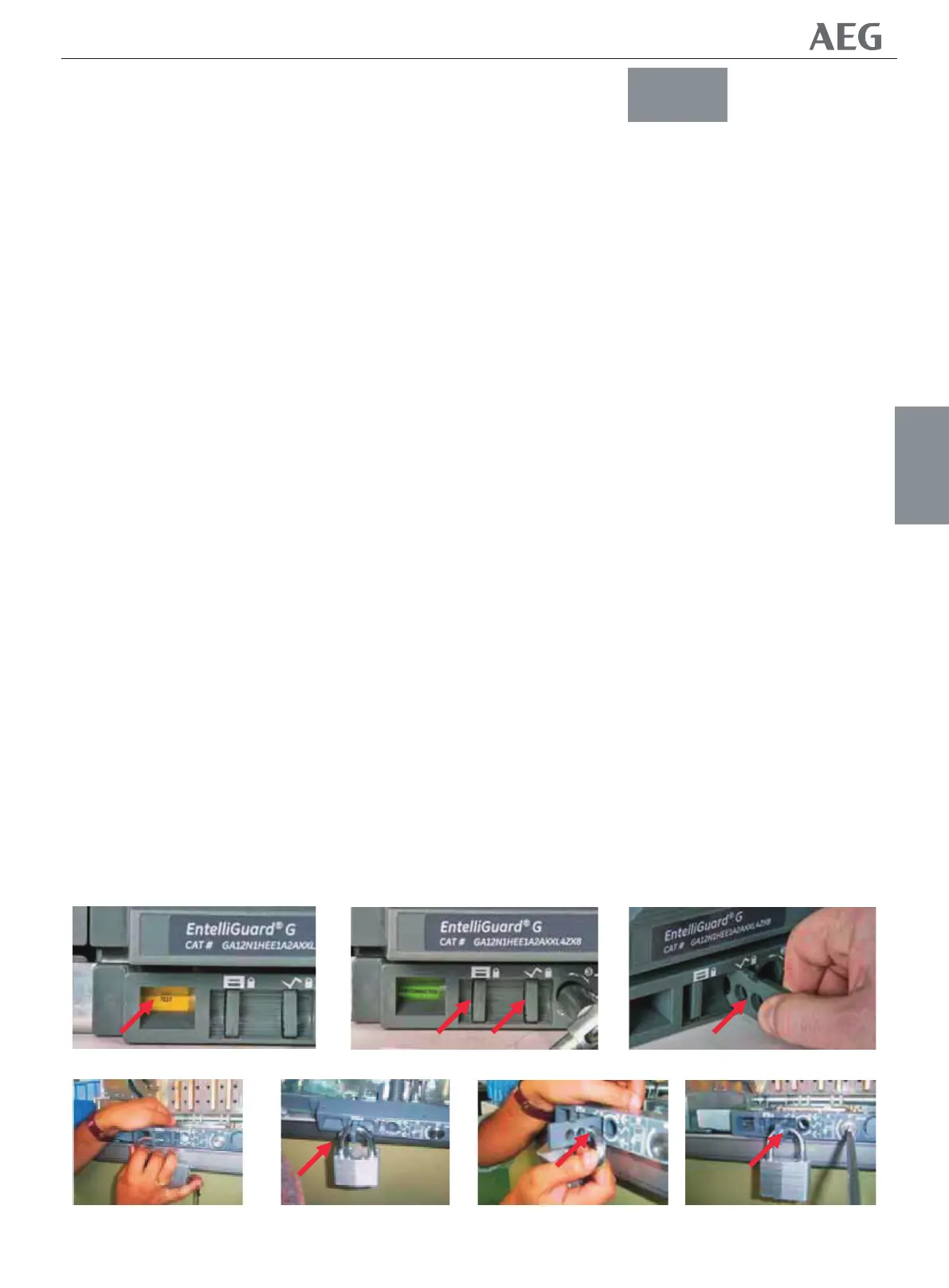
To engage the device and place padlocks :
1. Ensure that the breaker's mobile porƟon is in DISCONNECTED
posiƟon and/or is fully removed from the casseƩe (see posiƟon
indicator Fig. 3.3).
2. Remove and store the Racking Handle. (In it's storage
locaƟon)
3. Extend the locking lever to allow access to the padlocking
holes.
To disengage the locking feature, simply remove the padlocks
and push the lever back into a posiƟon that is Ňush with the
casseƩe front facia.
Now the shuƩers work normally again.
Racking Handle Access PrevenƟon Padlocking
A standard feature allowing the user to store the racking handle
and to padlock the storage locaƟon, thus prevenƟng the
handles unauthorized use.
The padlocking device accepts up to three padlocks with a hasp
dimension of 3 to 8 mm (Fig. 3.4 C). The device can only be used
when the breaker' s mobile porƟon is in TEST or DISCONNECTED
posiƟon and/or fully removed from the casseƩe.
To engage the device and place padlocks :
1. Ensure that the breaker's mobile porƟon is in TEST or
DISCONNECTED posiƟon and/or is fully removed from the
casseƩe. (see posiƟon indicator Fig. 3.2 A)
2. Remove and store the Racking Handle. (In it's storage
locaƟon)
3. Extend the locking lever (Fig. 3.4 C) to allow access to the
padlocking holes.
To disengage the locking feature, simply remove the padlocks
and push the lever back into a posiƟon that is Ňush with the
casseƩe front facia.
Now the Racking handle can be removed from it's storage
locaƟon.
Drawout Support Slides Padlocking
A standard feature allowing the user to place padlocks that will
prevent the inserƟon of a breaker's mobile porƟon into the
casseƩe. The
සࡕᄲౚࢇጎዃժҾጎࠬǖ
CASSETTE
؏
AB
B
C
CC
C
4/3
Gjh/4/3
4/4
Gjh/4/4
4/5
Gjh/4/5
NF1:ဣଚگუഘୟഗ


 To Next Page