Make a button hole
Make a button hole
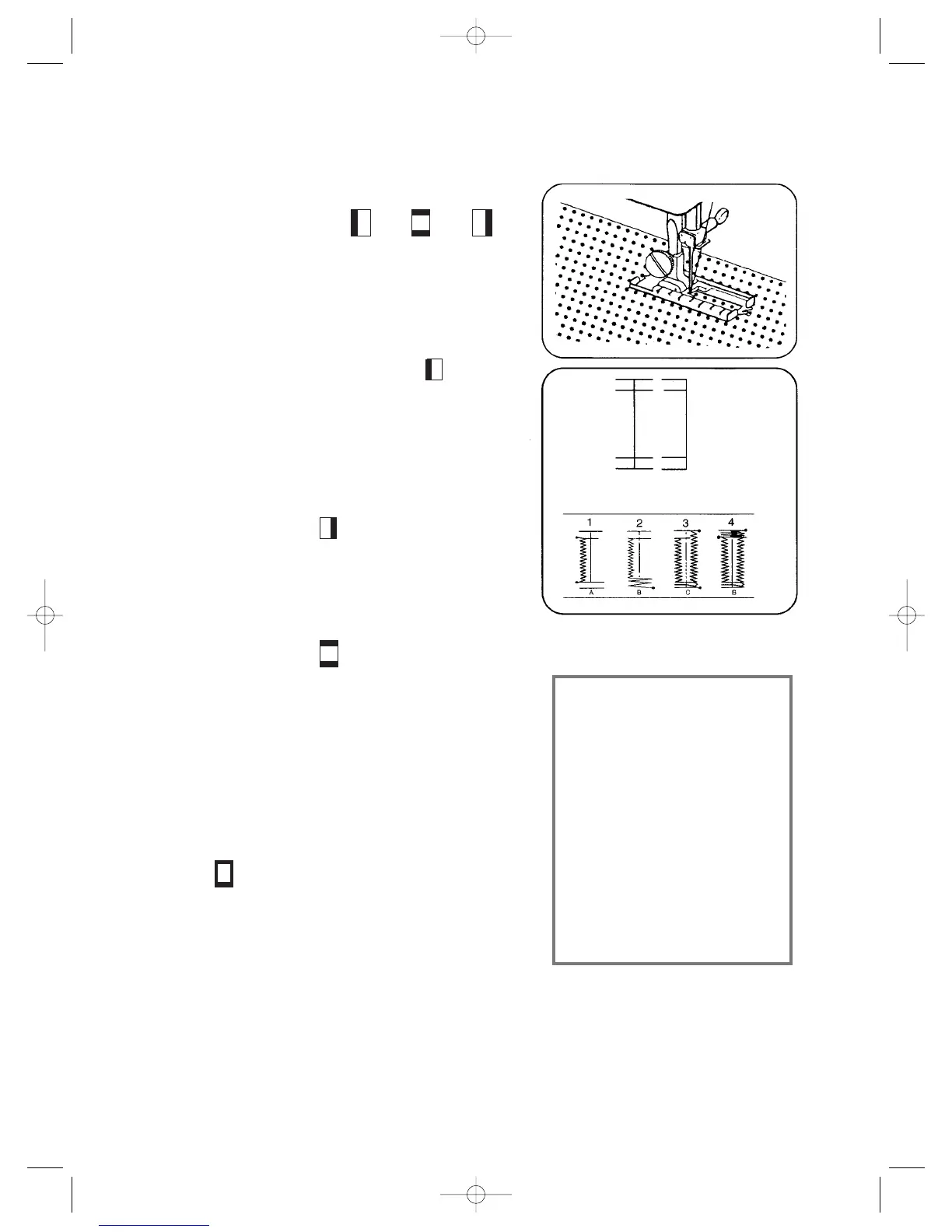
Presser foot: button hole foot
Stitch selection: “A” “B’’ ‘’C’’
Stitch length: 0.3 – 1
1. Pull the button hole sole completely
forward and start with the symbol:
Now, you sew forward the left
button hole caterpillar according to
the desired length (see 1).
2. Switch on symbol:
while the needle is outside the material.
You sew the first row with 3-4 stitches (see 2).
3. Switch on symbol:
while the needle is outside the material.
Now, you sew the right caterpillar automatically
backwards (see 3).
4. Here, you stop the machine while the needle
is outside the material and switch on
symbol:
Sew the back row with 4-6 stitches. The button
hole is now sewed and can be opened with a
dividing knife (see 4).
14
W
W
arning:
arning:
Sometimes it is better to
Sometimes it is better to
repeat the sewing pro
repeat the sewing pro
-
-
cess to get a better fixed
cess to get a better fixed
button hole. Before start
button hole. Before start
-
-
ing sewing a button hole
ing sewing a button hole
you should do trial runs
you should do trial runs
and sew one or more
and sew one or more
button holes on the cor
button holes on the cor
-
-
responding material.
responding material.


 To Next Page