10
1. Unplug from power source and remove mounted
unit from wall.
2. Remove cover (See Page 5).
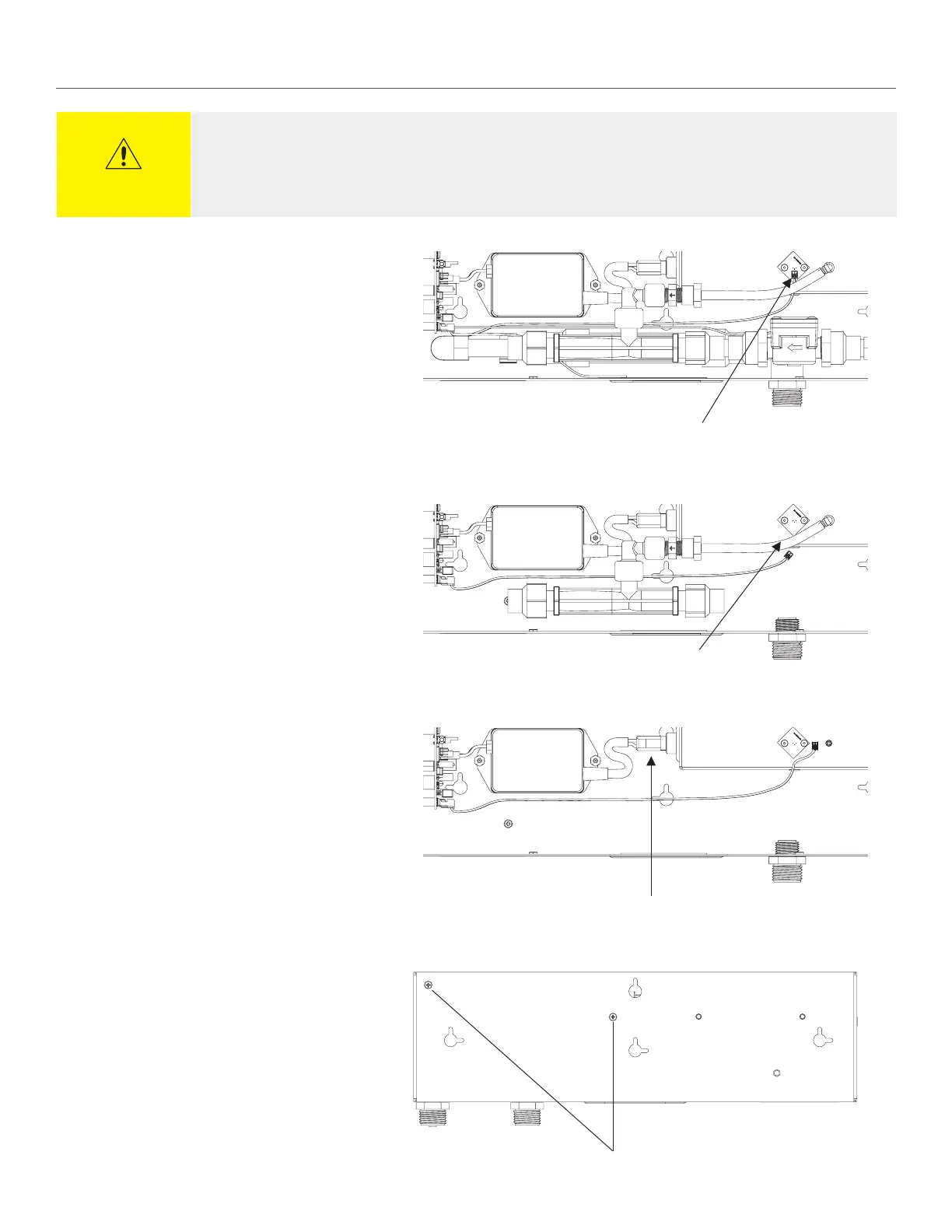
3. Unplug photo sensor lead (Figure 1).
4. Remove tubing from cell (Figure 2).
5. Unplug wiring harness from bulb (Figure 3).
6. Remove two screws to remove cell (Figure 4).
7. Replace with new cell and remount to base.
8. Plug wiring harness back onto bulb.
9. Fit tubing back onto cell.
10. Re-plug photosensor lead.
11. Replace cover (See page 7).
Cell Tube
Figure 2
Photo Sensor Lead
Figure 1
Wiring Harness
Figure 3
Screws
REPLACING THE ACTIVEPURE CELL ASSEMBLY
CAUTION
The ActivePure Cell Assembly requires replacement at approx. 9,000 hours of use or once every 12 months to maintain
the Limited 3 year warranty. The LED will flash periodically (visual chirp) to notify that cell replacement is required. The
UV bulb will NOT be turned on again until the cell has been replaced.


 To Next Page