8
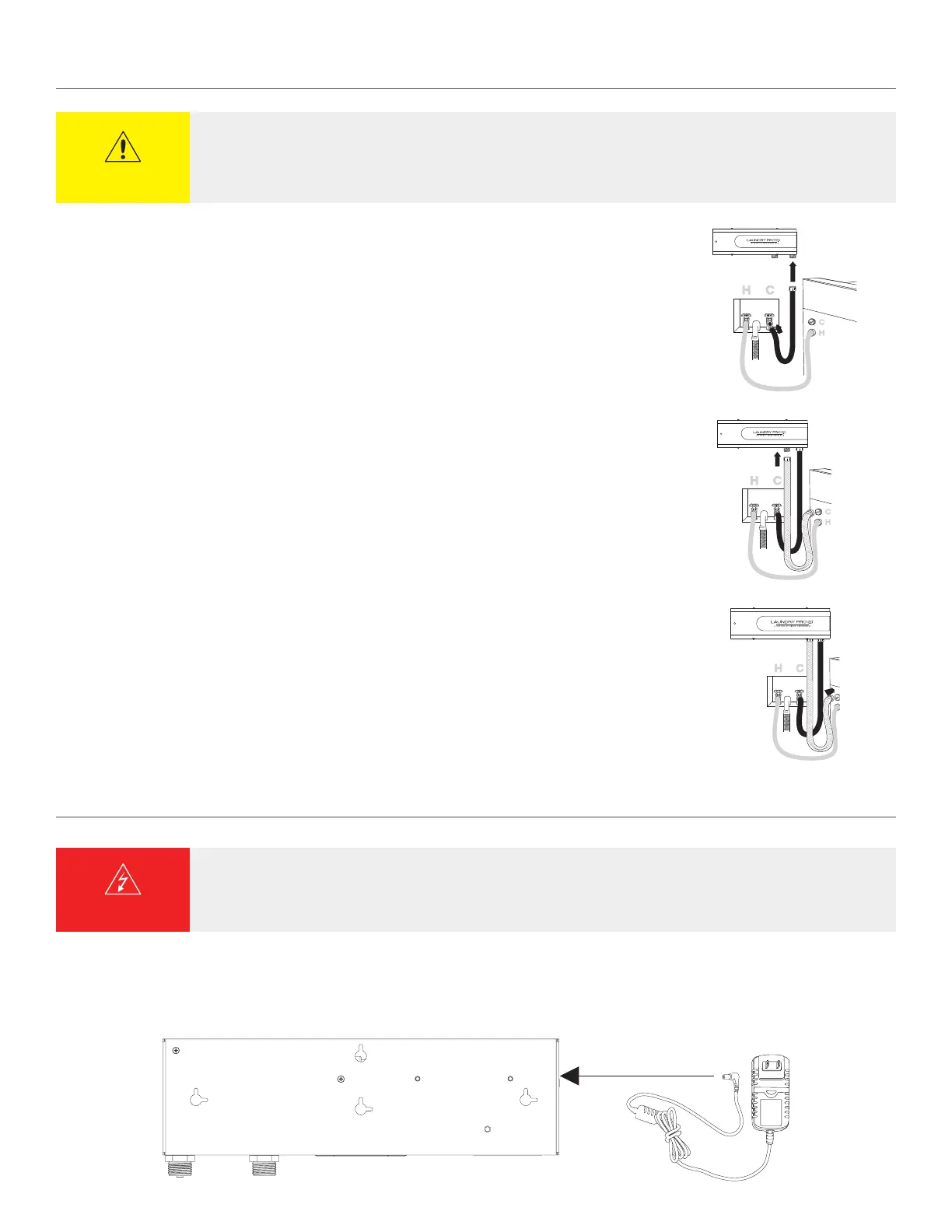
3. Connect the hose from the cold water inlet on your washing machine to the INLET connection on your
Laundry Pro 2.0.
4. Connect the new hose provided with your Laundry Pro 2.0 to the water OUTLET connector on your
Laundry Pro 2.0 unit.
5. Finally, connect the new hose to the cold water inlet on your washing machine.
HOSE INSTALLATION (CONTINUED)
1. Insert the provided power cord into the POWER IN socket located on the side of the unit.
NOTE
:
Do not plug the adapter into the wall socket until installation is complete. See page 9.
CONNECTING POWER ADAPTER
WARNING
DO NOT use any AC/DC adapter other than the one supplied with your Laundry Pro 2.0 or Aerus replacement AC/DC
adapter. Failure to follow these instructions may void your warranty and/or result in damage to your unit, fire,
or electrical shock.
CAUTION
• If your existing hose is more than 3 years old, we recommend that you replace it with the optional stainless steel hose
• To ease hose installation and prevent cross threading, connect hoses prior to mounting unit on wall


 To Next Page