31
in.tune instructions
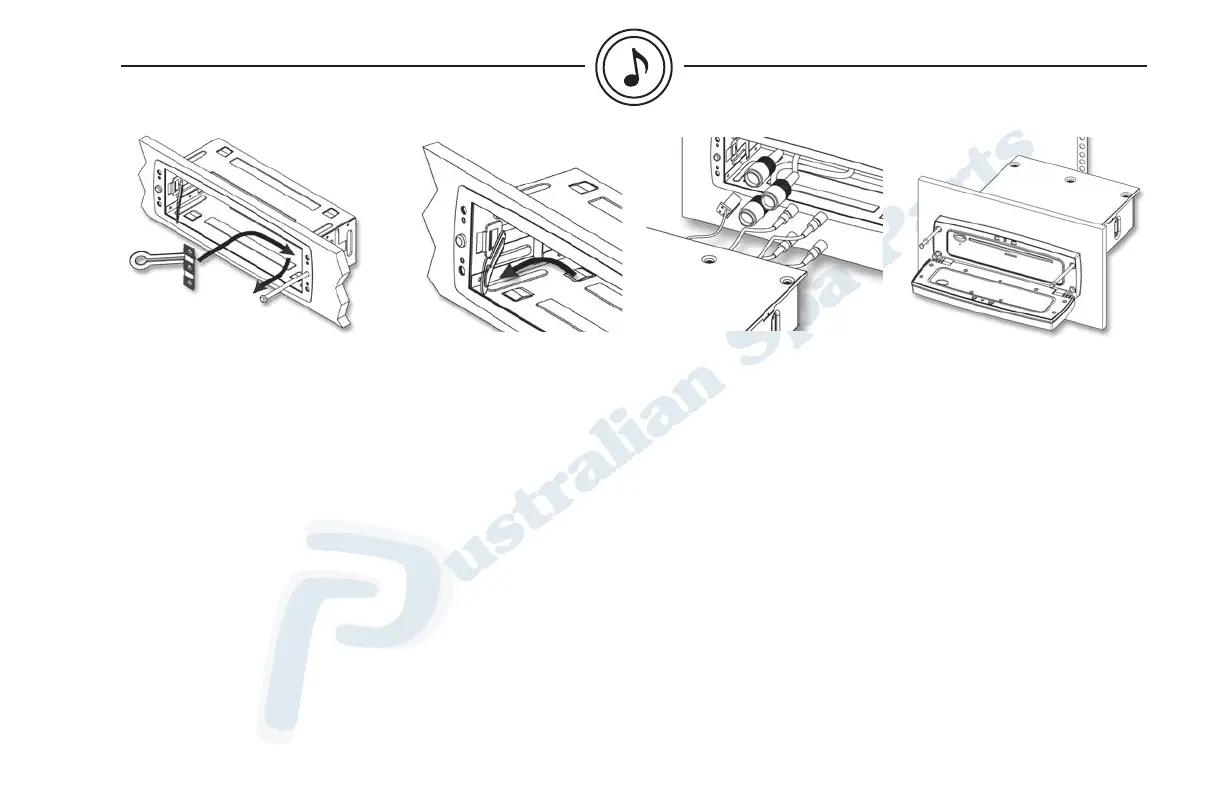
Step 4
Fixing the mounting sleeve:
a) Insert mounting bracket.
b) Then pull bracket towards
you.
c) Fix bracket with self tapping
screws # 6 x 2" type A.
d) Make sure the 6 holes are
correctly aligned.
e) Brake the installation
handle by moving it back
and forth.
f) Repeat steps a) to e) for
the other bracket.
Step 5
Connect wires.
Refer to wiring section (page 27)
of this manual for more details.
Note: The use of an
adjustable torque wrench
is recommended. Torque
setting: 8-12 lbs·in
(0.9-1.36 N·m).
Step 6
Insert the CD player into the
mounting sleeve.
Open front panel and fix CD
player with (4) self tapping
screws # 6 x 2" type A.
Note: The use of an
adjustable torque wrench
is recommended. Torque
setting: 8-12 lbs·in
(0.9-1.36 N·m).
installation & connections



 To Next Page