13
in.tune instructions
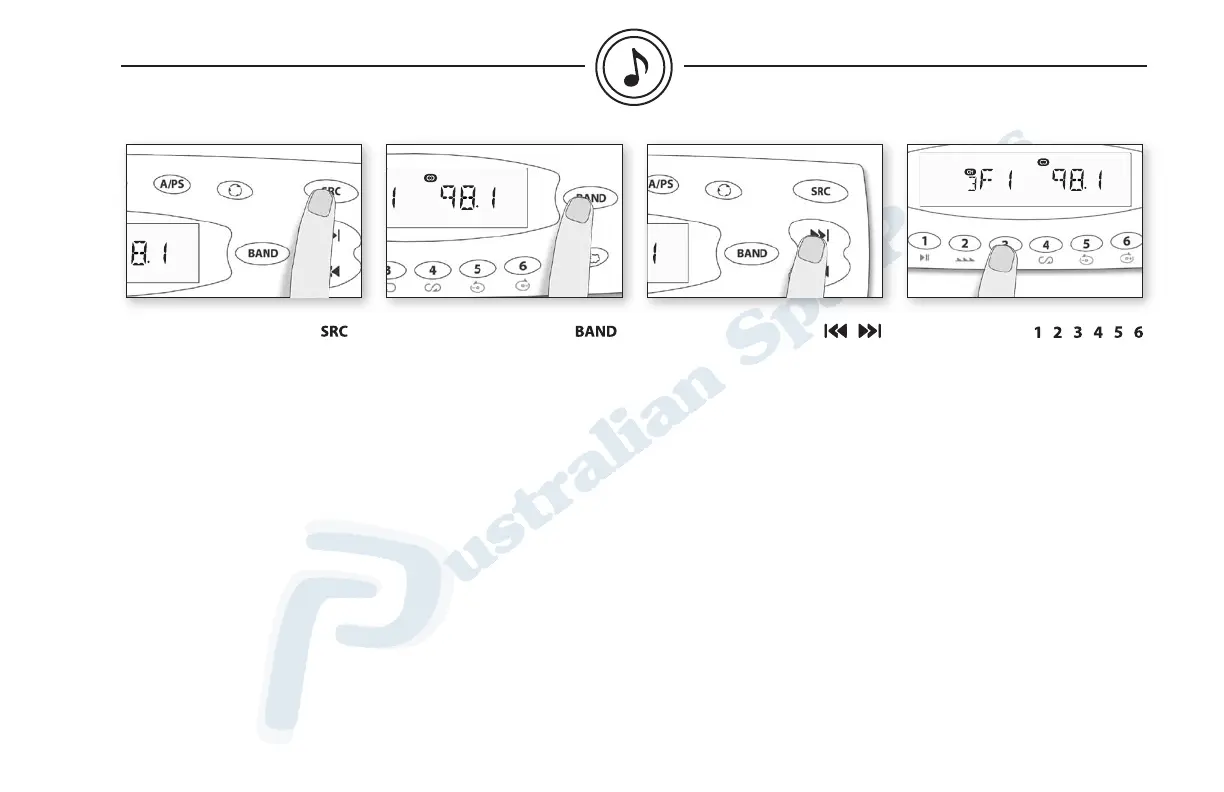
Selecting radio mode
Press SRC until Radio mode
is displayed.
Selecting radio band
Press BAND to select between
FM1, FM2, FM3, AM1, AM2 and
WB (weather band).
Tuning up or down
Press Track up to manually
adjust frequency up. Press and
hold Track up to make a seek
up to the next station. Scan
mode stops as soon as a strong
station is found.
Press Track down to manually
adjust frequency down. Press
and hold Track down to make
a seek down to the next station.
Scan mode stops as soon as a
strong station is found.
Preset stations
Any station may be preset
simply by pressing and holding
one of the keys (1 to 6).
Press one of the keys (1 to 6) to
recall the stored stations.
radio mode


 To Next Page