CHAPTER 2: Console Overlay and Workout Description
SELECT A TARGET AND WORKOUT
1) Select your USER by turning the workout knob and then pressing when your desired USER is displayed.
2) Select your WEIGHT by turning the workout knob and then pressing when your desired WEIGHT is displayed.
3) Select your PROGRAM by turning the workout knob and then pressing when your desired PROGRAM is displayed.
4) Adjust the SETTING by turning the workout knob and then pressing when your desired SETTING is displayed.
5) Press START to begin.
: Adjust your resistance manually during your workout.
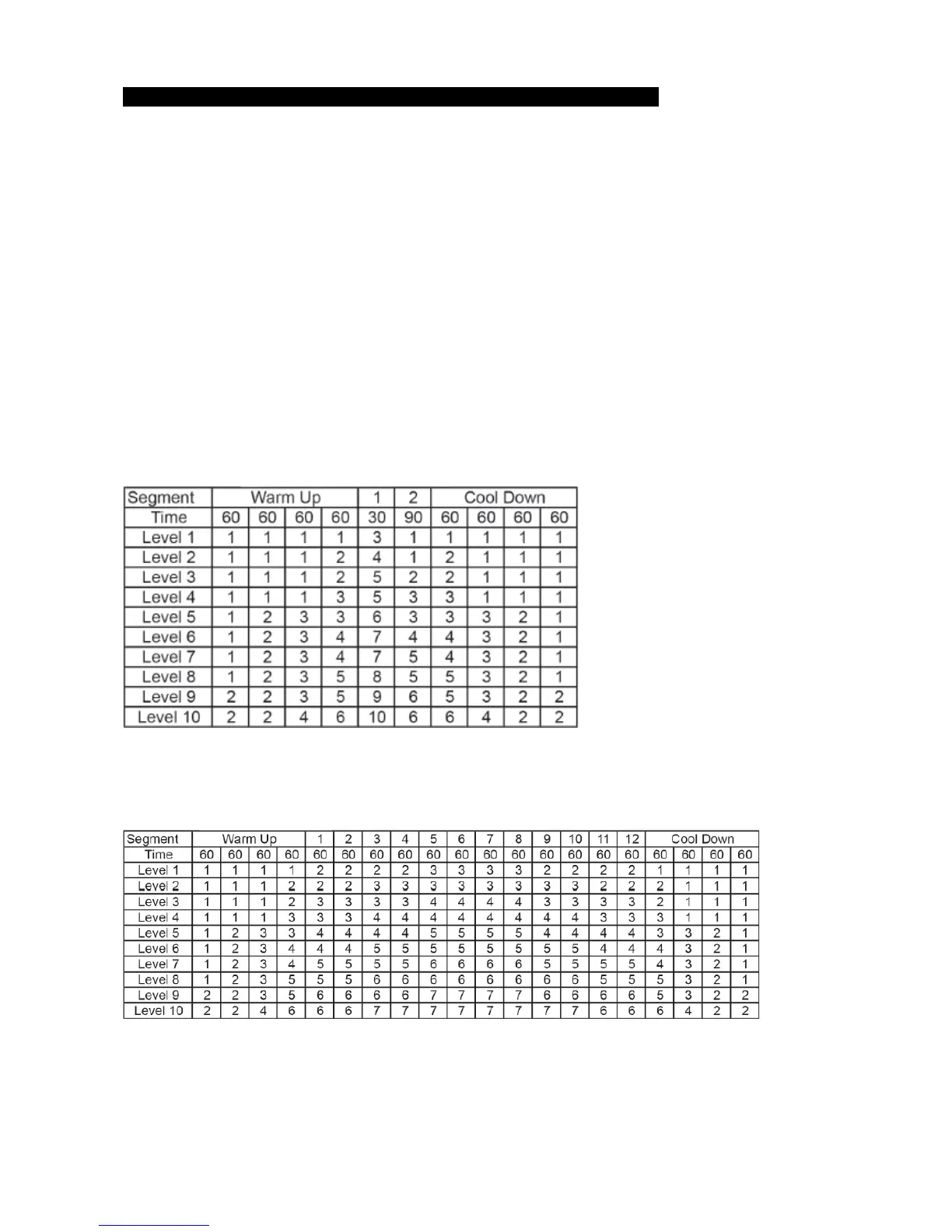
: Improves your strength, speed and endurance by increasing and decreasing the resistance throughout
your workout to involve your heart and other muscles. Includes 10 levels.
Resistance changes and segments repeat 30 seconds and 90 seconds.
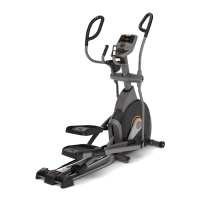
A workout designed specifically to target fat. Promotes weight loss by increasing and decreasing the
resistance, while keeping you in your fat burning zone. Includes 10 levels
Resistance changes, segments repeat every 60 seconds.
: Push yourself and go further during your workout with 13 distance workouts. Choose from 1


 To Next Page