CHAPTER 2: Console Overlay and Workout Description
: used to reach desired resistance level more quickly.
: used to confirm a selection.
: press to change display feedback during workout.
: press to turn fan on and off.
: music plays through speakers when your CD / MP3 player is connected to the console.
: plug your CD / MP3 player into the console using the included audio adaptor cable.
AUDIO OUT / HEADPHONE JACK
: plug your headphones into this jack to listen to your music through the
headphones.
Note: when headphones are plugged into the headphone jack the sound will no longer come out through the speakers.
: used to store your MP3 player.
: holds reading material.
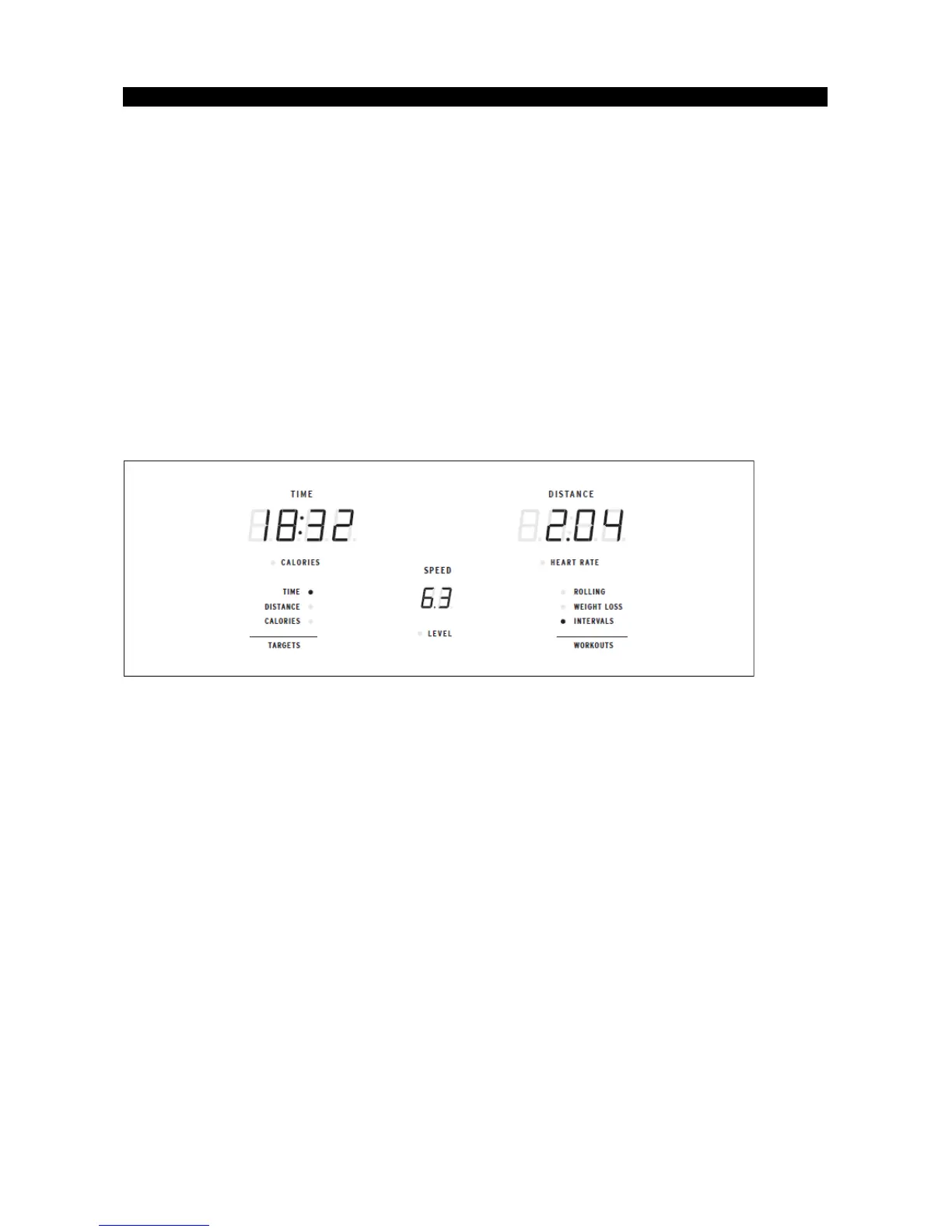
Shown as minutes : seconds. View the time remaining or the time elapsed in your workout.
•
Shown as miles. Indicates distance traveled or distance remaining during your workout.
•
Shown as MPH. Indicates how fast the foot pedals are moving.
•
Total calories burned or calories remaining left to burn during your workout.
•
Shown as BPM (beats per minute). Used to monitor your heart rate (displayed when
contact is made with both pulse grips).
•
Shows the current level of resistance.
•
LED lights up next to currently selected target. If no LED is lit, no target is activated.
•
LED lights up next to currently selected workout. If no LED is lit, no workout is activated.


 To Next Page