19
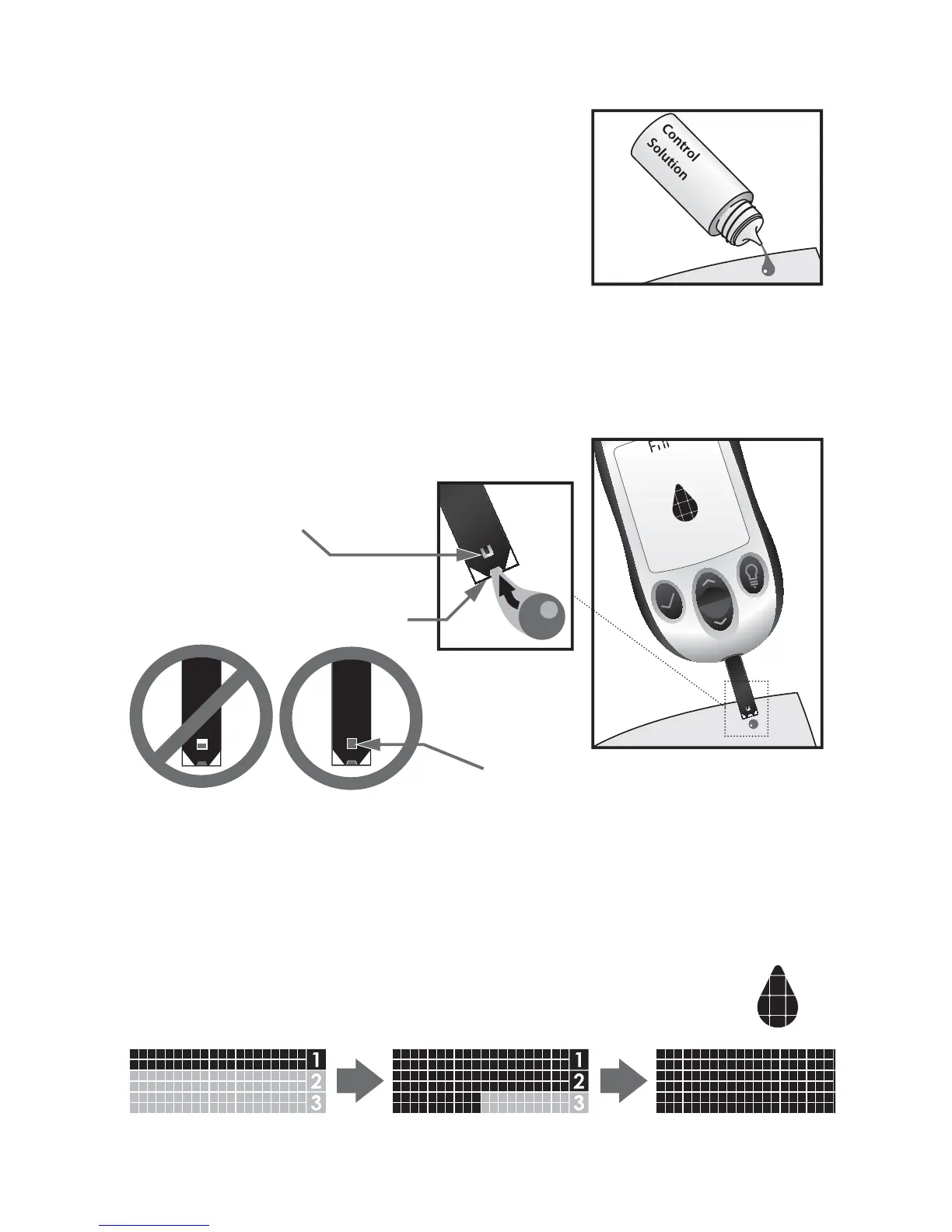
[3] Applying Control Solution: Shake
the control solution bottle. Discard the
first drop of control solution and wipe
the bottle tip clean using a clean tissue
or paper towel. Dispense a second drop
onto a clean surface, such as an unused
resealable plastic bag.
Bring the tip of the test strip to the control solution sample.
The AgaMatrix WaveSense JAZZ System will automatically
detect if a test is performed with AgaMatrix Control Solution.
When control solution is applied, the visual fill window on
the AgaMatrix WaveSense JAZZ Test Strip turns blue. Your
meter will beep once indicating that you should remove the
tip of the AgaMatrix WaveSense JAZZ Test Strip from
the control solution sample. On the meter display,
the droplet symbol fills. The scrolling bar and 1-2-3
indicates that the meter is calculating your results.
This is the visual ll window.
DO NOT PUT CONTROL
SOLUTION HERE.
Apply control solution here.
The entire visual ll
window will turn blue.
Droplet
Symbol:



 To Next Page