48
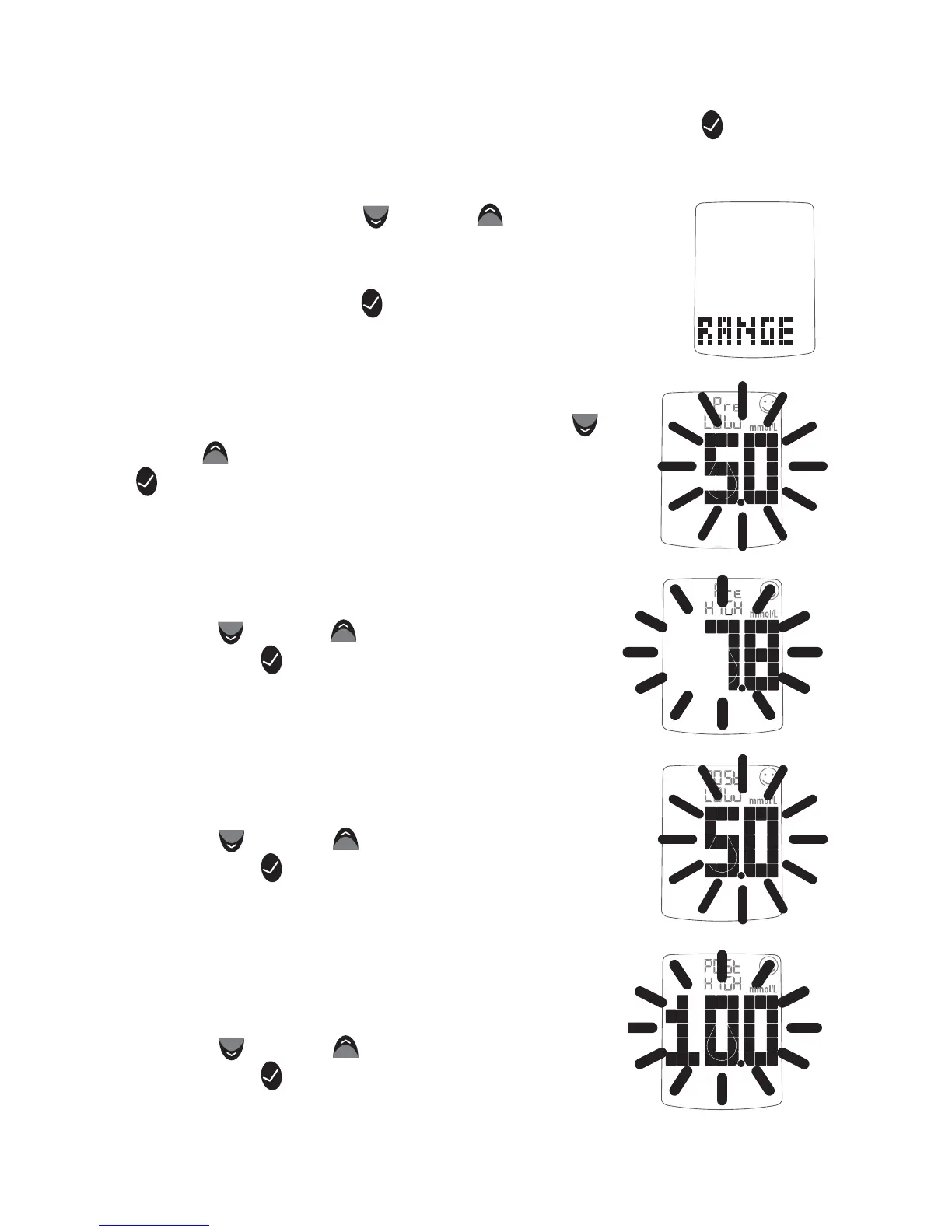
[1] When your meter is deactivated, press the CHECK ( ) but-
ton once to enter menu mode. The word “MEM” is displayed.
[2] Press the DOWN (
) or UP ( ) arrow but-
tons until the word “RANGE” is displayed.
[3] Press the CHECK (
) button to enter and
edit the glucose target range settings.
[4] Set the lower limit of the pre meal glucose
target range (flashing) with the DOWN ( )
or UP (
) arrow buttons. Press the CHECK
(
) button to confirm your selection and con-
tinue on to the upper limit pre meal setting.
[5] Set the upper limit of the pre meal
glucose target range (flashing) with the
DOWN (
) or UP ( ) arrow buttons. Press
the CHECK (
) button to confirm your se-
lection and continue on to the lower limit
post meal setting.
[6] Set the lower limit of the post meal
glucose target range (flashing) with the
DOWN (
) or UP ( ) arrow buttons. Press
the CHECK ( ) button to confirm your
selection and continue on to the upper
limit post meal setting.
[7] Set the upper limit of the post meal
glucose target range (flashing) with the
DOWN (
) or UP ( ) arrow buttons. Press
the CHECK (
) button to confirm your
selection and return to the menu.



 To Next Page