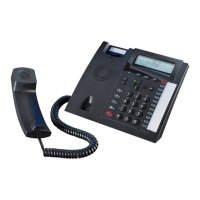
System Telephone ST 42
14
Programming the Do Not Disturb function
Exit Programming
!% z !
You can toggle „Do not Disturb“ on/off by pressing the „Do not Disturb“ button.
Press Set and button
„Do not disturb“ to
start programming
„1“: Do not Disturb for Internal Calls
„2“: Do not Disturb for External Calls
„3“: Do not Disturb for Exernal and Internal Calls
Changing the retrieval method
t
Press Pho-
nebook
button
Press „Search“ , choose search mode with arrow but-
tons and confirm with middle button
Phonebook (Numeric retrieval)
Lift the receiver or press the handsfree
button. The displayed number will be
dialled.
t
Z
'& + =
or
Enter the stored
location of the entry, ie 000 to 999 or use arrow
buttons to scroll.
Press Pho-
nebook
button
Display Call Log
The flashing mail button will indicate that there is one entry in the call log. With the receiver on
hook press the mail button.
M
The last missed call will be displayed giving telephone number, date and time. The LED will conti-
nue to be lit until you return the call or delete the entry from the call log.
You can use the arrow keys to view further entries.
y&
The displayed number will be dialled as soon as you lift the receiver. The entry will be automatically
being deleted if the caller answers. The entry will remain in the call log if no one answers.
Delete the displayed entry by presseing the left button.
Abort the call log by pressing the right button.


 To Next Page