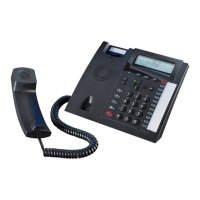
System Telephone ST 42
18
Please program a headset button for the ST 42 or STE 40 either via TK Suite or the system pro-
gramming code
!31.
- You now will be able to answer or clear a call for the headset.
Your headset will also ring in the earpiece once your telephone rings.
- You can answer the call by pressing the programmed headset button on the ST 42 or STE 40, or
by pressing the button directly on your headset.
- If so required you may disable the ringer of the ST 42 but still will hear a call ringing directly in
the earpiece of your headset. This will be ideal for call centres or open plan offices.
- If the caller hangs up, then the telephone system will also clear the call and the headset goes
automatically on hook. There is no need to press a button on the ST 42 or the headset to go back
on hook.
Using a DHSG Headset
ST 42 Firmware Upgrade
Your System Phone ST 42 can be upgraded to the latest firmware level without the need to change
any hardware. To do so please do the following:
- *0# 1
z
With the hand-
set on hook the
System Phone
ST 42 is idle.
Press the buttons *,0,#
all at the same time. The
ST 42 is now in service
mode
Select SoftwareUpdate by
pressing the digit 1.
If for any reason you do
not want to continue with
the update but want the
phone to return to nor-
mal operation, then press
digit 3 „Hauptprogramm“
(Main Program).
Enter the tele-
phone number of
the Update Server
004952144709950
[Updateserver AGFEO
Bielefeld]
If required enter access
digit 9 if no spontaneous
line seizure is set.:
9004952144709950
Confirm entry with midd-
le soft button (ok). The
Update Server will now
be dialled and the update
will start.
The update will be completed within approx. 90 seconds. The ST 42 will automatically re register to
the telephone system. On start up the software level will be displayed on the phone. The update is
now completed.
Please find the declaration of conformity on our website:
www.agfeo.de.
Declaration of Conformity


 To Next Page