AGM Global Vision10
2.1.4 POWER ON AND OFF
Power On
When the device is connected to USB cable or the battery is enough, press
button to power on the device.
Power Off
When the device is turned on, hold
button for 2 seconds to power off the
device.
2.1.5 THERMAL VIEW OBSERVATION
1. Power on the monocular.
2. Hold the monocular and make sure the eyepiece covers your eye.
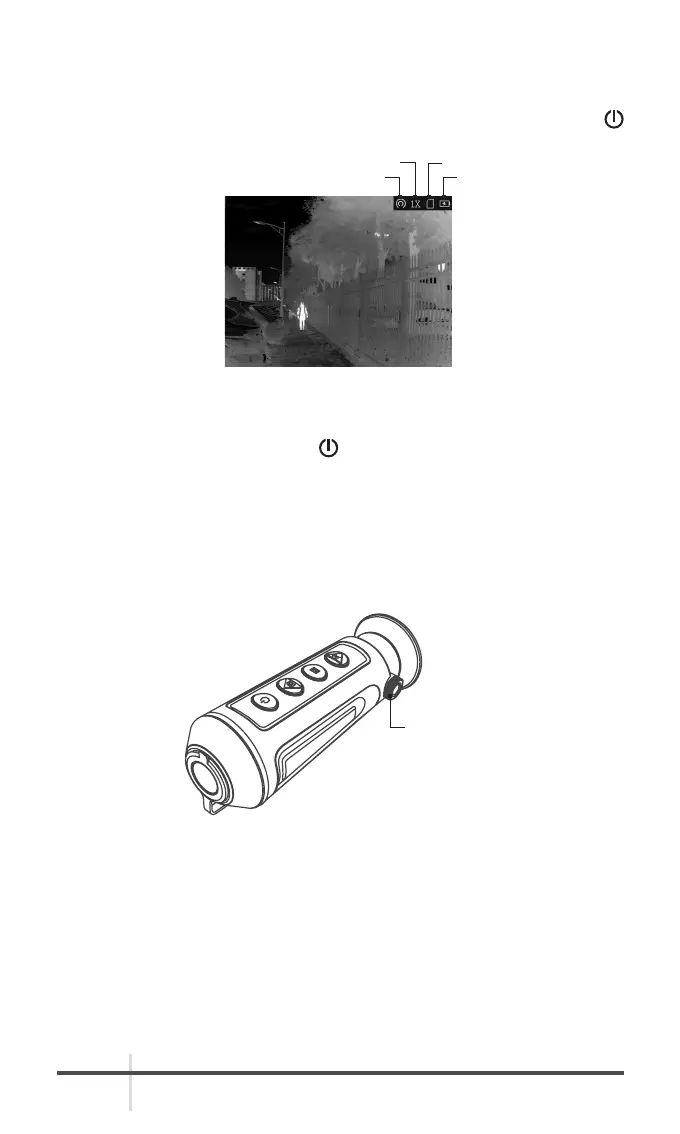
3. Adjust the diopter adjustment knob until the OSD text or image is clear.
4. Point the monocular towards the target of the view.
5. Set palettes, brightness, scenes, FFC (Flat Field Corrrection), and DPC
(Defective Pixel Correction) to display the best image effect.
HOT SPOT BATTERY
DIGITAL ZOOM STORAGE
FIGURE 2-3. THE MAIN VIEW
FIGURE 2-4. DIOPTER ADJUSTMENT KNOB
DIOPTER
ADJUSTMENT
KNOB



 To Next Page