AGM Global Vision16
TABLE 2-3. ICON DESCRIPTION
ITEM ICON DESCRIPTION
1 Enhanced display mode
Outline, Target highlight, Thermal image,
and Breathing alert modes (When external
videos are connected, “PIP of external
video” and “Full screen of external video”
modes are also available.)
2
Brightness of the infrared
thermal image
Infrared brightness 0% to 100%.
3 Infrared polarity White-hot, black-hot, and orange-hot.
4 Inclination angle -90° to +90°
5 Pitch angle -90° to +90°
6 Battery level
0-4 levels: When the battery power
reaches Level 0, it indicates that the power
is below 10%, so you should recharge or
replace the battery as soon as possible.
7 Azimuth
The scale arrow moves to indicate the
direction the ocular lens is facing.
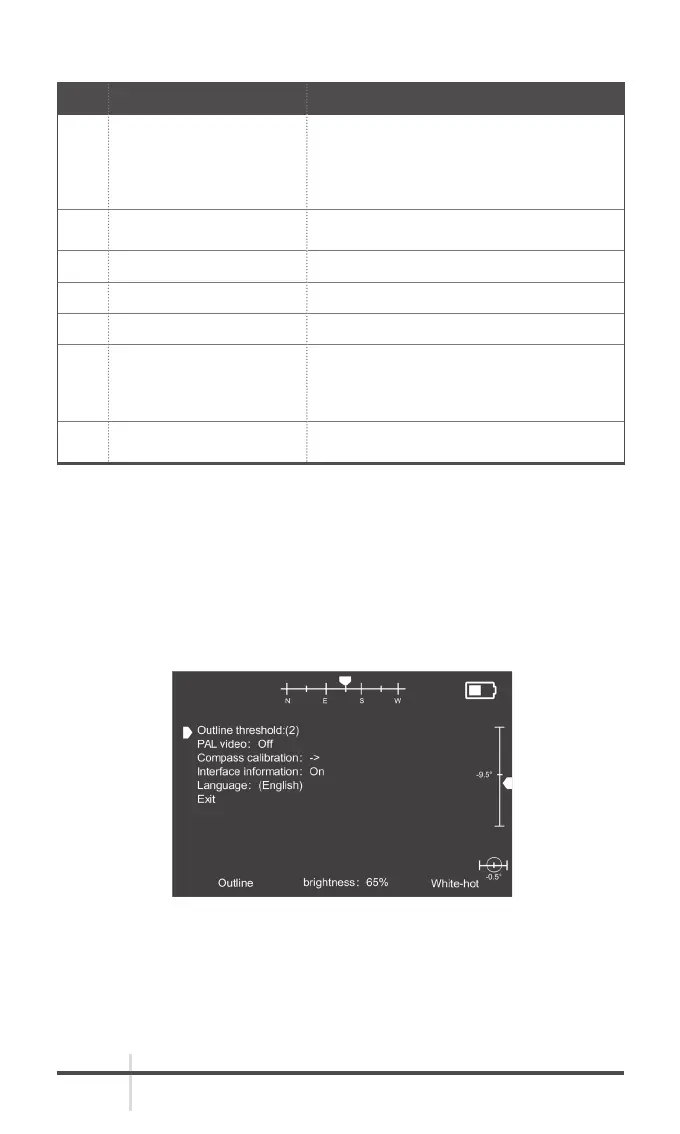
2.7 MENU AND SETTINGS
2.7.1 DISPLAYING THE MENU
Long press the infrared adjusting knob for 2s. The menu is displayed. You can
turn on or off the analog video output, compass calibration, azimuth angle,
pitch angle, and inclination angle.
FIGURE 2-9. MENU



 To Next Page