Operation
SOUND (D)
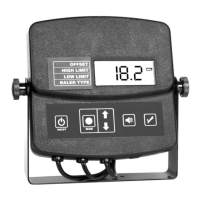
The sound button (D) allows you to turn the buzzer sound on or off.
USING THE SOUND BUTTON:
By default, the buzzer sound will be on each time your tester unit is
turned on. If you wish to turn the buzzer sound off, press the sound but-
ton (D) once. Press the sound button (D) again to turn the sound back
on. If the buzzer is shut off, an icon of a speaker with a line through it (H)
will be displayed in the lower right corner of the display.
CALIBRATION CHECK (E)
The calibration button (E) allows you to check the calibration of the mois-
ture tester.
USING THE CALIBRATION CHECK BUTTON:
With the baler chamber empty press the calibration check button (E). The
unit will then count down on the display 5,4,3,2,1. Then, either “CAL” or
“Err” will be displayed. If “CAL” is displayed, it means the unit is calibrated
and working correctly. If “Err” is displayed, it means there was a problem
in calibrating the unit. If you receive the “Err” message please refer to the
trouble shooting section of the manual.
NOTE: After the calibration message is displayed, the unit will
return to its “NORMAL OPERATION MODE”.
15


 To Next Page