Operation
SETTING THE LOW LIMIT
By default the low limit is turned off. The low limit can be set within a
range of 9 to 30% in 1% increments.
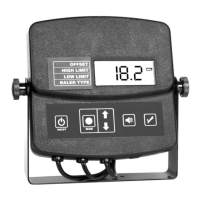
1. Press the mode button (B) until the triangular indicator (F) is blinking
next to “LOW LIMIT”.
2. Use the arrow buttons (C) to adjust the low limit up or down.
NOTE: If there is no low limit applied, or you wish to turn the low
limit off, simply use the arrow buttons (B) until the word “OFF”
is displayed for the low limit.
3. Once you have made your changes they will be saved and will be
used every time the tester is turned on.
4. If you are done making changes to the low limit, without pressing
any buttons, wait approximately 10 seconds and the tester will return
to “NORMAL OPERATION MODE”. If you want to make changes to
another mode you can press the mode button to change to the next
mode of operation.
5. Once you have made your changes to the low limit, and you have a
low limit applied, when the tester returns to “NORMAL OPERATION
MODE” the triangular indicator (F) will be solid and pointing to the “LOW
LIMIT”. This indicates that you have a low limit applied to the tester.
NOTE: The tester will beep if you have a low limit set and the hay
moisture is below the set limit.
SETTING THE BALER TYPE
1. Press the mode button (B) until the triangular indicator (F) is blinking
next to “BALER TYPE”.
2. Use the arrow buttons (C) to select the required baler type as indi-
cated by icon (G).
19


 To Next Page