pg 17
Fine Tuning
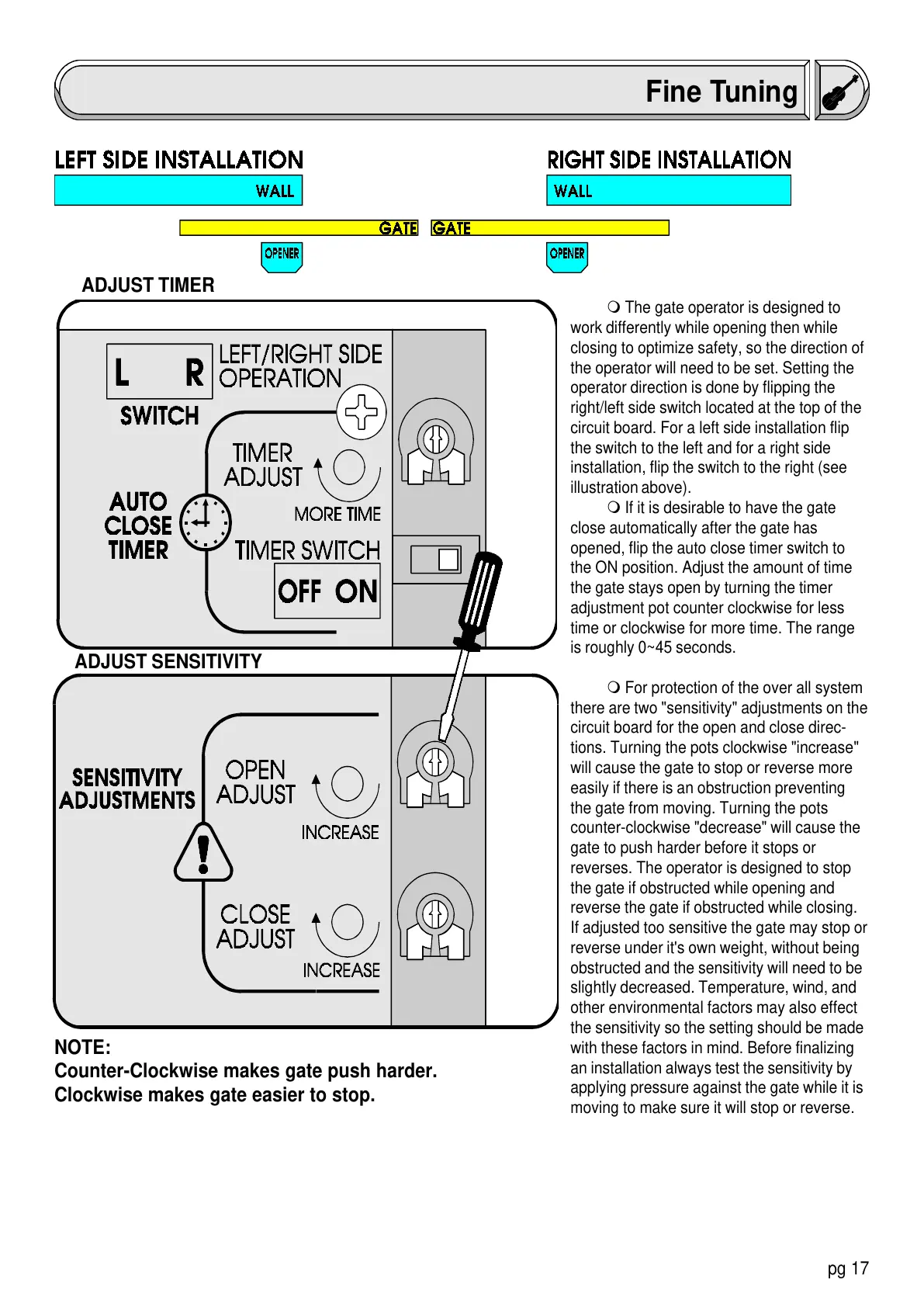
m The gate operator is designed to
work differently while opening then while
closing to optimize safety, so the direction of
the operator will need to be set. Setting the
operator direction is done by flipping the
right/left side switch located at the top of the
circuit board. For a left side installation flip
the switch to the left and for a right side
installation, flip the switch to the right (see
illustration above).
m If it is desirable to have the gate
close automatically after the gate has
opened, flip the auto close timer switch to
the ON position. Adjust the amount of time
the gate stays open by turning the timer
adjustment pot counter clockwise for less
time or clockwise for more time. The range
is roughly 0~45 seconds.
m For protection of the over all system
there are two "sensitivity" adjustments on the
circuit board for the open and close direc-
tions. Turning the pots clockwise "increase"
will cause the gate to stop or reverse more
easily if there is an obstruction preventing
the gate from moving. Turning the pots
counter-clockwise "decrease" will cause the
gate to push harder before it stops or
reverses. The operator is designed to stop
the gate if obstructed while opening and
reverse the gate if obstructed while closing.
If adjusted too sensitive the gate may stop or
reverse under it's own weight, without being
obstructed and the sensitivity will need to be
slightly decreased. Temperature, wind, and
other environmental factors may also effect
the sensitivity so the setting should be made
with these factors in mind. Before finalizing
an installation always test the sensitivity by
applying pressure against the gate while it is
moving to make sure it will stop or reverse.
ADJUST TIMER
ADJUST SENSITIVITY
NOTE:
Counter-Clockwise makes gate push harder.
Clockwise makes gate easier to stop.


 To Next Page