58
TR10K001-A RE / 04.2009
Tordaten löschen11.1.1
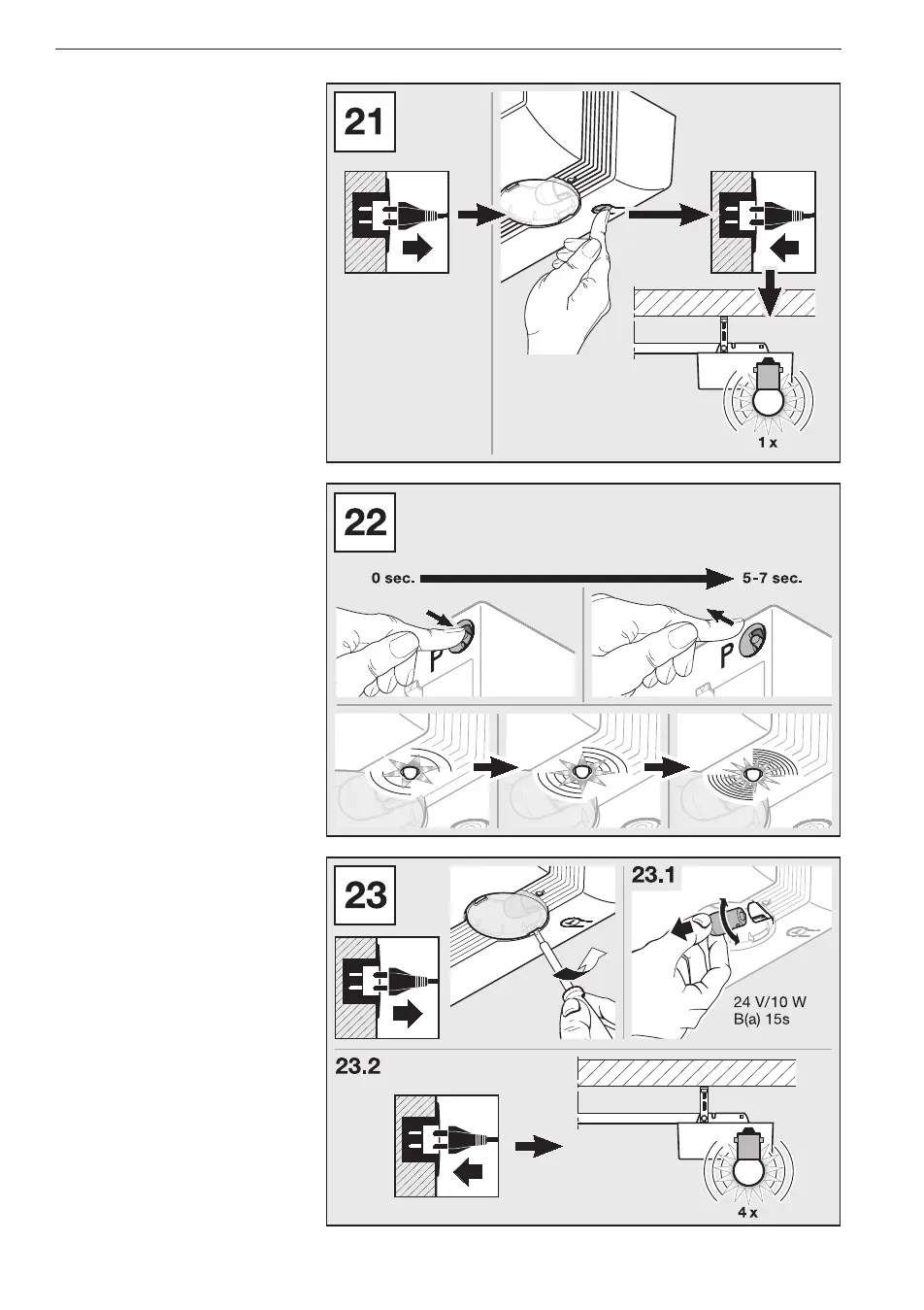
Bei gedrücktem Taster T Netzstecker
einstecken und Taster T solange gedrückt
halten, bis die Antriebs beleuchtung
einmal blinkt (siehe Bild 21).
Funk-Speicherplätze löschen11.1.2
Taster P so lange drücken, bis die rote
LED vom langsamen ins schnelle
Blinken wechselt. Taster P loslassen
(siehe Bild 22).
Lampenwechsel11.1.3
(siehe Bild 23)
Deleting door data11.1.1
Connect the mains plug and keep the T
button pushed until the operator light
flashes once (see figure 21).
Deleting the radio memory 11.1.2
spaces
Hold the P button until the red LED
starts flashing more rapidly. Release the
P button (see figure 22).
Changing the Bulb11.1.3
(See Figure 23)
Suppression de 11.1.1
spécifications de porte
En maintenant le bouton T enfoncé,
branchez la fiche secteur et maintenez
le bouton T jusqu’à ce que la lampe de
motorisation clignote une fois
(voir figure 21).
Suppression d’emplace-11.1.2
ments mémoire sans fil
Maintenez le bouton P enfoncé jusqu’à
ce que la DEL rouge passe d’un
clignotement lent à un clignotement
rapide. Relâchez le bouton P
(voir figure 22).
Changement d’ampoule11.1.3
(voir illustration 23)
Kasowanie danych bramy11.1.1
Przytrzymując wciśnięty przycisk T włożyć
wtyczkę i odczekać aż lampka napędu
błyśnie jeden raz (por. rysunek 21).
Kasowanie miejsc w pamięci 11.1.2
sterowania radiowego
Przycisk P wcisnąć i przytrzymać tak
długo, aż rytm migania czerwonej diody
zmieni się z wolnego na szybki. Zwolnić
przycisk P (por. rysunek 22).
Wymiana lamp11.1.3
(por. rysunek 23)
DEUTSCH / ENGLISH / FRANÇAIS / POLSKI



 To Next Page