This section describes a simple instruction guide for installing the hardware components
on the serverboard system. Turn off and unplug all system and peripheral devices before
proceeding.
2�1 Central Processing Unit Setup
The serverboard supports a single AMD EPYC™ 7000-series and socket type SP3.
2�1�1 Processor Installation
To ensure a safe and easy setup, you need to prepare before installation:
a T20 Torx screwdriver
ESD wrist strap/mat and conductive foam pad
CAUTION
The pins of the processor socket are vulerable and easily susceptible to damage if
ngers or any foreign objects are pressed against them. Please keep the socket pro-
tective cover on when the processor is not installed.
CAUTION
When unpacking a processor, hold the processor only by its edges to avoid touching
the contacts.
Procedure:
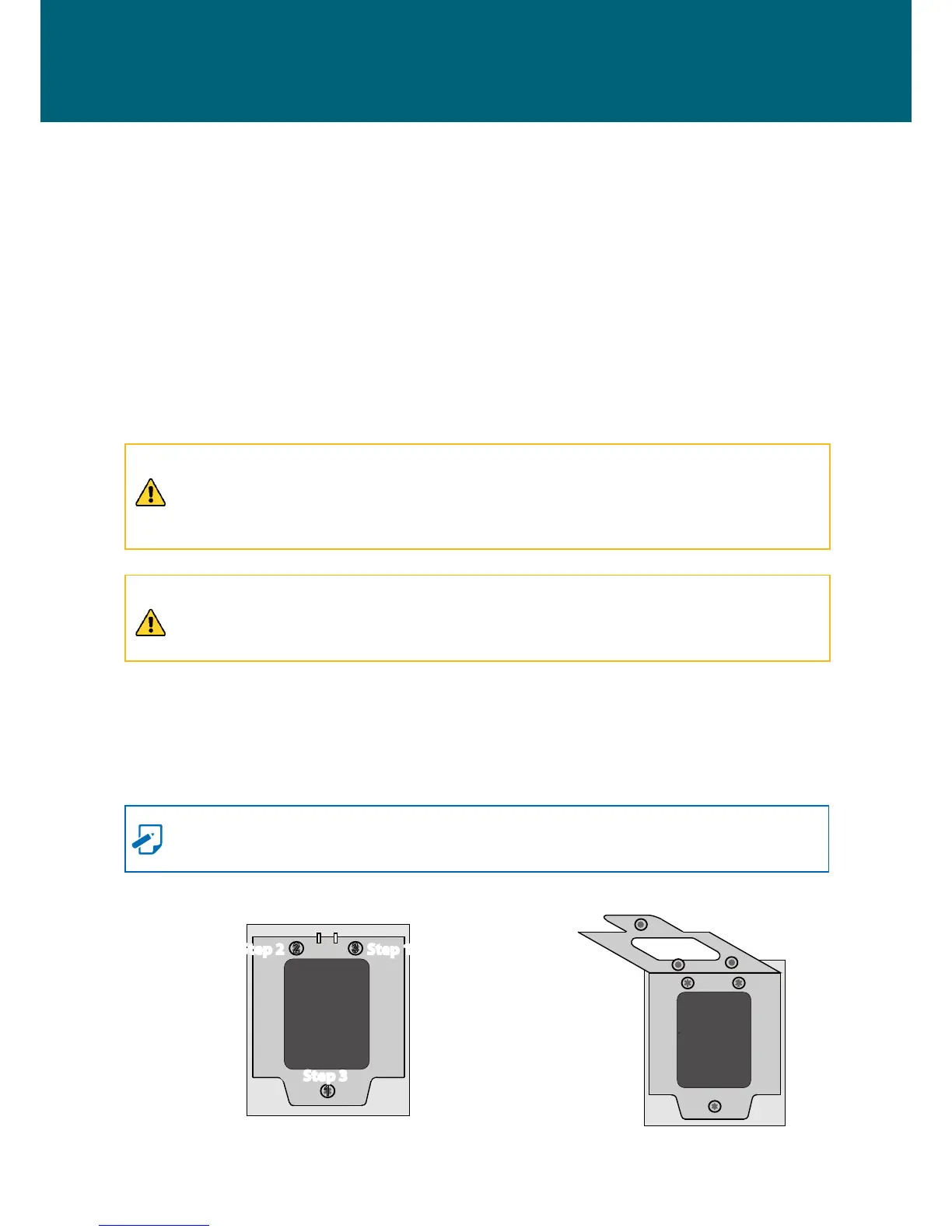
Step 1 Remove the screw in the order designated in blue (the screw labeled 3
→
2
→
1)
as demonstrated in gure 1. After the screws are dislodged, the load plate will
automatically be ejected as demonstrated in gure 2.
NOTE
The screws cannot be completely removed from the CPU cover.
Front
Figure 1 Dislodge screw
Figure 2 Remove top cover
Chapter 2� Hardware Setup
3


 To Next Page