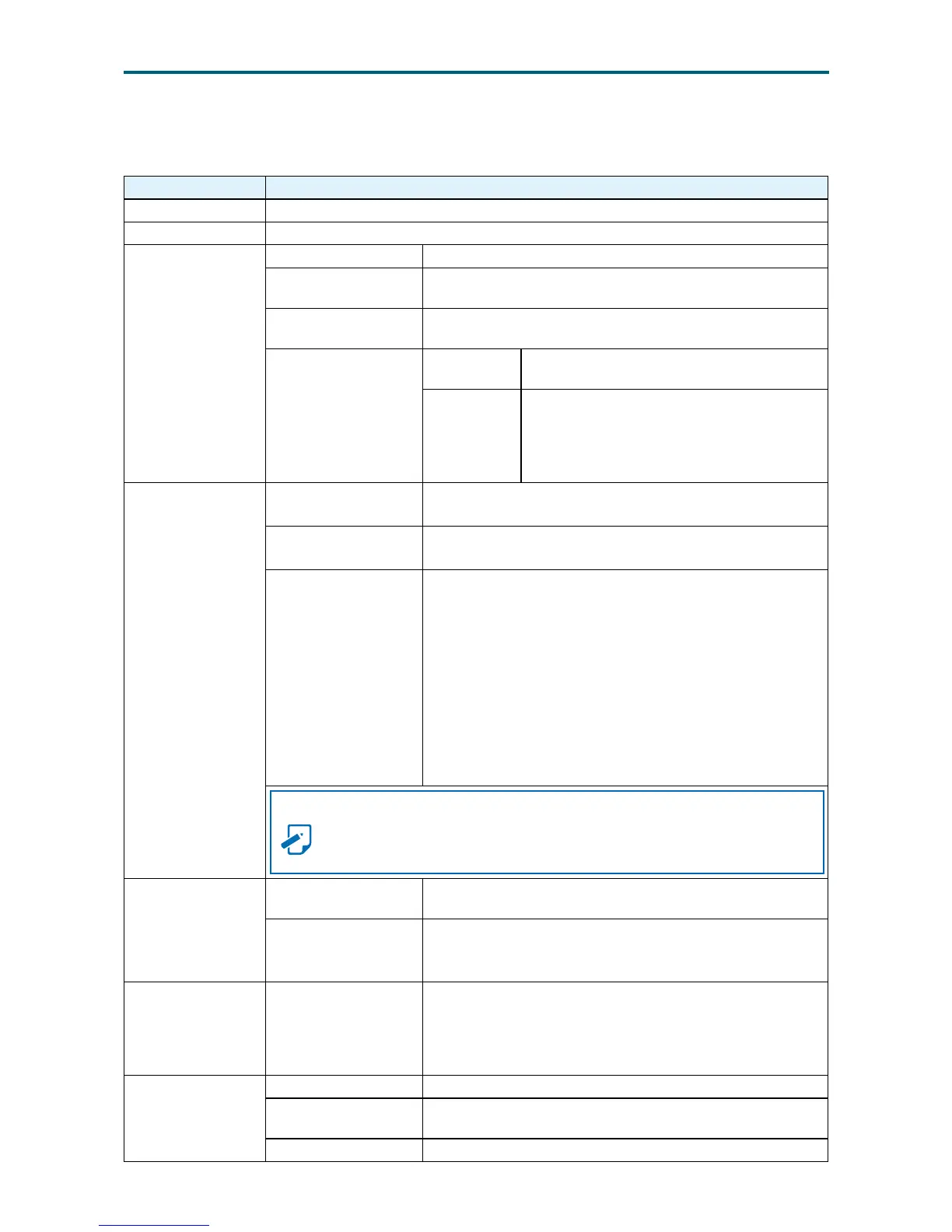
Remote KVM Menu and Option Key:
Remote KVM Description
Start KVM Starts the H5Viewer video redirection.
Stop KVM Stops the H5Viewer video redirection.
Video Record
Pause Video This option is used for pausing Console Redirection.
Resume Video
This option is used to resume the Console Redirection when
the session is paused.
Refresh Video
This option can be used to update the display shown in the
Console Redirection window.
Host Display
Display on
If you disable this option, the display will be
shown on the screen in Console Redirection.
Display off
If you enable this option, the server display
will be blank but you can view the screen
in Console Redirection. If you disable this
option, the display will be back in the server
screen.
Mouse
Capture
Screen
This option helps to take the screenshot of the host screen
and save it in the client’s system.
Show Client
Cursor
This menu item can be used to show or hide the local mouse
cursor on the remote client system.
Mouse Mode
This option handles mouse emulation from local window
to remote screen using either of the two methods. Only
‘Administrator’ has the right to congure this option.
• Absolute mouse mode: The absolute position of the local
mouse is sent to the server if this option is selected.
• Relative mouse mode: The Relative mode sends the
calculated relative mouse potion displacement to the
server if this option is selected.
• Other mouse mode: This mouse mode sets the client
cursor in the middle of the client system and will send
the deviation to the host. This mouse mode is specic
for SUSE Linux installation.
NOTE
Client cursor will be hidden always. If you want to enable, use Alt + C to
access the menu.
Options
Block Privilege
Request
To enable or disable the access privilege of the user.
Keyboard/ Mouse
Encryption
This option allows you to encrypt keyboard inputs and
mouse movements sent between the connections
Keyboard Keyboard Layout
List of Host Physical Keyboard languages supported in
H5Viewer.
1. English US
2. German
3. Japanese
Video Record
Record Video This option is to start recording the screen.
Stop
Recording
This option is used to stop the recording.
Record Settings This option is used to set Video Recording Duration.


 To Next Page