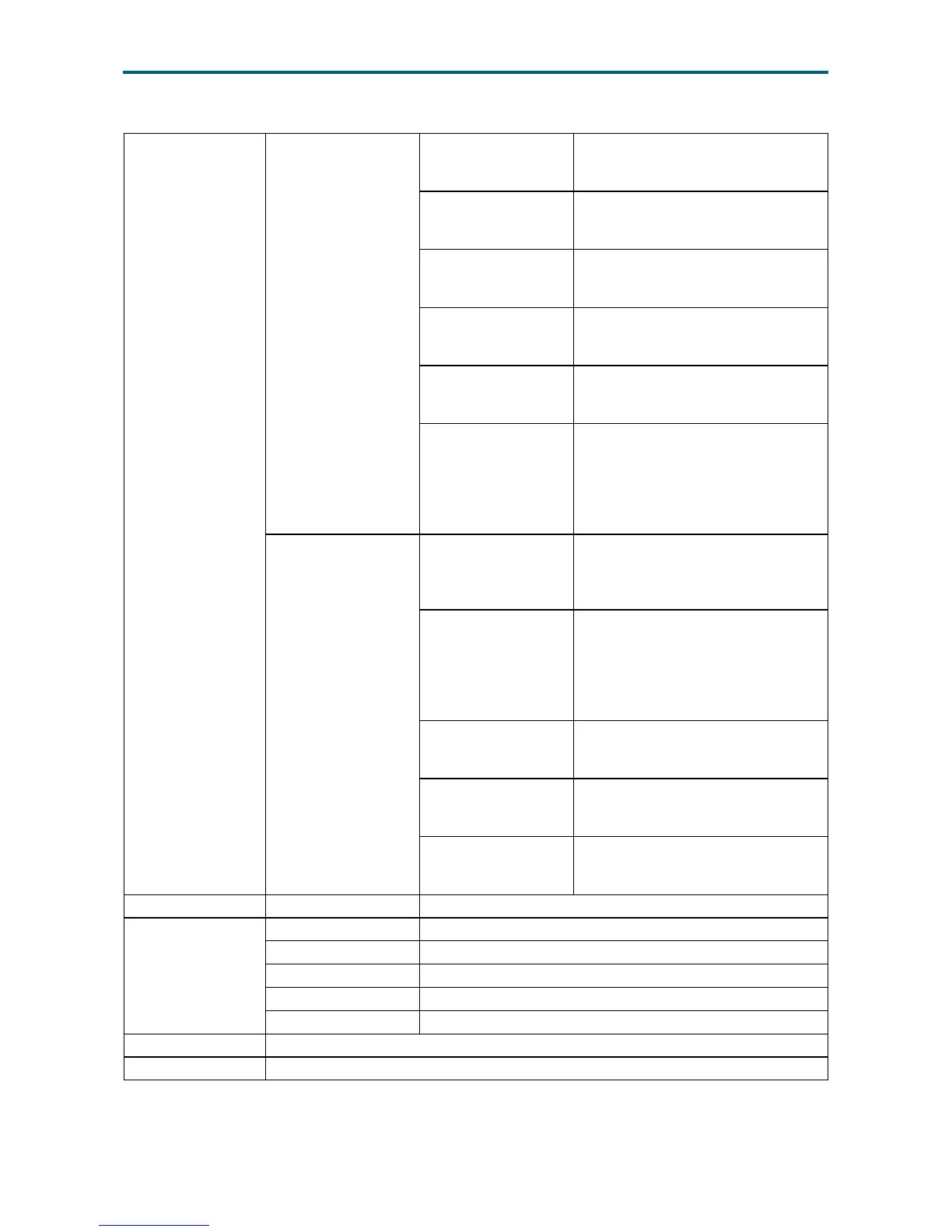
Send Keys
Hold Down
Right <Ctrl>
This menu item can be used to act
as the right-side <CTRL> key during
Console Redirection.
Right <Alt>
This menu item can be used to act
as the right-side <ALT> key during
Console Redirection.
Right <Window>
This menu item can be used to act
as the right-side <WIN> key during
Console Redirection.
Left <Ctrl>
This menu item can be used to act
as the left-side <CTRL> key during
Console Redirection.
Left <Alt>
This menu item can be used to act
as the left- side <ALT> key during
Console Redirection.
Left <Window>
This menu item can be used to act
as the left- side <WIN> key during
Console Redirection. You can also
decide how the key should be
pressed: Hold Down or Press and
Release.
Press and
Release
<Ctrl> + <Alt> + <Del>
This menu item can be used to act as
if you depressed the <CTRL>, <ALT>
and <DEL> keys down simultaneously
on the server that you are redirecting.
Left <Windows>
This menu item can be used to act
as the left- side <WIN> key during
Console Redirection. You can also
decide how they key should be
pressed: Hold Down or Press and
Release.
Right <Windows>
This menu item can be used to act
as the right-side <WIN> key during
Console Redirection.
<Context Menu>
This menu item can be used to act as
the context menu key, during Console
Redirection.
<Print Screen>
This menu item can be used to act as
the print screen key, during Console
Redirection.
Hot Keys Add Hot Keys This menu is used to enable macros. Click Add to macros.
Power
Power Reset To reboot the system without powering off (warm boot).
Immediate Shutdown Power Off the server immediately.
Orderly Shutdown Soft power off.
Power On To power on the server.
Power Cycle To rst power off, and then reboot the system (cold boot).
Active Users Read only. Displays active user and their system IP address.
Help Read only. Displays information about H5viewer.


 To Next Page