-19- -20-
Settingmeasurementconditions
Changingoverbetween3units
(Datasamplingtimechange)
Selectonefrom1,2,5,10and20times/sec.(Factorysetting5times/sec)
IneitheroftheTRACKandPEAKmodes,dataisindicatedaccordingtothe
setindicationupdatecycle.
Changetheinternalsamplingtimeofmeasuredvalues.
Selectonefrom1ms,5ms,16ms,50ms,125msand250ms.(Factory
setting50ms)
TRACKmode …Dataissampledcontinuouslyforthesetsamplingtimeand
indicatedaccordingtothesetindicationupdatecycle.
PEAKmode… Dataisjudgedforpeakvaluescontinuouslyfortheset
samplingtimeandindicatedaccordingtothesetindicationupdatecycle.
Tochangethedatasamplingtime,change (Indicationupdatecycle
change)atthesametime.
※ForcommunicationswithaPC,since1.3msisrequiredfortransferofonepieceof
data,when1msisselected,dataissentevery2ms.
(Indicationupdatecyclechange)
Whenthepoweristurnedonwhilepressingthe key,Unitisshown.Then
pressthe keytoshowUnitn(Newton).
Pressthe keytochangeUnitntoUnit3(3units)andacceptitwiththe
key.
Afterchanging,eachtimethe keyispressed,theunitwillbechangedinthe
orderofKgf(kilogram),N(Newton)andlb(pound).
Inthefactory,theunithasbeensettothestatutorymeasurementunitN
(Newton)stipulatedintheMeasurementAct.
ENT
ENT
Unitchangemode(Initialsetting:N(Newton),changeabletoone
of3units)
Measurement①
<Measurementbyuseofthememoryfunction>
■
Collectionofdatabyfieldmeasurement
①
①
Press②whilepressing①.
②
②
N
Thememoryfunctionofthisgagecanstore
maximum500setsofmeasuredforce
valueswiththecompressiveforceas−
andthetensileforceas+.Thestored
datacanbeoutputtoaprinterandPC.
※Whendataiscollectedwiththe
memoryfunctionorwhencollected
datahasbeenstoredinthe
memory,PEAK/TRACKandunits
cannotbechanged.
Tochangetheconditions,clearall
memorydata.
Allclearofthememory
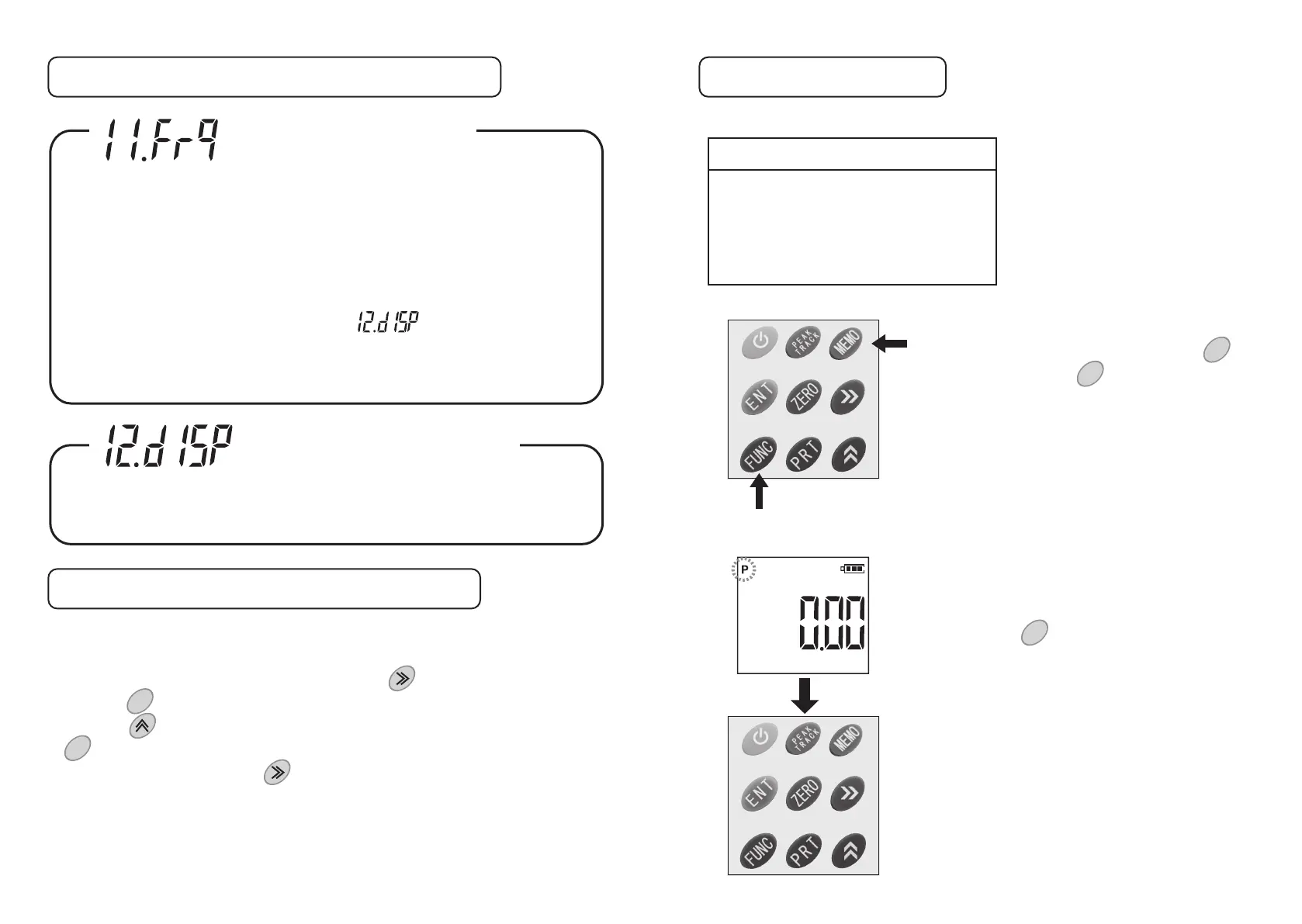
Tocleardatainthememory,pressthe key
whilepressingthe key.Thenthememory
willbeclearedcompletely.
FUNC
MEMO
Displaymode
SelecteitherthePEAKvalueorTRACKvalue
accordingtothenatureofmeasurement.
Eachtimethe keyispressed,Pchangesits
statusintheorderofflashing→on→off.
Pflashing……Thehighestmeasuredvalueof
eithertensileorcompressive
valueisacquiredasthepeak
value.
Pon……………Thecompressivepeakvalueis
indicatedinalargesizeandthe
tensilepeakvalueisindicatedin
asmallsizeinthesubdisplay.
Poff……………TRACK(trackvalue)isindicated.
PEAK
TRACK


 To Next Page
 Loading...