
 Need help?
Do you have a question about the Aikoh Engineering RZ Series and is the answer not in the manual?
Critical warnings indicating high possibility of serious injury or life loss.
Warnings indicating possibility of serious injury or life loss if misused.
Advice for minor personal injury if the product is not used properly.
Confirm that all specified items are included with the force gage.
Avoid capacity limits, correct force application, environmental, and installation factors.
How to reverse the display orientation for better readability.
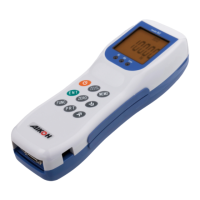
Details on the physical parts and their functions.
Explanation of symbols, values, and status messages shown on the display.
How the gage indicates overload conditions and low battery status.
Using memory, peak, and external contact hold modes for data capture.
Setting and using upper/lower limit values for judgment.
Instructions for charging the built-in battery using the AC adapter.
Guide to navigating and configuring various settings.
List of available modes and their primary functions.
How to enable/disable and set upper/lower limit values for comparison.
Clarifies the definition of limit values for comparison and control.
Setting up functions for test stands, including action types and signals.
Guidelines for connecting and using the gage with electric test stands.
Instructions for reversing the display to match the gage's orientation.
Configuring analog outputs and adjusting the zero point.
Enabling auto zero reset and managing power consumption.
How to reset the force value to zero using external signals.
Adjusting data sampling time and indication update frequency.
How to select between Kgf, Newton (N), and Pound (lb).
Procedures for using the memory function to save and recall data.
Verifying the selected unit of measurement (Kgf, lb, N).
Resetting the indicated value to zero without applying force.
Procedures for calling and deleting data stored in memory.
How to print collected measurement data from memory.
Using external signals to hold measurement values.
How to connect the gage to printers and external contacts.
How to measure forces during connector mating and unmating.
Precautions and initial steps for performing force calibration.
Steps to set the calibration value, confirm, and complete the process.
Connecting to a PC via USB for data management and analysis.
Detailed breakdown of pins on the 26-pin I/O connector and their functions.
Information on specific optional cables for I/O and printer connectivity.
Table detailing specifications for different RZ series models.
External dimensions, mass, and power supply details.
Details on what is covered, excluded, and how to obtain service.
 General
| Brand | Aikoh Engineering |
|---|---|
| Model | RZ Series |
| Category | Measuring Instruments |
| Language | English |

 To Next Page
