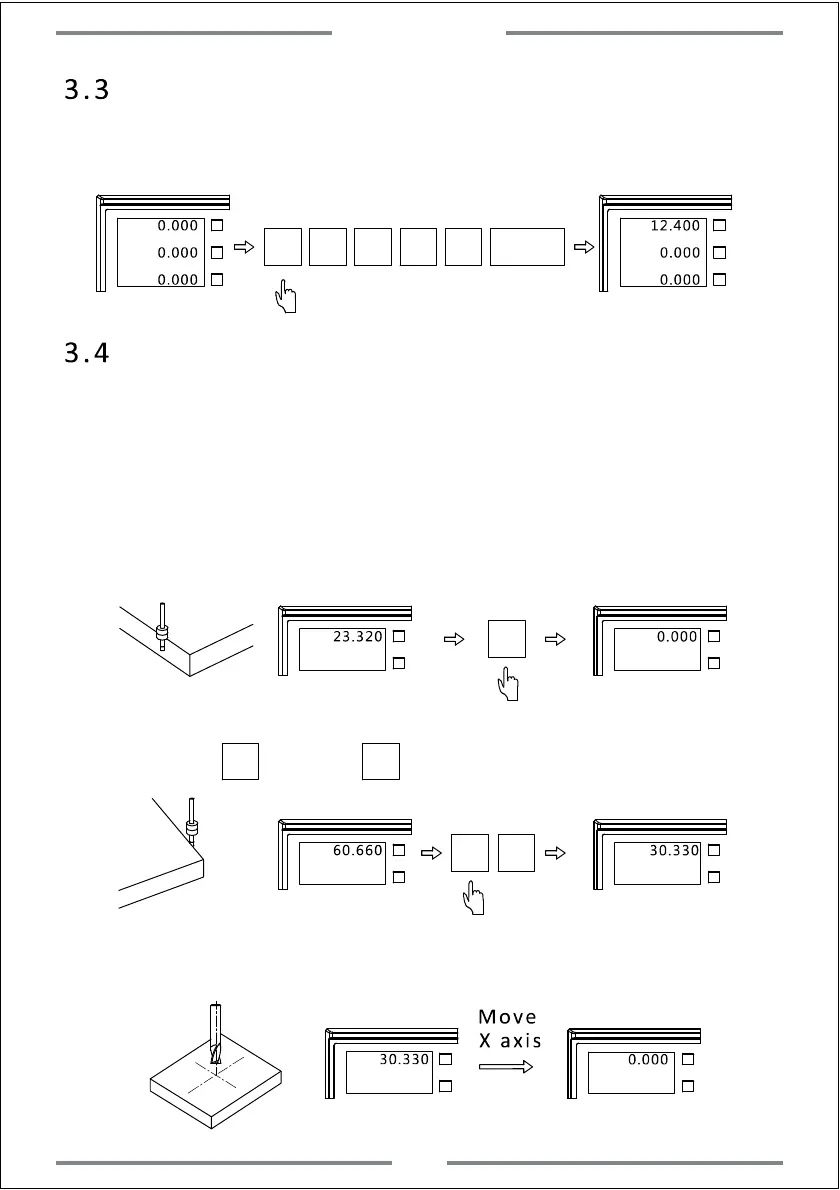
3.3 Value Input
(User could set the current position to be any value)
Example:Set the current position of X axis to be 12.4.
X0
Y0
Z0
0.000
X0
Y0
Z0
0.000
0.000
12.400
0.000
0.000
X
1 2
·
4
3.4 1/2 Function
(The DRO gets the automatic centre find function.It could divide the
current displayed position value by two.Thus user could set the zero
point at the centre of work-piece)
Example:Set the zero point of X axis at the centre of work-piece.(Same
operation to Y axis)
Step 1: Align the edge finder on one side of work-piece for X axis,then
zero the value.
X0
X0
Y0
X0
Y0
23.320 0.000
Step 2: Align the edge finder on the other side of work-piece for X
axis.Press ,and press to divide the value by two for X axis.
Step 3: Move the table of X axis until the value of X axis to be 0.000.The
current position is the centre of work-piece for X axis.
1/2
X0
Y0
X0
Y0
60.660 30.330
X
X0
Y0
0.000
X0
Y0
30.330
Move
X axis
X
1/2
Basic Function
8



 To Next Page