3.8 Sleep Function
When meet the occasion that the operator would leave for rest,the
DRO could be set as sleep state.To enter the sleep state,the DRO
should not be in ABS model.
Example:Press to enter the sleep state,make sure the DRO is not in
ABS model.
To activate the DRO,press to get back previous machining interface.
3.9 REF Function
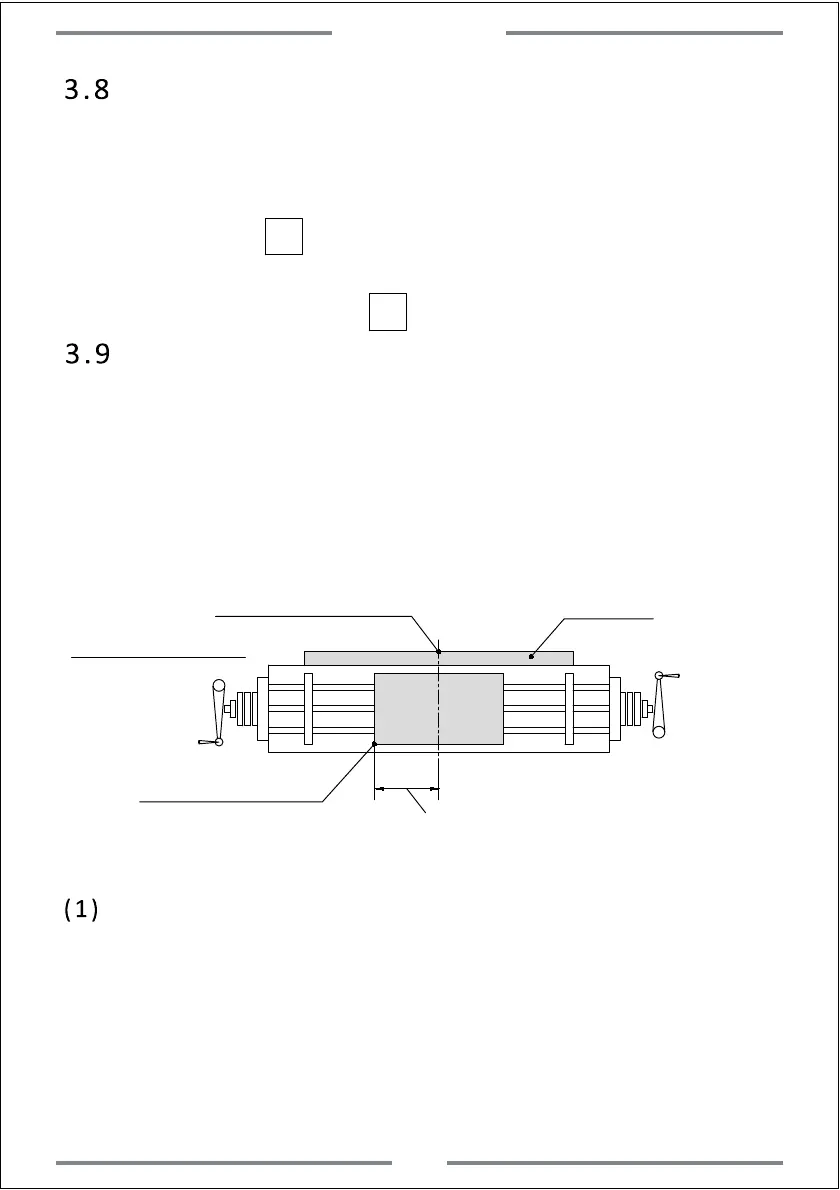
In daily machining,we may encounter power failure.If losing the zero
point of the work-piece,we have to retrieve the zero point again.For
the convenience to retrieve the zero point,the DRO could memorize
the mechanical zero reference point of linear scale.This enable the
users to retrieve the zero point of work-piece quickly.
work-piece
Mechanical zero reference
point of linear scale
Linear Scale
Zero point of work-piece
Schematic Diagram
Take note this distance.Turn on the DRO to find the
mechanical reference point of linear scale,then we
could calculate out the preset zero reference point of
work-piece.
(1) Set the mechanical zero reference point of linear scale
Note:To use the REF function,we need to set the mechanical zero
reference point of linear scale in DRO.In this way,the DRO could memorize
the zero point of work-piece.For the following zeroing,centre and value
input for re-locate the zero point of work-piece under ABS model,the DRO
will memorize the distance between new zero point of work-piece and
mechanical zero reference point of linear scale.The operations are shown
as below:
REF
REF
Basic Function
10



 To Next Page