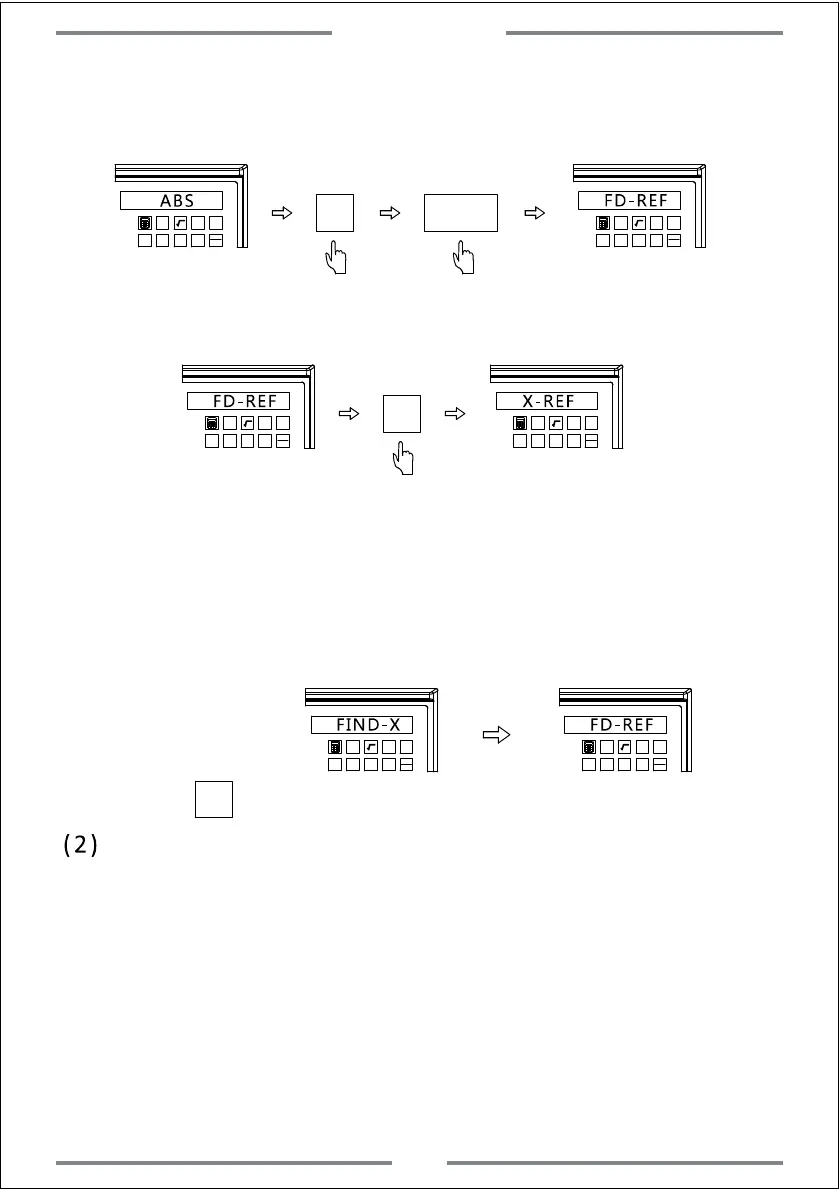
Step 1: Enter the REF function,select REF to set the mechanical zero reference
point of linear scale.
ABS
1 32
-
+
CLS Arc
sin
TOOL
ENT
FD-REF
1 32
-
+
CLS Arc
sin
TOOL
Step 2: Select the axis which shall be set.(Take X axis as example,same
operation to Y and Z axis)
1
32
-
+
CLS Arc
sin
TOOL
FD-REF
X
1
32
-
+
CLS Arc
sin
TOOL
X-REF
Step 3: Move the table,the DRO will search the mechanical zero reference
point of linear scale automatically.Once the reference point has been
found,the buzzer would ring once.The right window will display
FIND-X(The right window will display FD-REF again in 2 seconds,at this
time,user could Press Y or Z again to find their reference point when it
is necessary.)
1
32
-
+
CLS Arc
sin
TOOL
FIND-X
1
32
-
+
CLS Arc
sin
TOOL
FD-REF
(2) Retrieve zero point of work-piece
Note:Once the mechanical zero reference point of linear scale has been
set,we could retrieve the zero point of work-piece quickly if we lose
it.Operations are shown as below:
Step 4: Press to exit REF function and back to machining interface.
Step 1: Take note of X,Y and Z axis under ABS model once the DRO
self-checking process completed.
Step 2: Enter REF function,select retrieve zero point of work-piece(same
operation to Y and Z axis)
REF
REF
Basic Function
11



 To Next Page