X
X0
Y0
X
1 32
-
+
CLS Arc
sin
TOOL
0.000 X-S-SET
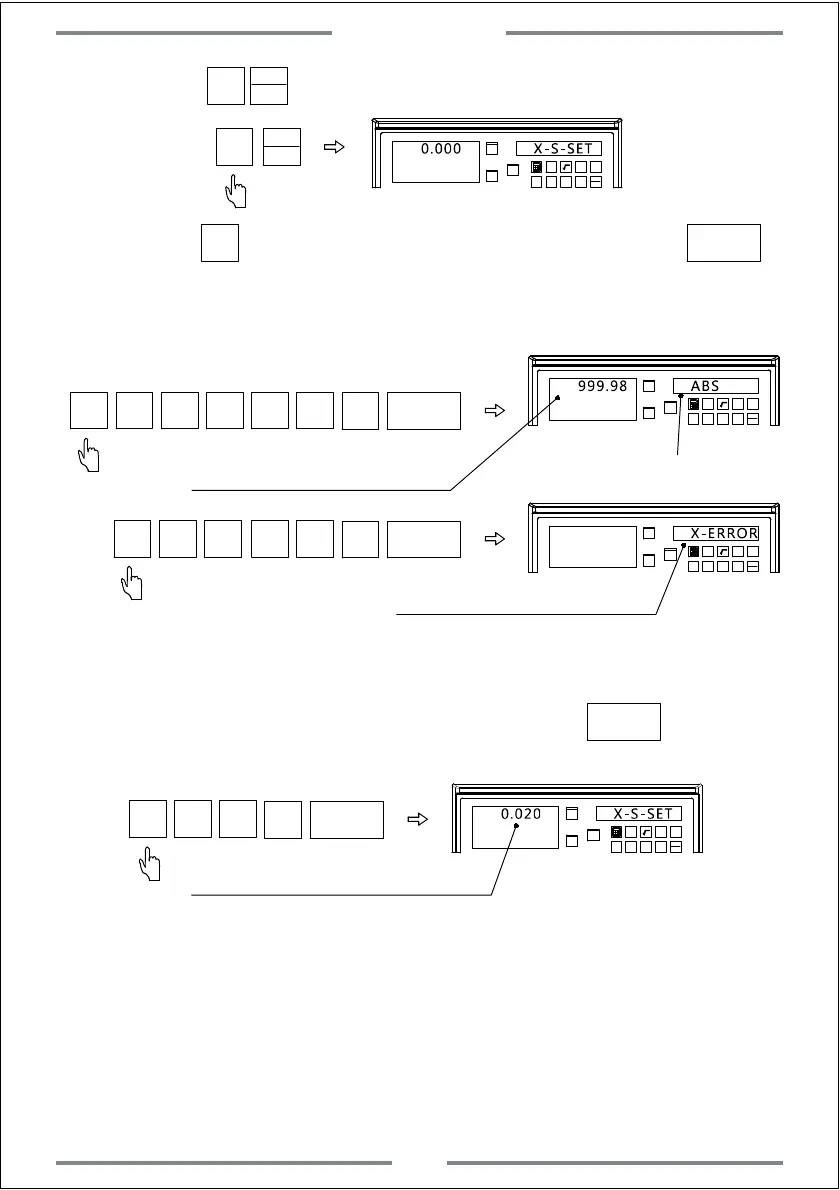
Step 3: Press ,then input the actual moving length value,press .
The DRO will calculate the compensate value automatically.If the input value
is correct,the DRO will exit automatically.If the input value is wrong,the right
window will display X-ERR to alarm.
X0
Y0
X
1 32
-
+
CLS Arc
sin
TOOL
999.98 ABS
ENT
9
·
8
9
Step 2:Press to enter the linear compensation for X axis.
X
99
X0
X0
Note: User could calculate the compensated value by the below formula.Then
input the compensated value.(operation step 1 and 2 are same as
above)After inputting the compensated value,press to exit linear
compensation.Operations are shown as below:
X0
Y0
X
1 32
-
+
CLS Arc
sin
TOOL
0.020 X-S-SET
ENT
0
·
2
0
Compensated value which shall be input.
Formula for compensated value: S=(L-L1)/(L/1000)mm/m
L: The actual measured length(mm)
L1: Displayed value(mm) on the DRO
S: Compensated value(mm/m)
(+ indicates lengthening,and -indicates shortening)
Compensation range: -1.9mm/m to +1.9mm/m
X0
Y0
X
1 32
-
+
CLS Arc
sin
TOOL
X-ERROR
ENT
·
8
9
99
Alarm if the input value is incorrect
X0
Displaying with compensated value
MM
INCH
MM
INCH
ENT
ENT
Exit automatically once the
input value is correct
Basic Function
13



 To Next Page