2.2.2 Installing the Windows system driver
The following procedures perform installation and verification of the Windows XP, Windows
Vista Driver or Windows 7. The Hardware Wizard will be directed to obtain the Windows
XP, Windows Vista or Windows driver for the device from:
c:\Program Files\AIM GmbH\PCI-1553-Windows-BSP-Vxxxx\SysDrv32
or
c:\Program Files\AIM GmbH\PCI-1553-Windows-BSP-Vxxxx\SysDrv64
This SysDrv32 and the SysDrv64 folder should have been installed using BSP
installation procedure from Section 2.1.
Note: The following procedure images have been obtained when performing installation
using Windows XP. If you are using a Windows Vista or a Windows 7 system, the
Hardware Wizard may display slightly different text in the windows.
To install the Windows driver
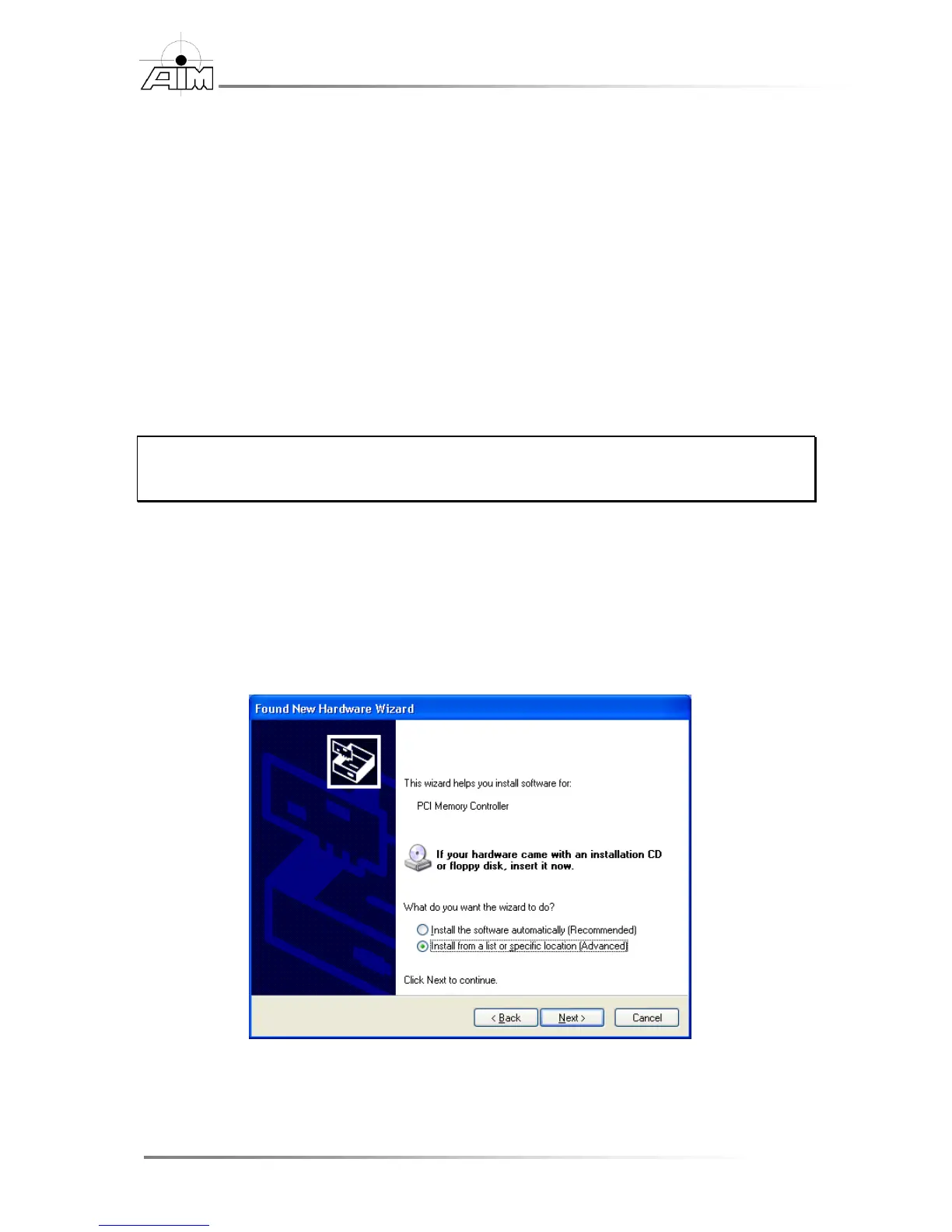
1. In the Found New Hardware Wizard, select:
Install from a list or specific location (Advanced)
Then select the Next button. (You do not need the installation CD inserted
into the CD drive.)


 To Next Page