AIMS Power www.aimscorp.net
4 Troubleshooting Guide
Troubleshooting contains information about how to troubleshoot possible error conditions while using the
Global LF Inverter & Charger.
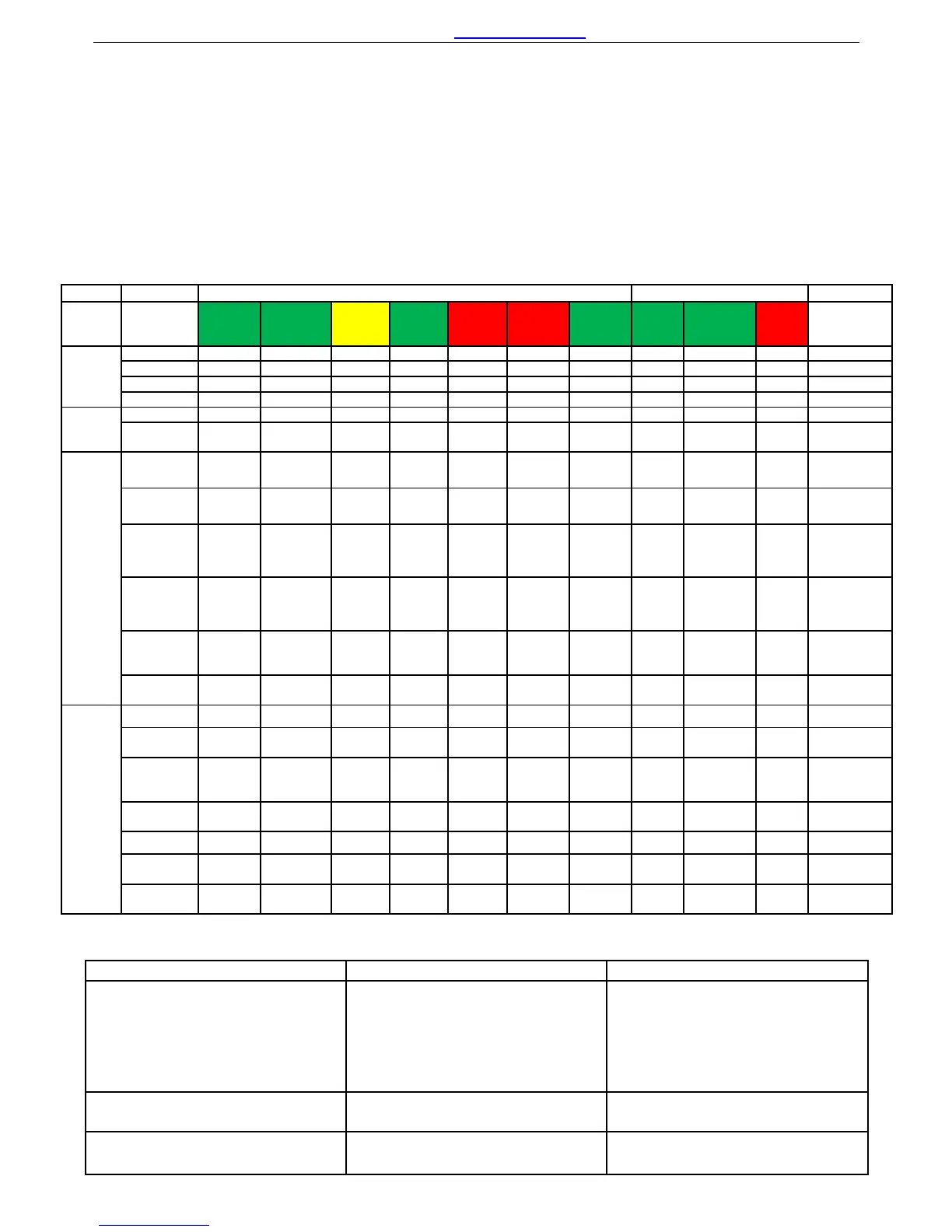
The following chart is designed to help you quickly pinpoint the most common inverter failures.
Indicator and Buzzer
Indicator on top cover LED on Remote Switch
Status Item SHORE
POWE
R ON
INVERT
ER ON
FAST
CHG
FLOAT
CHG
OVER
TEMP
TRIP
OVER
LOAD
TRIP
POWER
SAVER
ON
BATT
CHG
INVERTE
R
Alarm
Buzzer
Line
Mode
CC √ × √ × × × × √ × × ×
CV √ × √, blink × × × × √ × × ×
Float √ × × √ × × × √ × × ×
Standby √ × × × × × × × × × ×
Inverter
Mode
Inverter On × √ × × × × × × √ × ×
Power
Saver
× × × × × × √ × × × ×
Inverter
Mode
Battery
Low
× √ × × × × × × √ √ Beep 0.5s
every 5s
Battery
High
× √ × × × × × × √ √ Beep 0.5s
every 1s
Overload
On Invert
Mode
× √ × × × √ × × √ √ Refer to
“Audible
alarm”
Over-Temp
On Invert
Mode
× √ × × √ × × × √ √ Beep 0.5s
every 1s
Over-Temp
On Line
Mode
√ × √ × √ × × √ × √ Beep 0.5s
every 1s
Over
Charge
√ × √ × × × × √ × √ Beep 0.5s
every 1s
Fault
Mode
Fan Lock × × × × × × × × × × Beep
continuous
Battery
High
× √ × × × × × × √ × Beep
continuous
Inverter
Mode
Overload
× × × × × √ × × × × Beep
continuous
Output
Short
× × × × × √ × × × √ Beep
continuous
Over-Temp × × × × √ × × × × × Beep
continuous
Over
Charge
× × √ × × × × √ × × Beep
continuous
Back Feed
Short
× × × × × × × × × × Beep
continuous
Symptom Possible Cause Recommended Solution
Inverter will not turn on during
initial power up.
Batteries are not connected, loose
battery-side connections.
Low battery voltage.
Check the batteries and cable
connections. Check DC fuse and
breaker.
Charge the battery.
No AC output voltage and no
indicator lights ON.
Inverter has been manually
transitioned to OFF mode.
Press the switch to Power saver on
or Power saver off position.
AC output voltage is low and the
inverter turns loads OFF in a short
Low battery. Check the condition of the
batteries and recharge if possible.
22


 To Next Page