130
Settings and Adjustments
Configure on the device.
4
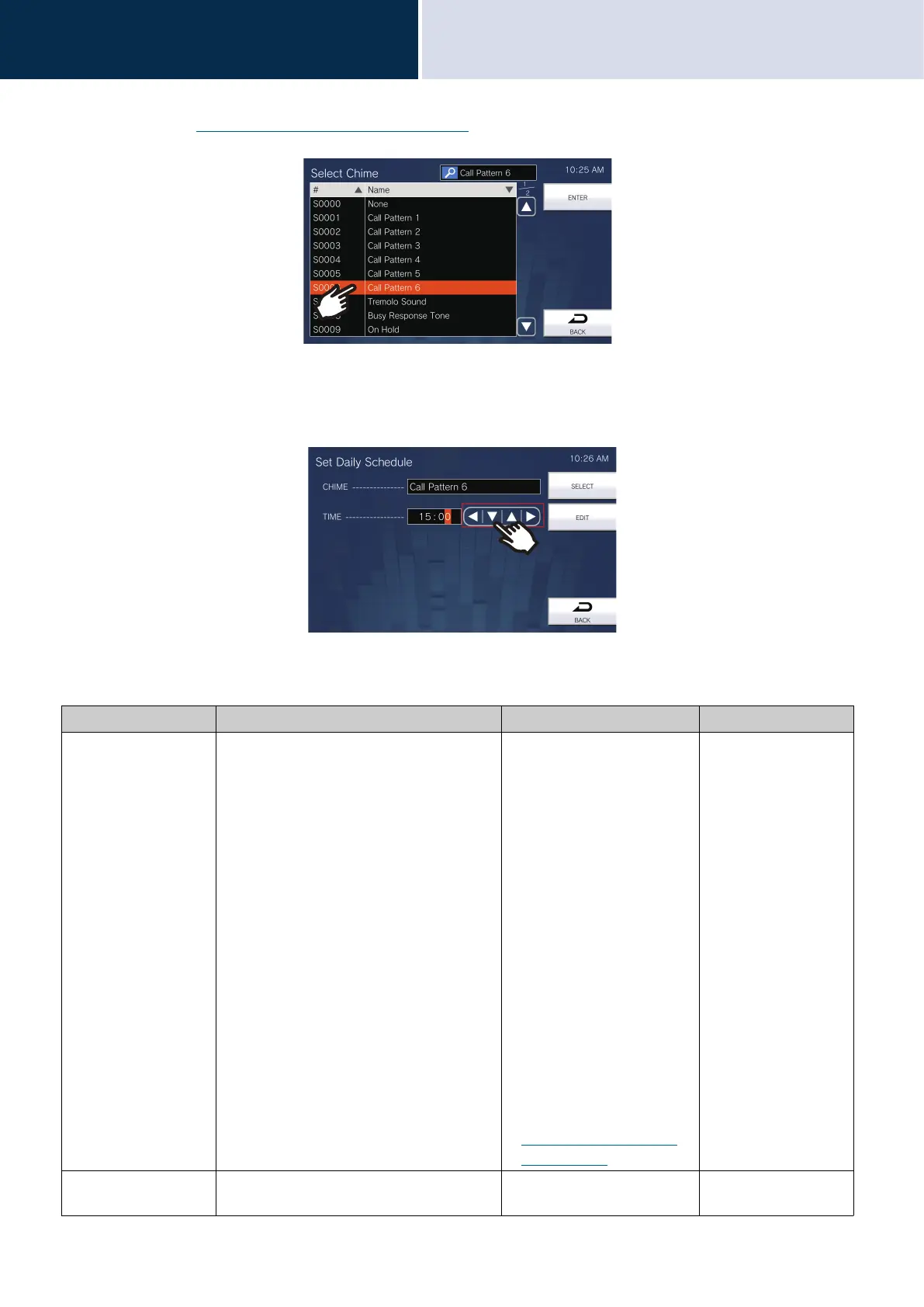
(4) Tap the chime tone to play.
– Refer to
“Searching and Specifying (→page 31)” to search chime tones.
(5) Tap [ENTER].
– The Set Daily Schedule screen is displayed.
(6) Configure the start time.
(7) Tap [SELECT].
– The settings are saved.
Entry Description Settings Default values
CHIME Configure the chime tone to play. • None
• Call Pattern 1
• Call Pattern 2
• Call Pattern 3
• Call Pattern 4
• Call Pattern 5
• Call Pattern 6
• Tremolo Sound
• Busy Response Tone
• On Hold
• Operation Sound
• Error
• Pre Tone 1
• Pre Tone 2
• Pre Tone 3
• Communication End
Pretone
• Call Queue Notification
• Waiting Reply Tone
• Select from the audio
sources registered in
“Custom Sound Registry
(→page 169)”.
None
TIME Configure the time to begin playing the
chime tone.
00:00 - 23:59 -



 To Next Page