Page
19Air Techniques, Inc.
AS10, AS12, AS21, AS22, AS30,
AS40, AS50, AS70, & AS100
Service Timer
Timer Display
Mode
Icon
Warranty
Indicator
Mode
Button
SERVICE TIMER
Alerts User to Perform Scheduled Maintenance
The Service Timer is designed to track, in hours,
the operating time of the AIRSTAR motors and
alerts the user when regularly scheduled preventive
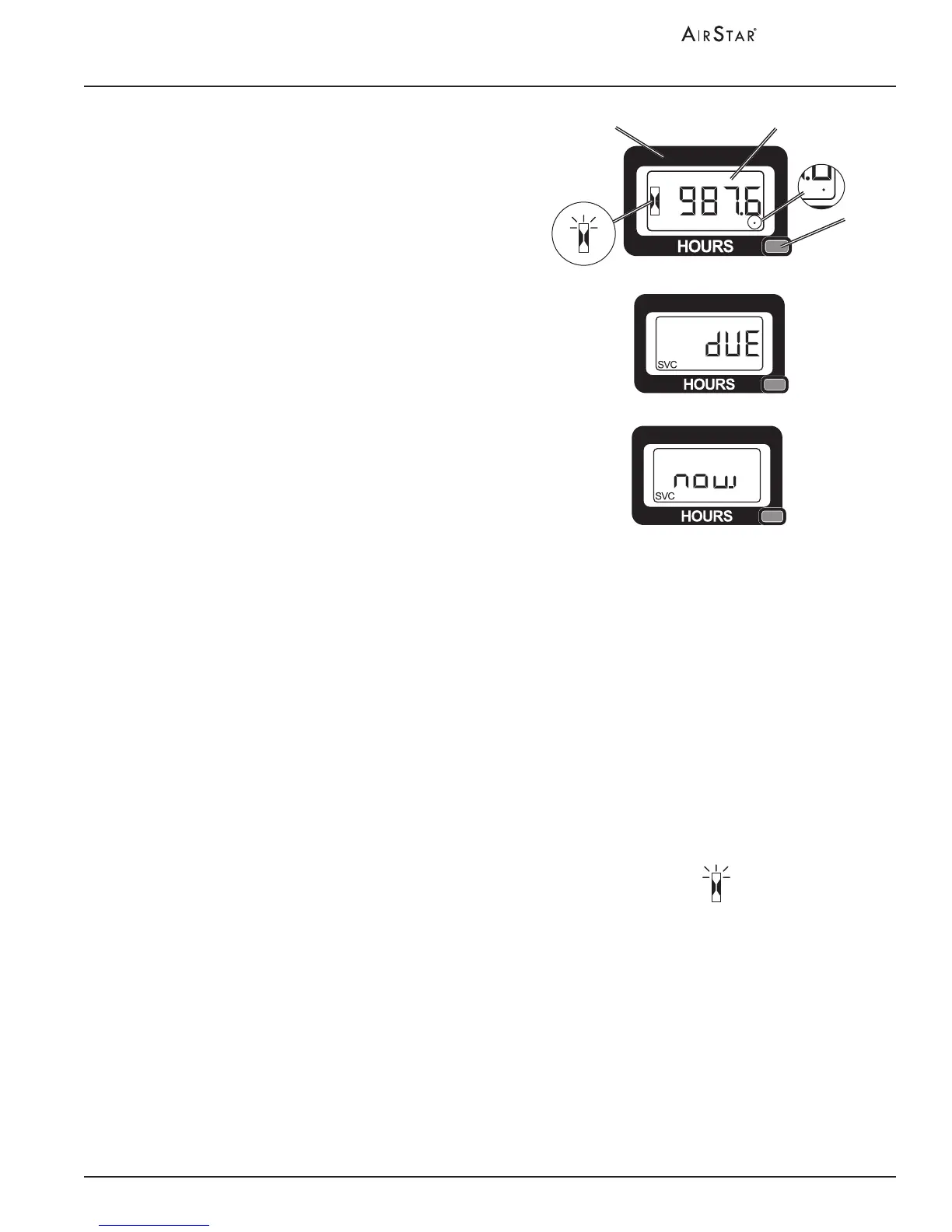
maintenance is due. (See View A.)
The typical interval between servicing is 1,000
hours of operation. The tracking is done by setting
the timer to 1,000 hours at the start of each new
service period and having the timer count down
only during operation when the motors are working.
When the Service Timer reaches 100 hours or
less, a SVC DUE message appears (See View B.)
once every minute to indicate it will soon be time
to perform preventive maintenance.
When the service timer has counted down 1,000 hours,
a SVC NOW message ashes to indicate it is time
to do preventive maintenance on your AIRSTAR.
(See View C.) The Timer Display alternates between
the service due and time remaining screens.
Figure 8. Service Timer
View A
View B
View C
MAINTENANCE
Timer Display: When set in the Hour Meter Mode, shows the total number of operating
hours the unit has run. (See View A.)
Displays service alerts in SVC DUE Mode when timer reaches the 100
and 1000 hour default intervals. (See Views B and C.)
NOTE: The Mode Icon blinks when Mode Button is pressed.
Mode Button: Allows selection between the Hour Meter Mode and the SVC DUE Mode.
1. When in SVC DUE Mode, press the Mode Button once to return to
the Hour Meter Mode.
2. Resets service timer when held down for 6 seconds.
NOTE: The dot indicator appears only after the rst 2 hours of running time. (See View A.)
Warranty
(dot) Indicator:
The Warranty Indicator is the dot in the lower right hand corner that
tracks the warranty period. When blinking, the until is still within the
5,000 hours warranty period. The 5,000 hours warranty period has
elapsed if the dot is solid (stops blinking).
The Service Timer feature is included to help the user adhere to the recommended maintenance
schedule provided in this manual. Timely performance of this maintenance ensures that your
AIRSTAR will provide uninterrupted service and continue to perform at its best. The only user
action necessary is as follows.
1. Perform the preventive maintenance when alerted.
2. Reset the Service Timer for the next service interval.
Refer to the table below summarizing the Service Timer functions as necessary.


 To Next Page