5
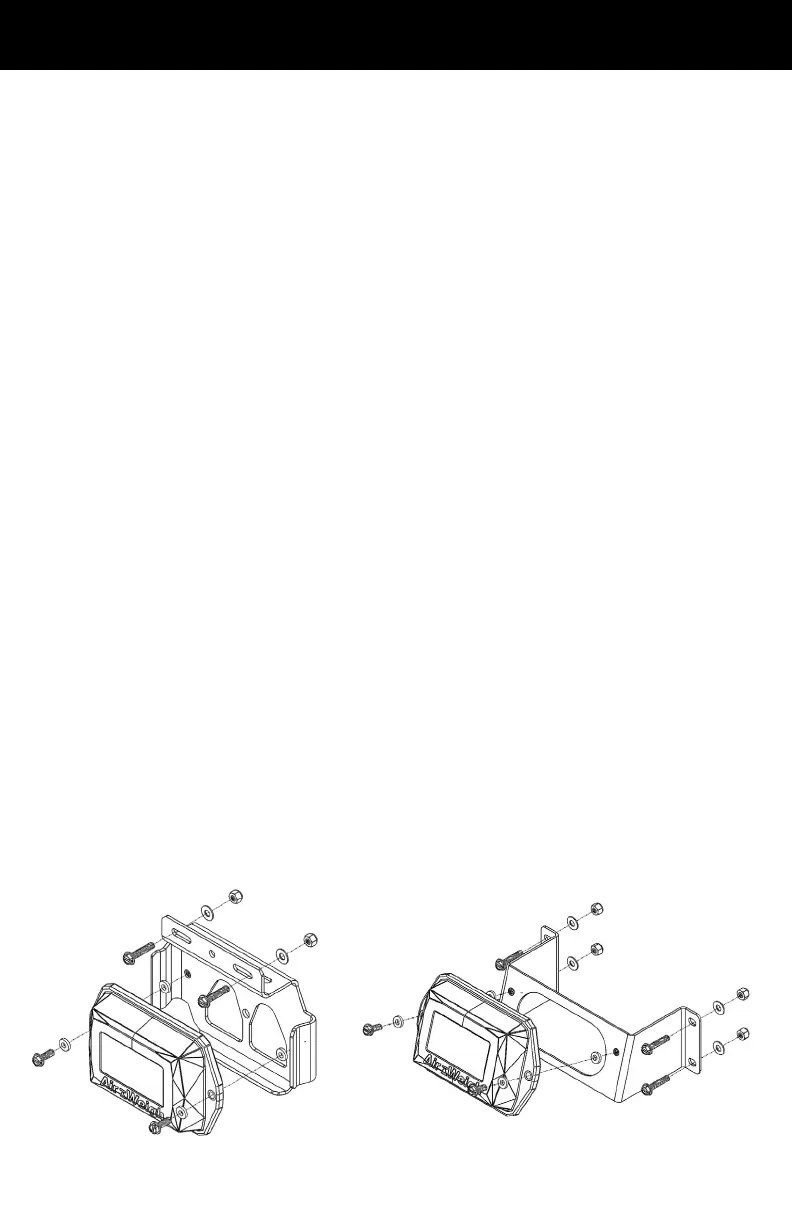
1. Determine the best location to mount the scale. For the Van
Bracket, the bracket screws should be mounted on a ledge,
and the scale itself should hang o the ledge with no obstacles
blocking it. For the Frame Rail Bracket, it should be visible while
loading and in a protected area from direct tire spray.
2. Hold the bracket in the location you will mount it. Mark the trailer
surface that is visible through the holes in the top of the bracket
using a permanent marker.
3. Using the marked areas as a guide, drill two 1/4-inch holes into the
surface of the trailer.
4. Secure the scale to the bracket by using the provided bolts and
rubber washers. Insert one bolt and washer on each side of the
scale through each of the scale wing holes and tighten.
5. Apply provided blue Loctite on threaded bolts.
At this point, determine whether you want to connect the power to the
display before or after you secure the bracket to the trailer. If after,
proceed to step 8 before completing steps 6 and 7.
6. Feed the power cables to the back of the trailer display.
7. Plug the power interface cable into Port 1 on the back of the scale.
8. Secure the bracket to the trailer surface. To prevent the bolts from
backing out, apply the provided blue Loctite to all threaded bolts
before placing through bracket and securing to the trailer.
Do not overtighten mounting bolts. Torque to 6 inch lbs or .68 Nm.
Mounting with a Van or a Frame Rail Bracket
Van Mounting Bracket
Frame Rail Mounting Bracket


 To Next Page