NOTE: THIS FAN MUST BE INSTALLED BY A LICENSED AND QUALIFIED
ELECTRICIAN IN ACCORDANCE WITH LOCAL AUTHORITY REGULATIONS
9
DANGER! Before changing colour temperature on the light kit , turn off electricity supply to
the fan at the isolation switch and wait for fan blades to stop rotating.
CHANGE LED COLOUR TEMPERATURE WITH LIGHT VERSION
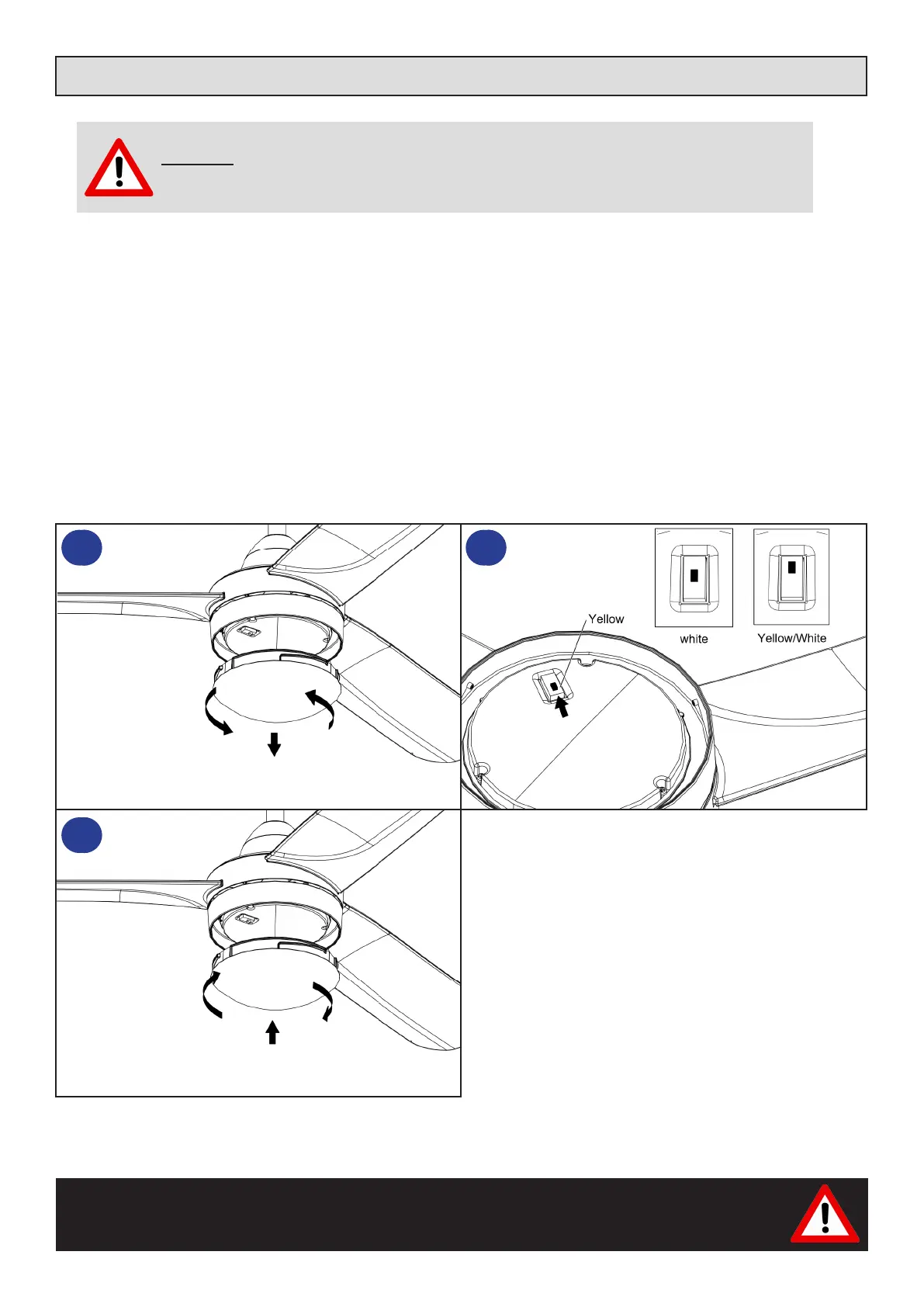
The light kit on the fan has three different colour temperature options 3000K / 4000K / 6000K. The fan has a switch
built into the light kit allowing the user to toggle between colour temperatures.
To change the colour temperature:
1. Ensure the fan is turned off at the isolation switch and the blades have stopped rotating
2. Remove light shade - see below item 1.
3. Select the desired colour temperature by moving switch
4. Test colour temperature by turning on light switch
5. Turn off light switch and install light shade - see item 3.
1
3
2



 To Next Page