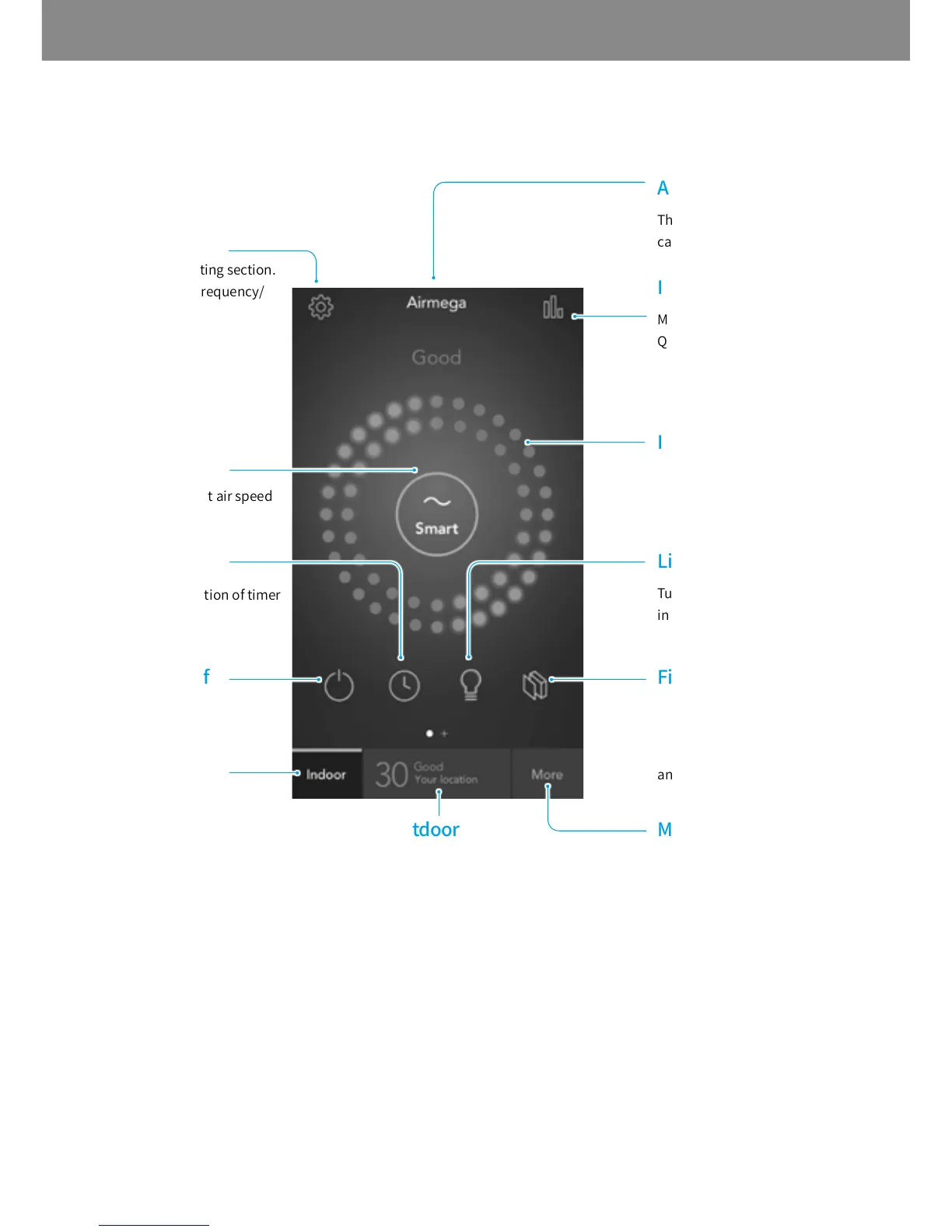
ScreenLayoutofAirmegaApp
Moves to the main page.
Shows the outdoor air quality
of the location you set.
Shows the filter lifetime.
It turns red when the
lifetime is left below 20 %
and blinking below 0 %.
Turns the air quality
indicator on or off.
Shows the real time indoor
air quality at 4 stages.
Moves to the indoor Air
Quality Indicator report
(24 hours, 7 days, 30 days,
12 months).
The name of product (This
can be changed in Setting.)
Moves to the more sections.
Purchase/About Airmega/
Help/Notification Settings/
Change Password options
are available.
Moves to the setting section.
Pre-filter Wash Frequency/
Smart Mode Sensitivity/
Name/Time Zone/Warranty
options are available.
Shows the current air speed
and selects the air speed.
Shows the activation of timer
and scheduler.
Turns the product on or off.



 To Next Page