EasyManua.ls Logo

Airmega 400 - Air Quality Checking and Sensor Adjustment

Default Icon
36 pages
Print Icon
To Next Page IconTo Next Page
To Previous Page IconTo Previous Page
Loading...

EN
 

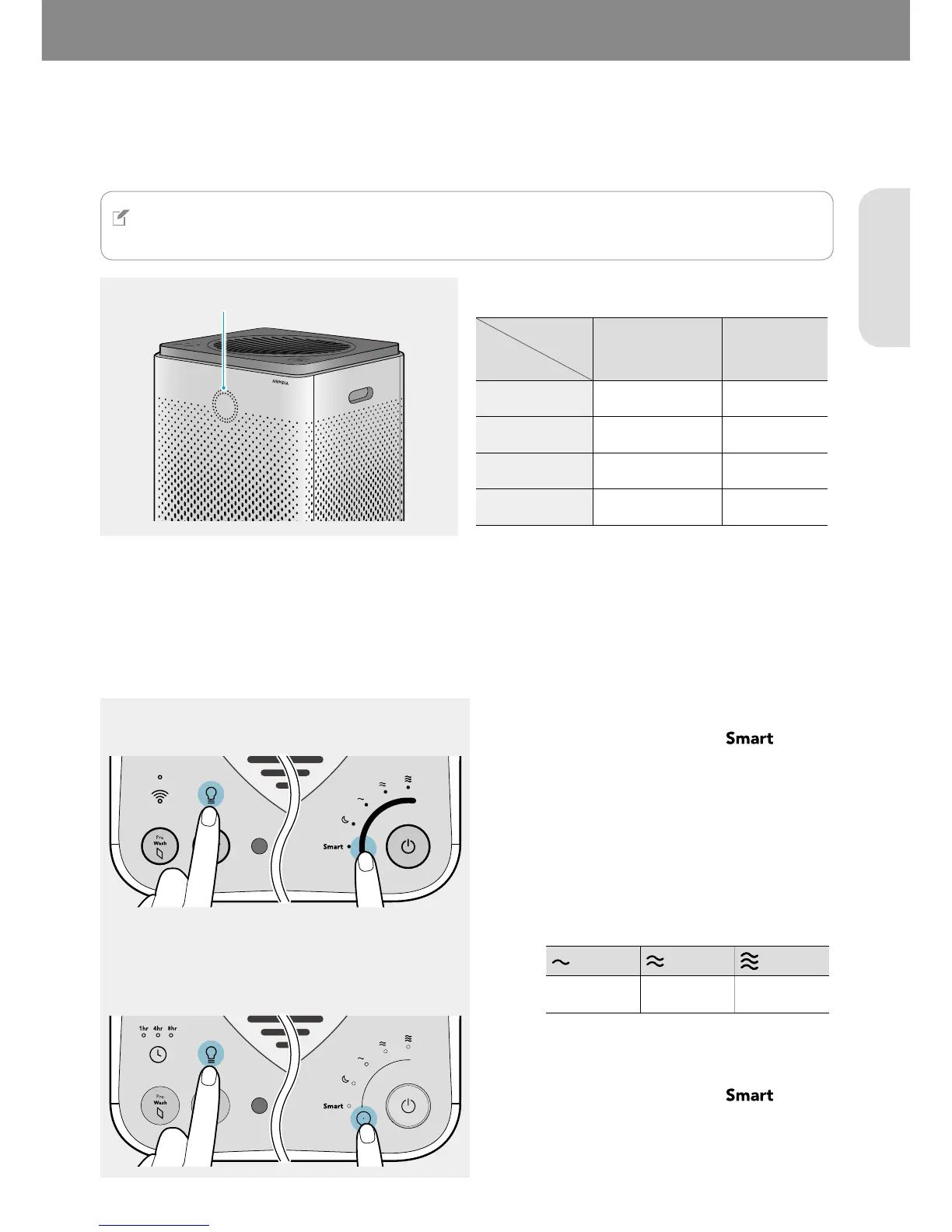
You can easily check the current air quality around the product using the air quality indicator on the front of the
product.
NOTE
For 400S/300S users, you can also check the current air quality in the smart phone application.
The color of the air quality indicator changes as follows:


 
 Blue and green Blue
 Green and yellow Purple
 Yellow and pink Pink
 Pink and red Red

You can adjust the pollution sensor's sensitivity.
400S/400
300S/300
1




2

400S/400: Touch one of the air speeds to
select the desired air sensitivity.
300S/300: Touch the [Air speed/mode] button
repeatedly until the desired air sensitivity is
selected.
Sensitive Normal
Less sensitive
3




You will hear a sound when the setting is
saved.



Related product manuals