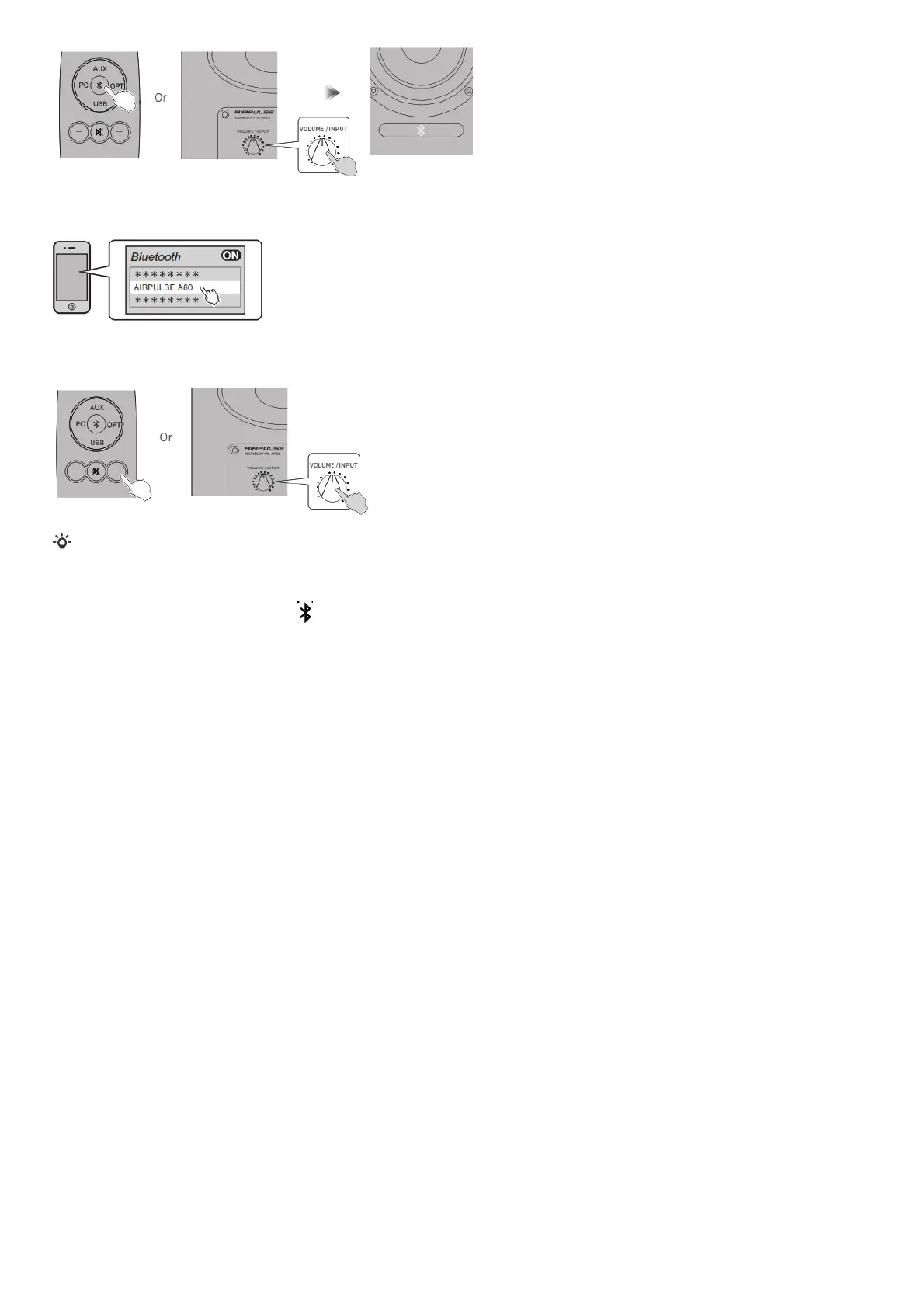
2. Set your Bluetooth device to search for and connect to “AIRPULSE A80”; pin code for connection is “0000” if needed. Operations may be different
between different devices, please refer to the operational instructions attached with the devices.
3. Play music on the connected Bluetooth device, press the “+/-” button on the remote control or press the “VOLUME / INPUT” button on the rear panel of
the active speaker to adjust volume to a desired level.
* Effective Bluetooth connection distance is within 10 meters.
* The Bluetooth of A80 can only be searched and connected in Bluetooth input.
The existing Bluetooth connection will be disconnected once the speaker is switched into other audio inputs. When switched to Bluetooth input, the speaker
will try to connect to the Bluetooth device connected last time.
* To disconnect Bluetooth, press and hold the “ ” button on the remote control for above 2 seconds.
* To enjoy all Bluetooth functions please ensure your audio device has A2DP and AVRCP profiles.
* When connected to this product, Bluetooth connectivity and functions may be different between different Bluetooth devices, depending on software settings
of Bluetooth devices.
Specifications/statement


 To Next Page