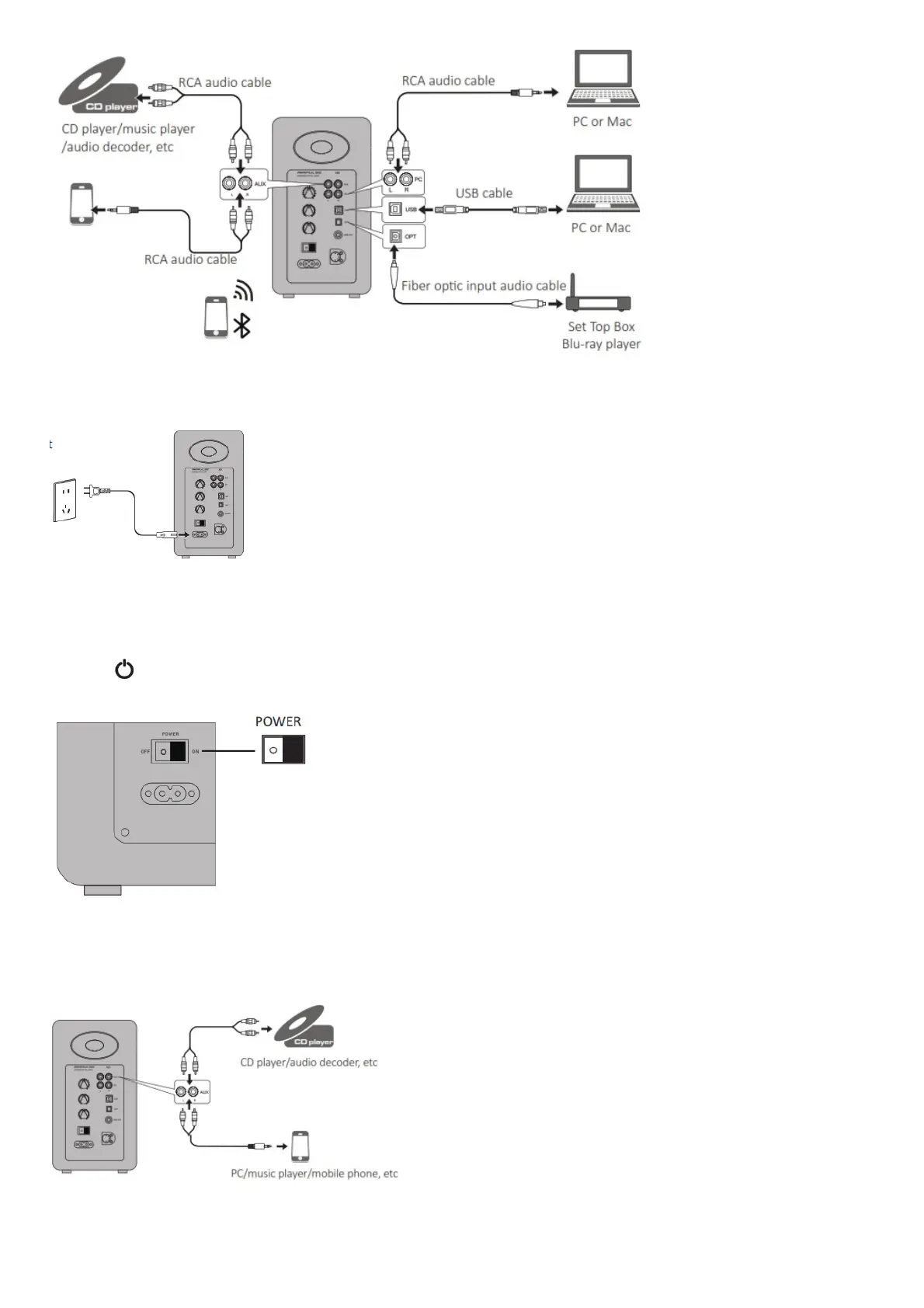
4.Connect to power source
Connect the power cable included to power input port on the rear panel, and then insert power plug into wall outlet.
5.Speaker placement
* Place the passive and active speaker on a solid, leveled and steady surface.
* For the optimum stereo sound effect, the listener can slightly adjust speaker angel.
* The treble has certain directivity, and for more direct sound the speaker’s tweeter should be at ear level of the listener.
6.Turn on main power
* After all cables are connected securely, press power switch on the rear panel to turn on main power;
* Press the “ ” on the remote control to let the speaker enter standby state;
* LED indicator will be lit to show current audio mode, please select the correct audio source with the corresponding connection.
AUX Input Mode
1. Insert RCA audio cable into AUX input port on the rear panel of the active speaker (pay attention to L/R connector matching); then connect RCA audio
cable to audio source devices with RCA output port (CD player/audio decoder/PC/music player/ mobile phone).
2. Press the “AUX” button on the remote control or press the “VOLUME / INPUT” button on the rear panel of the active speaker to select AUX input mode,
LED indicator on the active speaker will display “AUX”.



 To Next Page