EasyManua.ls Logo

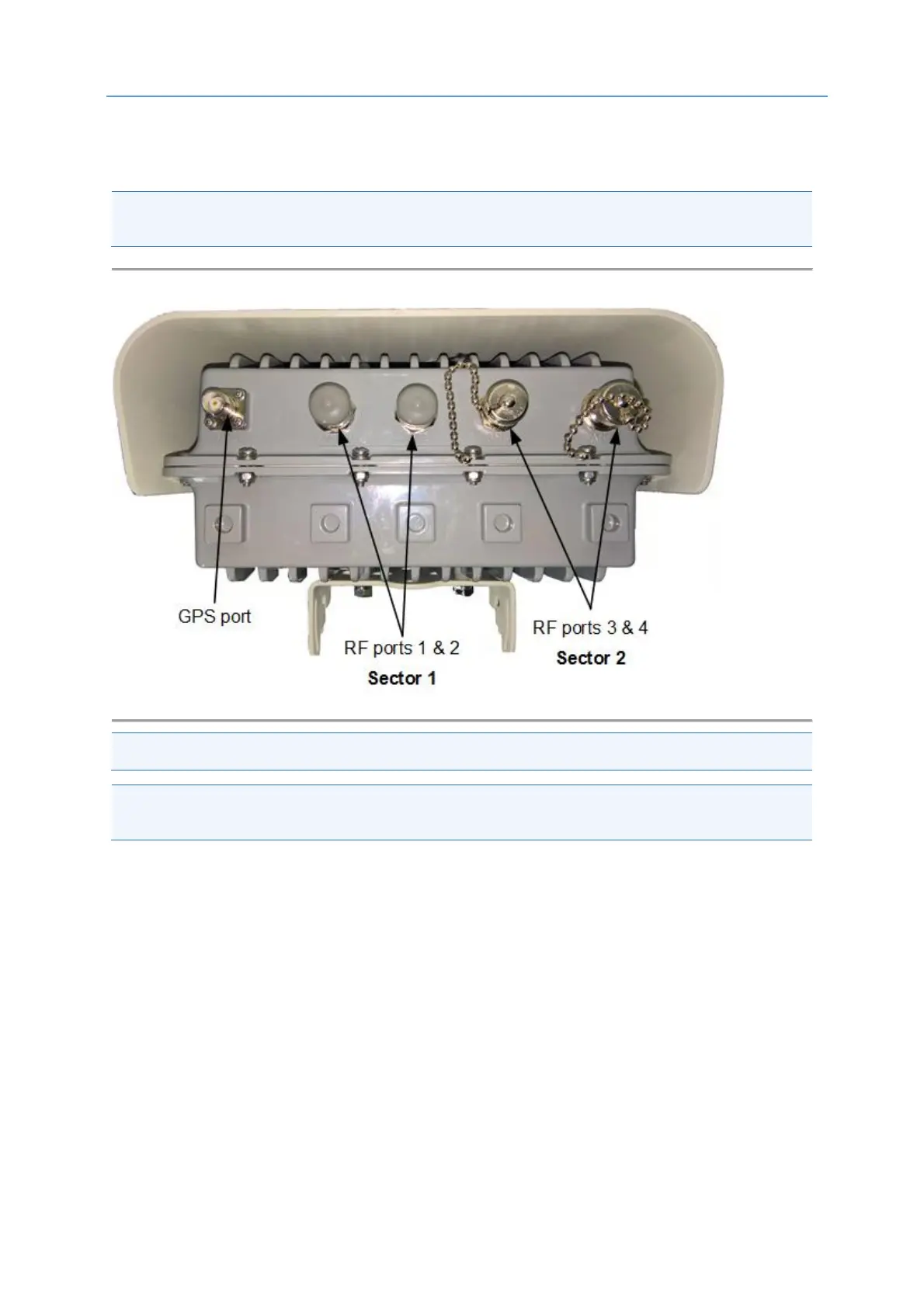
Airspan AirSpeed 1000 - Connections; Figure 4: Airspeed 1000 Top Ports

Default Icon
35 pages
Print Icon
To Next Page IconTo Next Page
To Previous Page IconTo Previous Page
Loading...
AirSpeed 1000 Installation Guide
DUG01289 Airspan Commercial and Internal Use 17
3.2.4 Connections
The following diagrams display the connections on the top and bottom panels of the AirSpeed 1000.
Note: The unit requires a secure ground connection and a grounding screw fitted with a flat washer
and lock washer is provided on the back and clearly marked with the universal ground symbol.
Figure 4: AirSpeed 1000 Top Ports
Note: RF ports 1 & 2 are specified as Sector 1. RF ports 3 & 4 are specified as Sector 2
Note: When utilizing only a single sector, Sector 1 should be used (ports 1 & 2) and the other ports
(3 & 4) should be closed with the provided caps.

Table of Contents

Related product manuals