5-9
Interior
2021 Classic
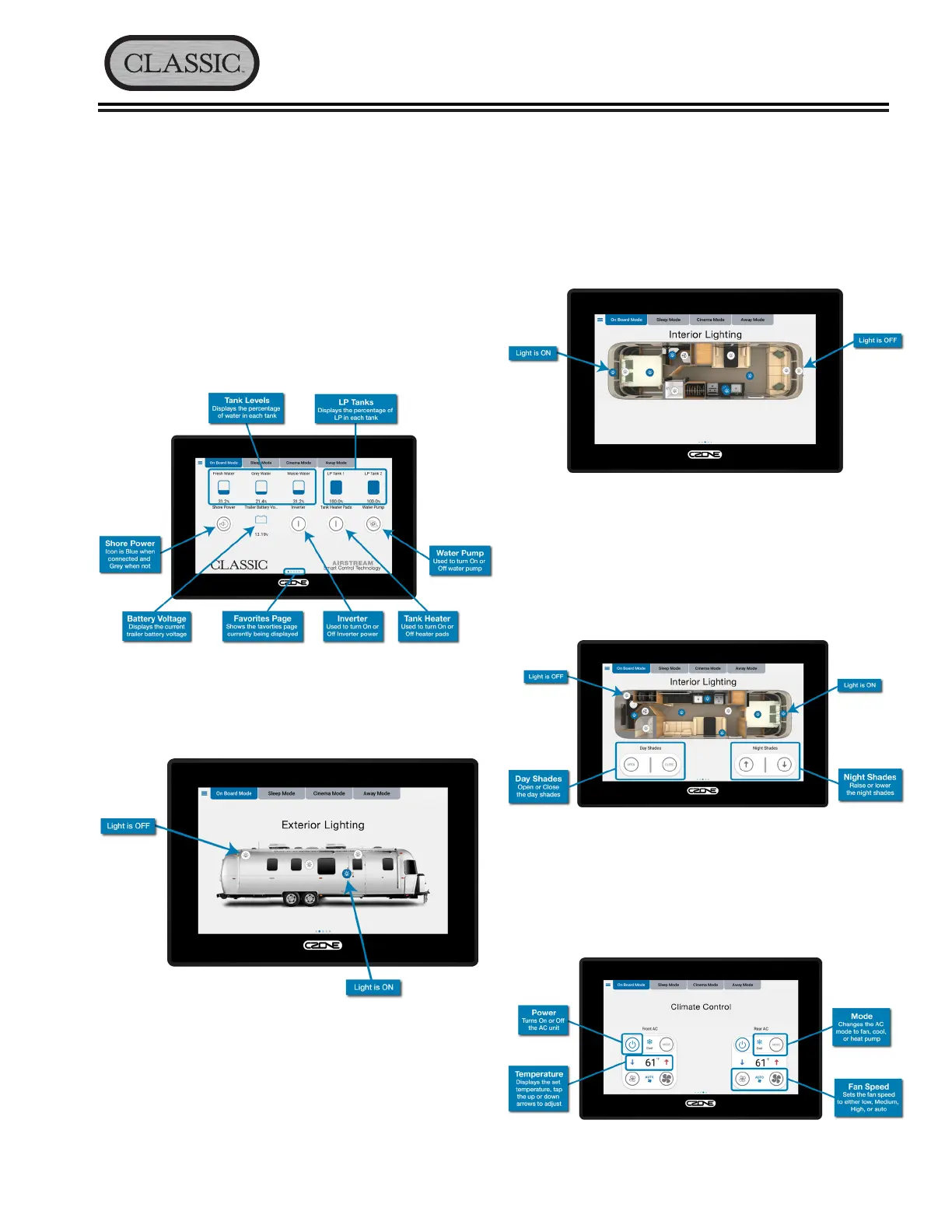
3� Page 3: Displays the lighting controls for the travel
trailer’s interior lighting� Tap the icon to turn ON
or OFF the desired light� Some lighting may be
dimmable and can be adjusted by touching and
holding the icon for two seconds� A secondary
screen will appear allowing you to slide UP or
DOWN to adjust the brightness�
On 33’ models, this screen will also display the
controls for the day and night shades� The shade
controls can be used to RAISE or LOWER all the
day or night shades at once� Pressing the icon a
second time before the shades reach their pre-set
limit will stop the shades at their current position�
4� Page 4: Displays controls for both the front and
rear air conditioning units� The AC units can be
operated independent of one another, meaning
either or both units can be ON or OFF or in
different modes�
Favorites
The CZone® default screen display is the favorites
page� After the screen’s initial boot up the favorites
page will be displayed� There are multiple favorites
pages represented by the dots near the bottom of the
touch screen� Swiping left or right will move to the next
page� The favorites pages provide quick access to the
most commonly used features�
1� Page 1: Displays battery voltage, LP and water
tank levels� This page also provides buttons to turn
the inverter on or off and displays the status of
shore power�
2� Page 2: Swiping left on the screen will display
the lighting controls for the travel trailer’s exterior
lighting� Tap the icon to turn ON or OFF the desired
light�




 To Next Page