50
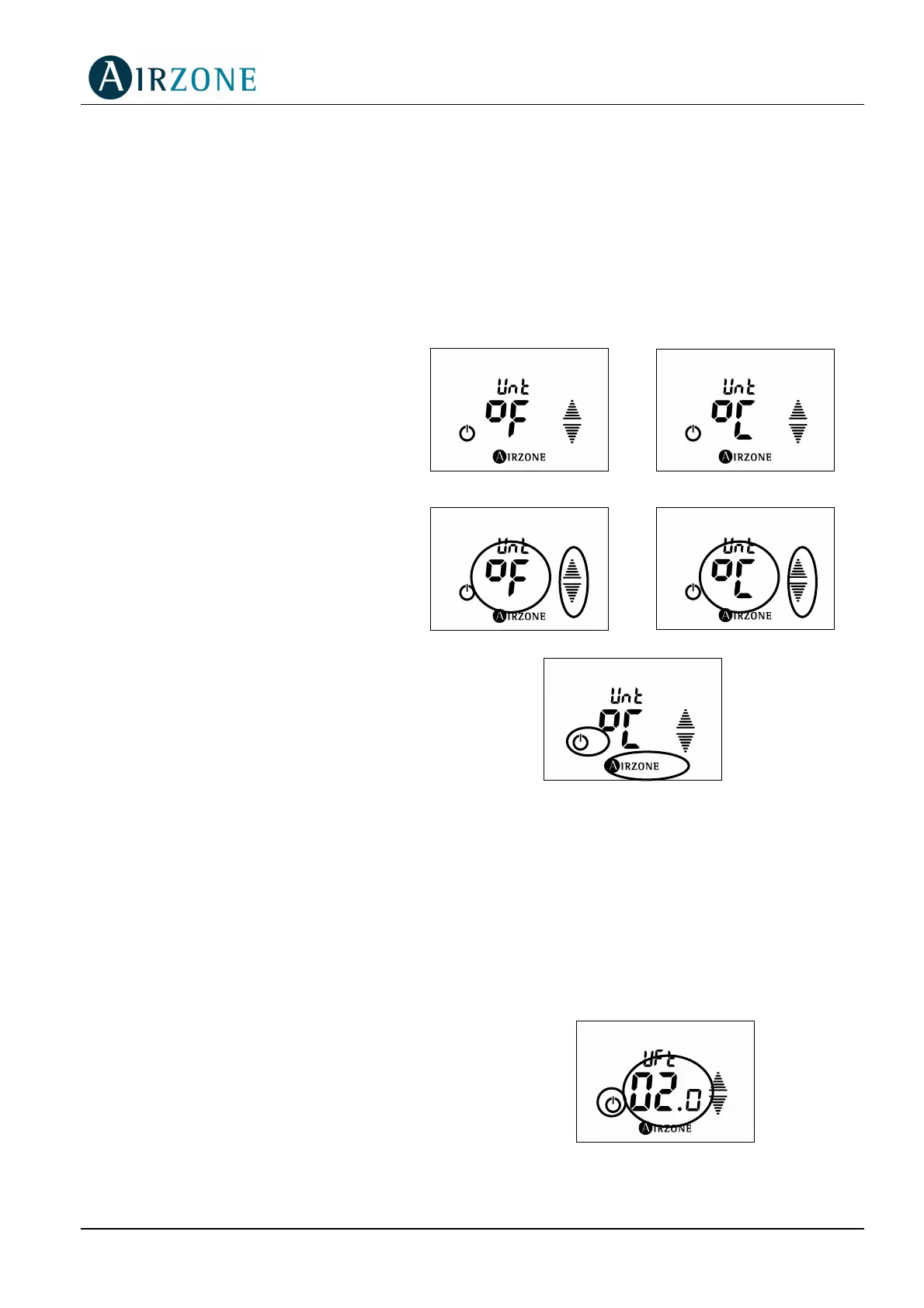
4.2 UNITS SET UP (ºC/ºF)
The TACTO thermostat, whether it is cabled or cordless, can display the temperature in ºC or
ºF. The default unit is the ºC, but this can be changed from the Set Up Menu of the
thermostat.
To change the unit to be displayed please follow these steps:
1) Repeat steps 1 and 2 of the
previous section to access the Set
Up Menu.
2) Use the arrows to browse through
the different parameters until you
see the unit version (Unt):
3) Press on the units for 1 second
until they flash.
4) Use the arrows to change over
the unit version.
5) Confirm the selected unit by
pressing the Airzone button.
6) Exit the Set Up Menu by pressing
the ON/OFF button.
4.3 THERMOSTAT TACTO FIRMWARE VERSION
The TACTO thermostat, whether it is cabled or cordless, can display the firmware version of
the thermostat.
To view this value, follow these steps:
1) Repeat steps 1 and 2 of the previous
section to access the Set Up Menu.
2) Press again for another 3 seconds until
you have access to the Set Up mode
where the thermostat’s version (UFT) will
be displayed.
3) Exit the menu showing the version using
the ON/OFF button.
3
4
5
6
3
4
2
3



 To Next Page