HDP3 Mini-Converter v1.0 www.aja.com
9
Frame Rates
When the HDP3 is manually configured for a particular output frame rate, the output will
run in lock-step with the video input. For best results, (without any added or dropped
frames), select an output frame rate that matches the incoming video frame rate.
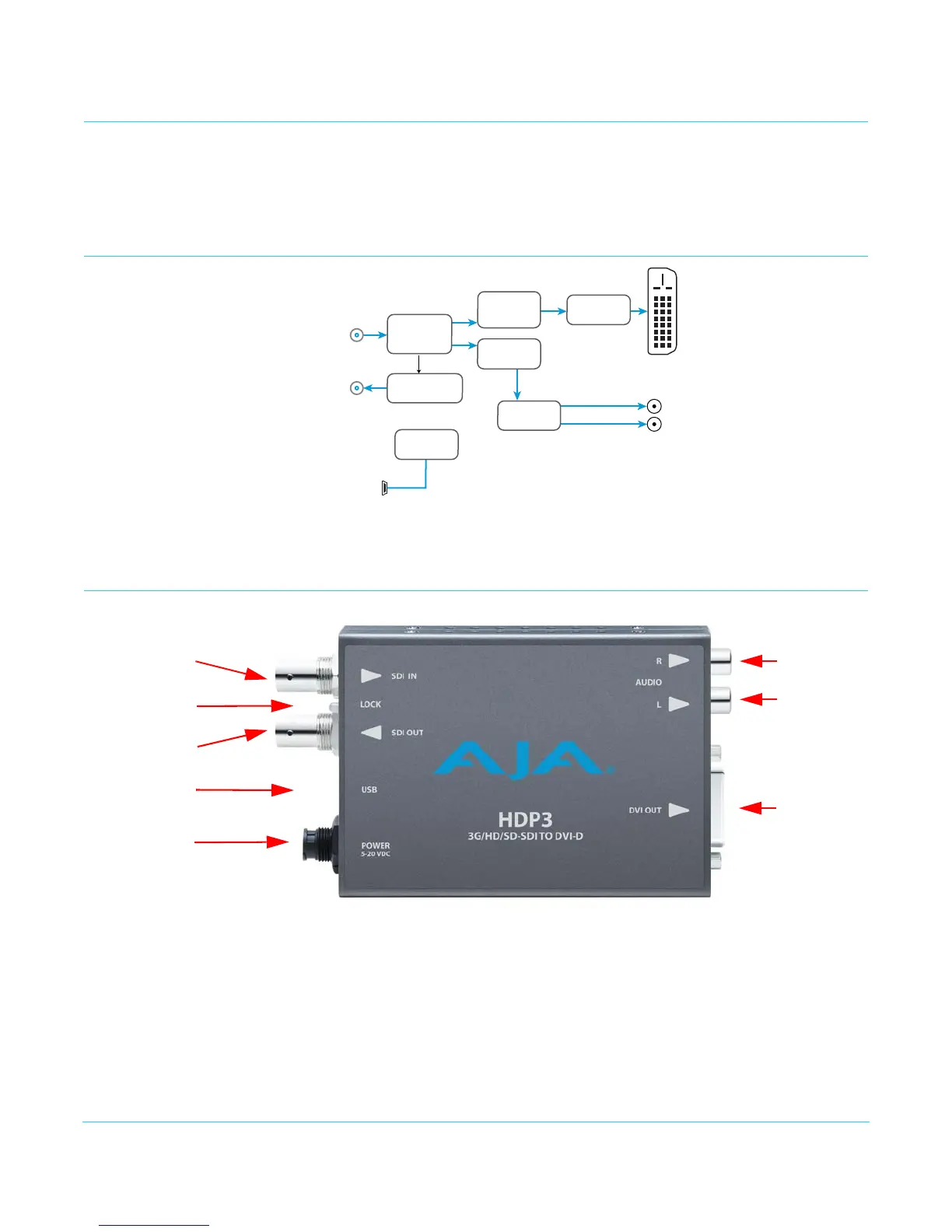
Simplified Block Diagram
I/O Connections
NOTE: The Lock LED indicates valid input video by color.
• Green is SD video
• Red is HD video
• Amber is 3G video
• Off is no input
DVI-D Output
3G/SD/HD-SDI
Input
3G/SD/HD-SDI
Output
2-Channel
Analog Audio
Output
USB Port
(connect to PC or Mac)
For conguring and
updating
SDI Receiver
SDI Transmitter
Processor
Video Scaler
and
Framebuer
Audio
Disembedder
Audio
D/A
DVI
Transmitter
LOCK
LED
USB Connector
2-Channel
Unbalanced
Analog Audio
(RCA Jacks)
Output DVI
Connector
3G/SD/HD-SDI
Input BNC
3G/SD/HD-SDI
Output BNC
+ 5VDC
Power Input


 To Next Page