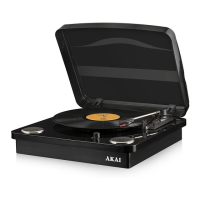
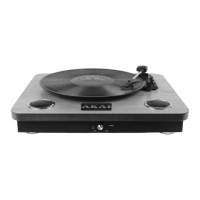
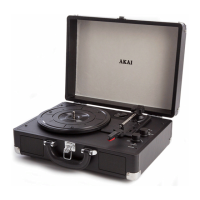
This document is an instruction manual for the Akai Retro Portable Record Player, model A60011N. It provides essential information for safe operation, technical specifications, usage instructions, and maintenance guidelines.
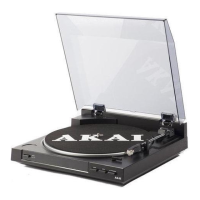
The Akai Retro Portable Record Player is a compact and portable device designed for playing vinyl records. It features a retro aesthetic and comes with a carrying handle for easy transport. The player includes built-in speakers, but also offers options for connecting to external audio systems.
Function Description:
The primary function of the device is to play vinyl records at multiple speeds. It supports 33, 45, and 78 RPM records, accommodating a wide range of vinyl formats. For 45 RPM records with cut-out centers, a center piece is provided. The record player also includes an auto-stop control feature, which can be toggled on or off, to automatically stop the turntable when a record finishes playing.
Beyond record playback, the device offers versatile audio input options. It has a Line-In jack, allowing users to connect external audio devices like phones or tablets via an AUX cable to play music through the record player's speakers. Additionally, it features Bluetooth connectivity, enabling wireless streaming of music from Bluetooth-enabled devices. For private listening, a headphone jack is included.
For users who wish to integrate the record player into a larger audio setup, it provides Line Out (R & L Channels) connections, allowing it to be connected to an external amplifier or Hi-Fi system using an RCA cable (not supplied).
The device is designed for portability, featuring a built-in rechargeable battery. This allows for cordless operation, making it suitable for use in various locations.
Important Technical Specifications:
- Model No: A60011N
- Power Supply Product: DC 5V 1A
- Adaptor Input: 100-240V~50/60HZ 0.2A
- Adaptor Output: DC 5V 1.0A
- Battery: 3.7V 1200mAh
- Playing Speeds: 33, 45, 78 RPM
- Connectivity: Bluetooth, Line-In (AUX), Headphone Jack, Line Out (R & L Channels)
- Battery Run Time: Up to 3 hours on a full charge
- Charging Time: Approximately 3 hours for a full charge
Usage Features:
- Controls:
- Function Switch: Allows selection between BT (Bluetooth), Line In, and Phono (record playback) modes.
- Power Switch / Volume Control: A rotary dial that turns the unit on/off and adjusts the volume.
- Speed Selection Switch: To choose the desired playing speed (33, 45, or 78 RPM).
- Auto Stop Control: A switch to enable or disable the automatic stop function.
- Tone Arm Lift: For manually raising and lowering the tone arm.
- Charging: The unit is charged via an included AC-DC adaptor. A built-in battery indicator light shows red during charging and turns off when fully charged.
- Bluetooth Pairing: To connect a Bluetooth device, set the function selector to BT, search for "A60011N" on your device, and connect. The blue indicator light will flash during pairing and become solid once connected.
- AUX-In: Connect an external audio device using the included AUX cable to the Line-In jack to play music through the record player's speakers.
- Amplifier Connection: Connect the Line Out (R & L Channels) to a mixer or amplifier using an RCA cable for enhanced audio output.
- Record Playback:
- Place the record on the turntable, using the center piece for 45 RPM records if needed.
- Select the correct playing speed.
- Turn on the power/volume switch.
- Release the tone arm lock.
- Gently raise the tone arm and position the stylus over the first track of the record.
- Slowly lower the stylus onto the record to begin playback.
- After playback, lift the tone arm, return it to its rest, replace the protective cap on the stylus, and close the tone arm lock.
- Turn off the power.
Maintenance Features:
- Cleaning:
- Always disconnect the power supply before cleaning.
- Clean the equipment with a soft, damp, lint-free cloth.
- Do not use abrasives or harsh cleaners.
- Stylus Replacement:
- The stylus should be replaced periodically (approximately every 250 hours).
- To replace:
- Release the tone arm lock.
- Remove the cartridge cap.
- Gently separate the cartridge from its socket.
- Disconnect the audio line from the cartridge.
- Replace with a new stylus and reverse the steps.
- Exercise extreme care to avoid damaging the tone arm and audio wires.
- Stylus Cleaning: Dust the stylus from time to time using a very soft brush dipped in alcohol, brushing from the back to the front of the cartridge.
- Transportation: When transporting the record player, ensure the protective cap is on the stylus and the rest clip is in the pick-up arm.
The manual emphasizes several safety warnings, including:
- Checking mains voltage compatibility.
- Using the appliance on a stable, level, heat-resistant surface.
- Not immersing cords, plugs, or the appliance in liquid.
- Not leaving the appliance unattended during operation.
- Close supervision when used by children or pets.
- Children aged 8 and above, and persons with reduced capabilities, can use the appliance with supervision and instruction.
- Not allowing children to play with or perform maintenance on the appliance without supervision.
- Switching off and unplugging the appliance when not in use or before cleaning.
- Discontinuing use and seeking advice if the supply cord or appliance is damaged.
- Not letting the cord hang over edges or contact hot surfaces.
- Not using accessory attachments not recommended by the manufacturer.
- Not using extension cords.
- Not pulling the plug by the cord.
- Using the product only for its intended household purpose.
- Not carrying the appliance by the power cord.
- Not using the appliance outdoors, in direct sunlight, or in wet/damp conditions.
- Avoiding placement near electromagnetic pollution, vibration, or poor ventilation.
- Not placing water-filled containers on the product.
- Ensuring hands are dry when handling electrical items.
- Never disconnecting the plug by pulling the power cable.
- If water enters the product, switch off and consult a qualified electrician.
- In case of malfunction due to electrostatic discharge, switch off, wait 30 minutes, and reconnect.
- Ensuring no metallic objects are placed inside the product.
- Contacting customer support for faults.
Guarantee:
The product comes with a 12-month guarantee from the date of purchase, covering faulty materials or workmanship. This guarantee is valid in the UK and Eire only. An extended 3-year guarantee is available upon online registration within 28 days of purchase at www.akaionline.co. The guarantee does not cover wear and tear, damage, misuse, or consumable parts.
Disposal:
The product should be disposed of separately from domestic rubbish, in accordance with the WEEE Directive. Users are directed to www.recycle-more.co.uk or www.recyclenow.co.uk for recycling information and to take the appliance to a local refuse center.


 To Next Page
 General