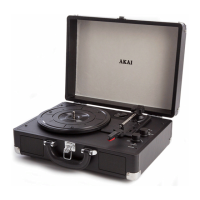
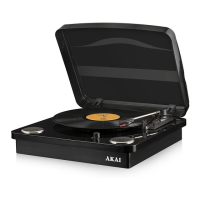
This document is an instruction manual for the Akai A60020/A60020B 3-Speed Turntable with Bluetooth, a device designed for playing vinyl records and streaming audio. The manual emphasizes Akai's "Tomorrows Technology Today" philosophy and highlights 80 years of Japanese technology, offering a 3-year guarantee.
Function Description:
The Akai A60020/A60020B is a versatile audio device that combines traditional vinyl playback with modern connectivity. Its primary function is to play 3-speed vinyl records (33, 45, and 78 RPM). Beyond vinyl, it offers Bluetooth connectivity for wireless audio streaming from mobile devices and a USB port for playing encoded music and encoding vinyl to USB. The turntable includes built-in speakers for direct playback, a headphone jack for private listening, and RCA line out ports for connecting to external amplifiers or mixers.
Important Technical Specifications:
- Model No.: A60020/A60020B
- Input: 100-240V ~ 50/60Hz
- Output: 5V 1.5A
- Speeds: 33 1/3, 45, 78 RPM
- Connectivity: Bluetooth, USB, RCA Line Out, Headphone Jack
- Power: DC 5V Charging Port
Usage Features:
General Setup:
Before first use, users need to remove parts from packaging and assemble the unit as instructed. The turntable should be placed on a flat, level, dust-free, cool, and dry surface with good ventilation, ensuring the power cable does not pose a trip hazard.
Mains Connection:
- Verify that the home's mains voltage matches the adaptor's operating voltage.
- Connect the DC connector to the DC Power jack on the unit.
- Plug the power adaptor into the mains socket.
Headphone Jack Out:
To listen privately, decrease the volume by rotating the Volume Dial anti-clockwise, then insert headphones into the headphone jack.
Amplifier Connection (If Required):
For enhanced audio, the turntable can be connected to an external mixer or amplifier using an RCA cable (not supplied). The red plug connects to the right channel input, and the white plug connects to the left channel input.
Playing a Record:
- Lift the lid and secure the arm support.
- Rotate the On/Off Volume Dial clockwise to power on.
- Press the Mode button to select Turntable mode.
- Remove the protective cover from the stylus cartridge by gently sliding it away from the tone arm.
- Place the record on the turntable. For 45 RPM records with a removed center hole, place the 45RPM adaptor on the spindle first.
- Select the desired playing speed (33, 45, or 78 RPM) using the Speed Selection Switch.
- Unlock the tone arm from the arm lock.
- Raise the tone arm using the arm raising lever or by carefully lifting it.
- Place the stylus vertically over the first track; the turntable will start automatically.
- Slowly lower the stylus onto the record to begin playback.
- Playback stops automatically when the tone arm reaches the end of the record. Lift the tone arm and return it to the rest. If the turntable doesn't shut off automatically, turn off power with the On/Off Volume Dial. If a record stops before the last track, manual restart is required.
- Replace the protective cap on the stylus and close the tone arm lock.
- Turn off power by rotating the On/Off Volume Dial anti-clockwise and unplug the device from the mains. Ensure the tone arm is secured before transport.
Encode Music via USB:
- Ensure the turntable is on.
- Place a record on the turntable.
- Insert a USB drive into the USB port.
- Long press the Mode button to select USB to begin encoding.
- Start record playback.
- Long press the Mode button when finished.
Note: Encoding is only available via USB and does not work in Bluetooth mode.
Playing Music via USB:
- Ensure the turntable is on.
- Insert the USB drive (containing encoded music) into the USB port.
- Control playback using the turntable's controls.
Playing Music via Bluetooth:
- Turn on the turntable by rotating the On/Off Volume dial clockwise.
- Press the Mode button to select BT or Bluetooth mode.
- The Bluetooth indicator light will flash, indicating it's ready to pair.
- Enable Bluetooth on your mobile device, search for "A60020," and pair. If a password is required, enter "0000."
- The Bluetooth indicator light will stop flashing once successfully paired.
- Music playback and sound can then be controlled from either the turntable or your mobile device.
Replacing the Stylus:
Caution: Power off the turntable before replacing the stylus. Do not bend the stylus or touch the needle to avoid injury.
- To remove the old stylus, carefully place a screwdriver at the tip and push downward.
- Gently pull the old stylus down and forward simultaneously.
- To install the new stylus, hold it at the front edge (needle side) and insert the rear edge into the tone arm (GUIDE PIN INSIDE).
- Push the stylus upward until it locks into position.
Maintenance Features:
Cleaning and Care (Turntable):
- Always disconnect the equipment from the power supply before cleaning.
- Clean with a soft, damp, lint-free cloth.
- Do not use abrasives or harsh cleaners.
- Store in a cool, dry place away from children and pets.
Cleaning and Storing Vinyl Records:
- Use a soft anti-static cloth to gently wipe the surface.
- Store records in a protective sleeve when not in use.
- Avoid direct sunlight, heat sources (radiators, stoves), vibration, excessive heat, cold, or moisture.
Troubleshooting:
- Unit will not power on: Ensure the power cord is connected to an appropriate electrical outlet and switched ON.
- No sound: Rotate the Volume knob clockwise to increase volume.
- Record will not play: Ensure the correct speed (33, 45, or 78 RPM) is selected.
- No sound via Stereo RCA port: Ensure the power adapter is correctly plugged in and check the volume on your amplifier or external device.
- Verify mains voltage matches appliance rating.
- Use on a stable, level, heat-resistant surface.
- Do not immerse cords, plugs, or any part of the appliance in liquid.
- Do not leave unattended during operation.
- Supervise children and pets when the appliance is in use.
- Children aged 8+ and persons with reduced capabilities can use the appliance with supervision and instruction.
- Children should not play with the appliance or perform cleaning/maintenance without supervision.
- Switch off at the wall socket and unplug before cleaning or when not in use.
- If the supply cord or appliance is damaged, stop use immediately and seek advice from the manufacturer or service agent.
- Do not let the cord hang over table edges or touch hot surfaces.
- Do not pull the plug by the cord.
- Use only for its intended purpose.
- For household use only.
- Do not carry by the power cord.
- Do not use outdoors, in direct sunlight, or in wet/damp conditions.
- Avoid placing near sources of electromagnetic pollution, vibration, or poor ventilation.
- Do not place containers with water or other liquids on top of the product.
- Maintain a minimum distance of 6 inches for ventilation.
- Avoid placing where it could be subject to vibration or magnetised by speakers.
- Handle electrical items with dry hands.
- Never disconnect the plug by pulling the power cable.
- If water enters the product, switch off at the wall socket and consult a qualified electrician.
- In case of malfunction due to electrostatic discharge, switch off at the wall socket, wait 30 minutes for the charge to dissipate, then reconnect.
- Ensure no metallic objects are placed inside the product.
- In case of a fault, stop use and contact Customer Support: +44 (0)333 220 6042.
Electrical Safety:
The appliance is double insulated; do not connect any wire to the earth terminal.
- Plug Fitting Details: Blue wire is neutral [N], connected to the terminal marked [N] or black. Brown wire is live [L], connected to the terminal marked [L] or red. Neither brown nor blue wires should be connected to the [EARTH] terminal.
- Ensure cord grip is fastened correctly.
- The plug must have a fuse of the correct rating (BS 1362, ASTA approved).
- If in doubt, consult a qualified electrician.
- For non-rewireable mains plugs, if the fuse needs replacing, use an ASTA approved fuse (BS 1362).
- If the plug needs removal, disconnect from mains, cut off the lead, and dispose of safely. Do not reuse or insert into a socket.
Recycling:
Appliances bearing the crossed-out wheelie bin symbol must not be disposed of with domestic rubbish. Dispose of old electrical and electronic appliances separately.
- Visit www.recycle-more.co.uk or www.recyclenow.co.uk for recycling information in the UK.
- Visit www.weeeireland.ie for recycling information in Ireland.
- The WEEE directive (August 2006) requires all electrical items to be recycled, not landfilled.
- Take the appliance to a local Civic Amenity site for recycling at the end of its life.


 To Next Page
 General