Playing Back or Deleting Files on AKASO GO App
1.
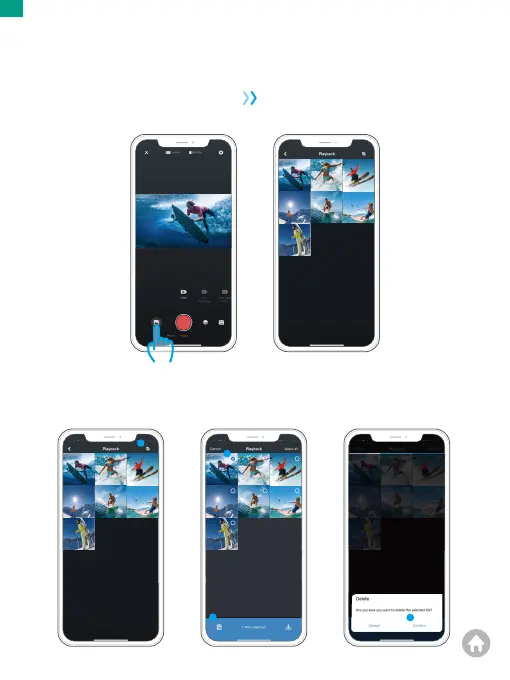
Open the AKASO GO App, then connect the camera to the App.
For further details regarding the app connection, please refer to Connecting to
AKASO GO App starting from Page 28.
2.
Tap the Album icon in the bottom left corner to see the videos and photos.
00:15:03 00:13:04
00:16:02
00:08:06
00:15:03 00:13:04
00:16:02
00:08:06
1
4
00:15:03 00:13:04
00:16:02
00:08:06
2
3
3.
Tap the Select icon in the upper right corner to choose the photo or video you want
to delete, then tap the Delete icon in the bottom left corner, and then choose Confirm
to complete the deletion.
00:15:03 00:13:04
00:16:02
00:08:06
EN
01 02 03 04 05
06 07 08 09 10 11 12 13
14 15 16 17 18 19 20
21 22 23 24 25 26 27
28 29 30
31 32 33 34 35
36 37 38 39 40


 To Next Page