EasyManua.ls Logo

Akeeyo AKY-710S - Page 17

Akeeyo AKY-710S
80 pages
Print Icon
To Next Page IconTo Next Page
To Previous Page IconTo Previous Page
Loading...
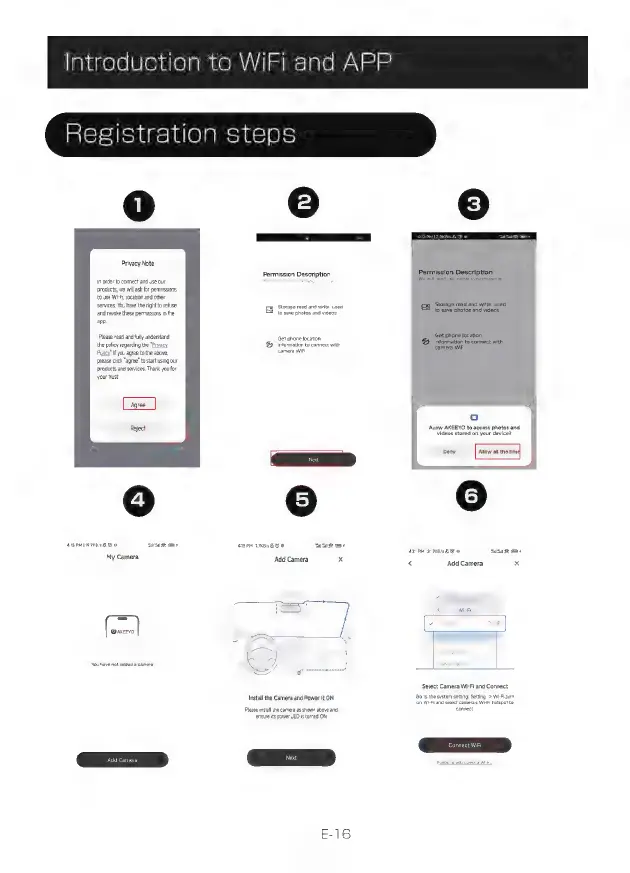
Introduction
to
WiFi
and
APP
Registration
steps
Privacy
Note
In
order
to
connect
and
use our
products
we
wil ask
for
permissions
to
use
Wii,
location
and
other
services.
You
have
the
right
to
reuse
and
revoke
these
permissions
in
the
ap.
Please
read
and
fly
understand
the
policy
regarding
the
"Privacy
/
f
you
agree
to
the
above,
please
cick
"agree"
to
start
using
our
products
and
services,
Thank
you
for
your tust
asp
SK
o
My
Camera
[I
You
have
not
added
a
camera
Permission
Description
storage
read
and
write
usea
E
S
photos
and
videos
Get
phone
location
f£)
information
to
connect
with
camera
Wii
annae
g
0
PPETI
Add
Camera
x
Install
the
Camera
and
Power
it
ON
Please
instal
the
camera
as
shown
above
and
ensure
its
power
LED
is
turned
ON
Next
INMAN
G
o
Permission
Description
We
will
nsed
the
olowng
permissions
Storage
read
and
write
used
to
save
photos
and
videos
|
Get
phone
location
information
to
connect
with
camera
WIFI
Allow
AKEEYO
to
access
photos
and
videos
stored
on
your
device?
Deny
Aiow
all
the
md
<
Add
Camera
x
Select
Camera
Wi-Fi
and
Connect
Go
to
the
systern
setting:
Setting
->
WiFi
turn
on
WiFi
and
select
camera's
WHFi
hotspot
to
connect.