EasyManua.ls Logo

Akeeyo AKY-710S - Page 18

Akeeyo AKY-710S
80 pages
Print Icon
To Next Page IconTo Next Page
To Previous Page IconTo Previous Page
Loading...
Introduction
to
WiFi
and
APP
@The
WiFi
of
the
machine
is
turned
on
by
default
after
it
is
turned
on.
When
it
is
turned
off,
short
press
2
times
to
turn
on
the
WiFi
function.
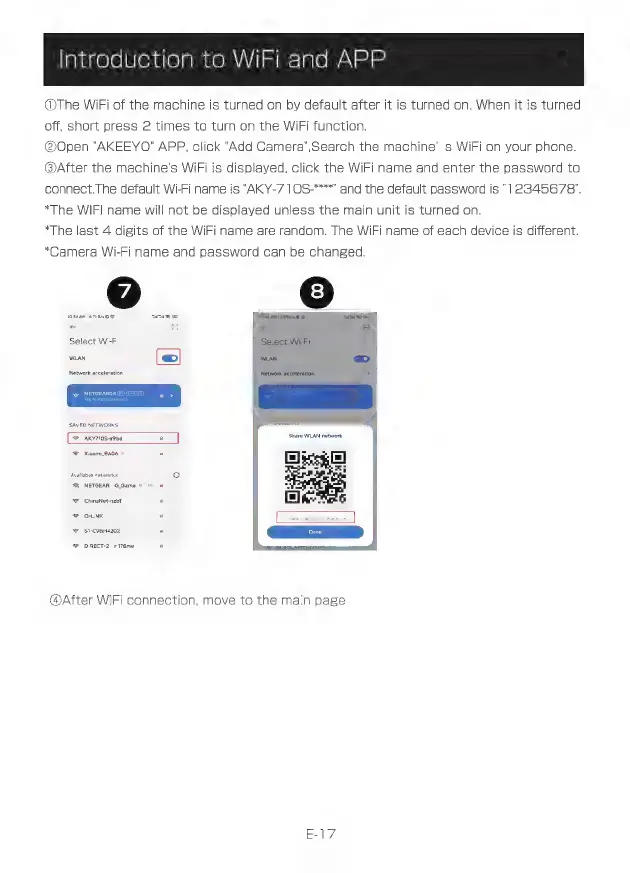
@Open
"AKEEYO"
APP,
click
"Add
Camera",Search
the
machine’
s
WiFi
on
your
phone.
@After
the
machine's
WiFi
is
displayed,
click
the
WiFi
name
and
enter
the
password
to
connect.The
default
Wi-Fi
name
is
'AKY-7
1
OS-****
and
the
default
password
is
"12345678".
“The
WIFI
name
will
not
be
displayed
unless
the
main
unit
is
turned
on.
*The
last
4
digits
of
the
WiFi
name
are
random.
The
WiFi
name
of
each
device
is
different.
*Camera
Wi-Fi
name
and
password
can
be
changed.
e
©
Nasa
AM
ISSUE
©
asam
a
es
ES
Select
Wi-Fi
wun
ep
Networ
Select
Wi-Fi
SAVED
NETWORKS
=
AKY710S-a9bd
=
<
NETGEAR..G
Game
=
ChinaNet-nztT
a
*
QUNK
a
=
SI-C9BH4202
=
DIRECT-2...r
178nw
=
④After
WiFi
connection,
move
to
the
main
page