What to do if AKG Microphone system shows 'LOW BATT'?
- PpamelajacksonAug 21, 2025
If your AKG Microphone system displays 'LOW BATT', this indicates that the transmitter battery is running low. To fix this, insert new batteries into the transmitter.
What to do if AKG Microphone system shows 'LOW BATT'?
If your AKG Microphone system displays 'LOW BATT', this indicates that the transmitter battery is running low. To fix this, insert new batteries into the transmitter.
Why does my AKG DMS800 Microphone system have brief dropouts?
Brief dropouts in your AKG Microphone system's audio can occur if the receiver or antennas are incorrectly positioned, or if the transmitter is too far from the receiver. Reposition the receiver or remote antennas, and move the transmitter closer to the receiver to resolve this issue.
What does 'INTERFERE ERROR' mean on AKG DMS800 Microphone system and how to fix it?
The 'INTERFERE ERROR' message on your AKG Microphone system indicates interference from other wireless systems, TVs, radios, wireless devices, or electrical equipment. To resolve this, try changing the frequency or switching off the device causing the interference.
What does 'RF LOW' mean on AKG DMS800 and how to fix it?
The 'RF LOW' message on your AKG Microphone system means the reception signal is weak, causing the receiver to mute automatically to prevent noise. To fix this, reposition the receiver or use remote antennas to improve the signal strength.
What does 'ENCRYPTION!' mean on AKG DMS800 Microphone system and how to fix it?
The 'ENCRYPTION!' message on your AKG Microphone system indicates that the encryption settings are not correctly configured, or there are errors with other DMS800 transmitters. To solve this, try synchronizing the transmitter or changing the carrier frequency (resynchronizing).
What does 'AF CLIP' mean on AKG DMS800 Microphone system and how can I resolve it?
The 'AF CLIP' message on your AKG Microphone system means the audio signal is too high, overriding the transmitter's A/D converter. Reduce the audio input level to resolve this.
What does 'ANT ERROR' mean on AKG DMS800?
The 'ANT ERROR' message on your AKG Microphone system indicates that the same antenna has been active for more than two minutes. Check if the antenna cable is faulty or incorrectly connected.
What does it mean when AKG DMS800 Microphone system displays a question mark for battery life?
If your AKG Microphone system's transmitter display shows a question mark for battery life, it means the transmitter can't detect the charge status of the batteries. If you are using dry batteries, insert new batteries. If you are using rechargeable batteries, fully charge them.
What does 'WRONG DEVICE' mean on AKG DMS800?
The 'WRONG DEVICE' message on your AKG Microphone system indicates that the transmitter and receiver are operating on different frequency bands. Ensure that both devices are set to the same frequency band.
What does 'TIMEOUT' mean on AKG Microphone system and how to fix it?
The 'TIMEOUT' message on your AKG Microphone system indicates that no infrared data was detected. Align the IR window of the transmitter and receiver with each other and resynchronize.
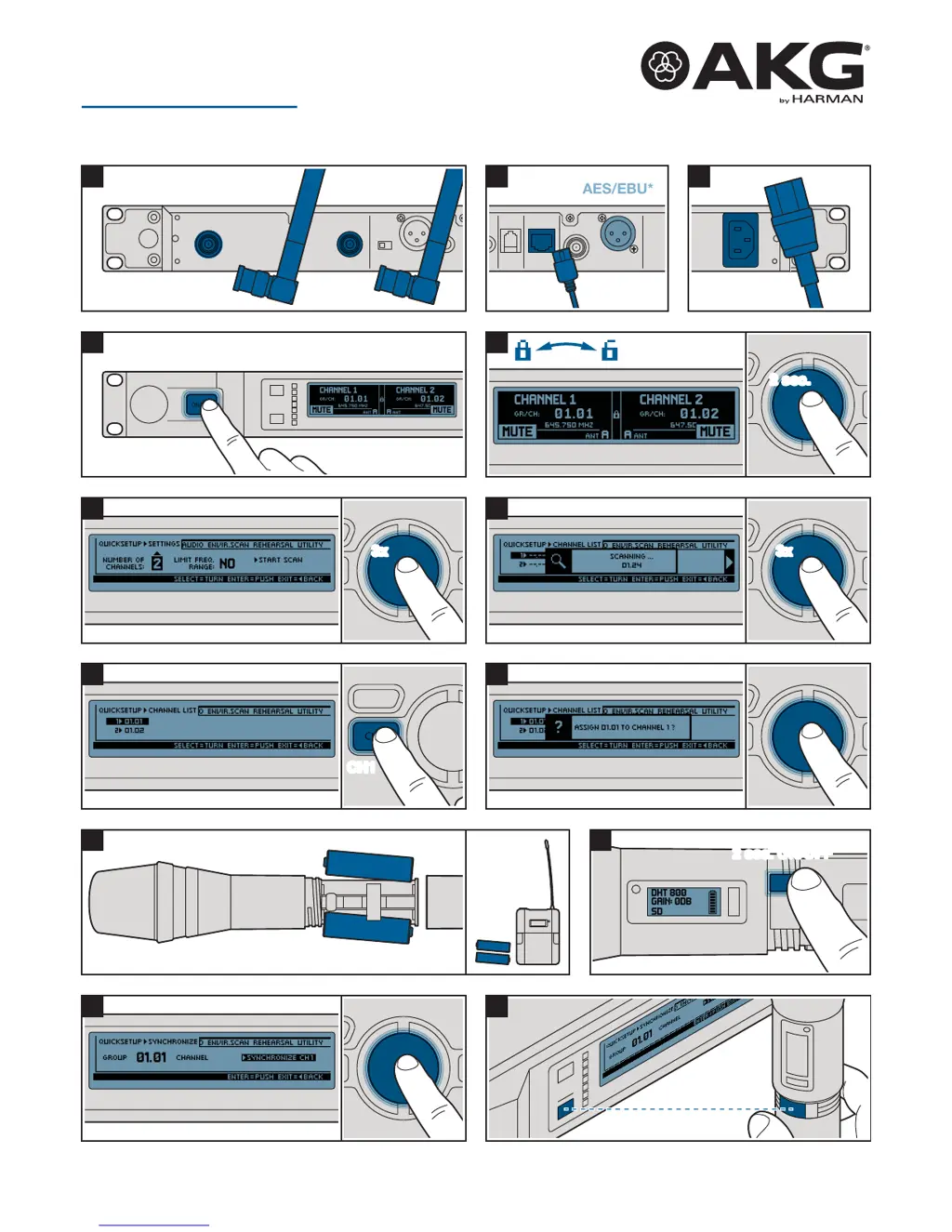
Connect antennas, audio outputs (AES/EBU, Dante), and power supply to the receiver unit.
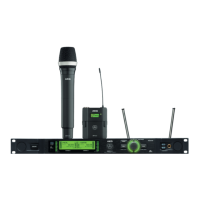
Details the front panel controls, display, and back panel connections of the receiver.
Guide to performing quick setup, scanning frequencies, and assigning channels on the receiver.
Information on the DHT800 handheld and DPT800 bodypack transmitters, including battery installation.
Steps to synchronize transmitters with the receiver for wireless operation.
Indicates successful synchronization (SYNC OK) or failure (SYNC FAILED, TIMEOUT).
Adjusting transmitter settings, including gain levels for vocal or guitar.
Details FCC rules, limitations, and conditions for device operation and interference.
Connect antennas, audio outputs (AES/EBU, Dante), and power supply to the receiver unit.
Details the front panel controls, display, and back panel connections of the receiver.
Guide to performing quick setup, scanning frequencies, and assigning channels on the receiver.
Information on the DHT800 handheld and DPT800 bodypack transmitters, including battery installation.
Steps to synchronize transmitters with the receiver for wireless operation.
Indicates successful synchronization (SYNC OK) or failure (SYNC FAILED, TIMEOUT).
Adjusting transmitter settings, including gain levels for vocal or guitar.
Details FCC rules, limitations, and conditions for device operation and interference.
| Type | Digital Wireless Microphone System |
|---|---|
| Modulation | Digital |
| THD | < 0.5% |
| Latency | < 3 ms |
| Simultaneous Channels | Up to 32 |
| Receiver Display | LCD |
| Transmitter Power | 10 mW |
| Transmitter Battery Type | 2 x AA |
| RF Output Power | 10 mW |
| Audio Frequency Response | 20 Hz to 20 kHz |
| Operating Range | 100 m (line of sight) |
| Receiver Outputs | XLR, 1/4" (6.3 mm) |
| Transmitter Type | Handheld, bodypack |
| Transmitter Microphone Type | Dynamic, condenser |
| Dynamic Range | > 110 dB |
| Audio Output | Balanced, unbalanced |
Loading...